All Activity
- Past hour
-
-
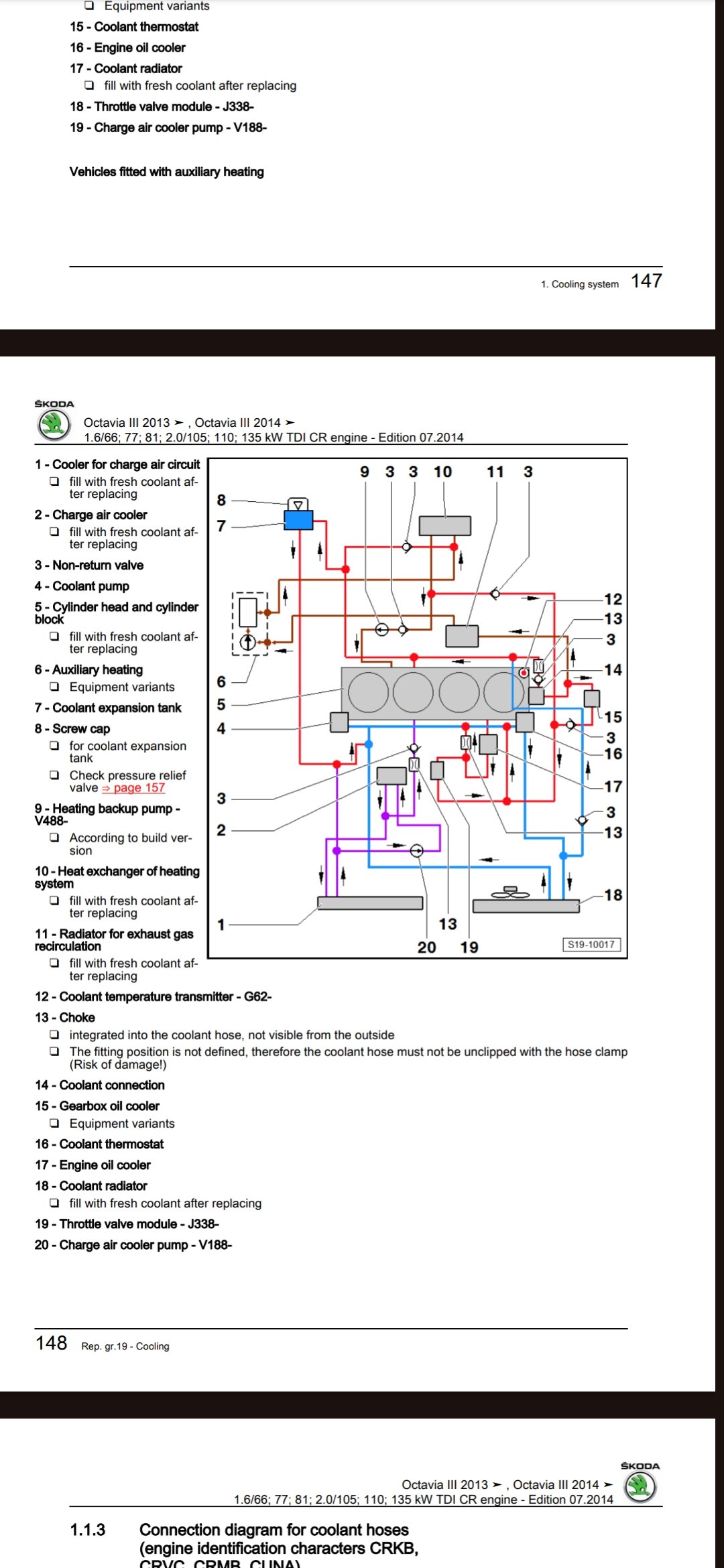
Hi. I had the same symptoms in my 2015 2.0 Vrs Tdi manual gearbox, last year with about 225kkm back then. The car took really long to reach operating temp and i logged my car with obd11 while driving, my coolant temp never got over 82Celsius even in summer so my thermostat had stuck open. I changed by myself a new OE Gates thermostat and also emptied the whole coolant system of the original G13 coolant and changed it to the new G12 Evo variant. The filling of the new coolant and getting air out of the system was pretty fiddly because you have to use something like Vagcom or obd11 to run all the electric waterpumps in the system, my car has four pumps: the main water pump driven by the cambelt, it has an electrially operated "sleeve", an auxiliary heating pump, charge air cooler pump and my car has factory webasto, it has also its own. There is also a procedure in vagcom and obd11 where the car runs the air purging process in the main coolant circuit and the secondary ones. You really need to do these so no air is left in the system. I would say almost certain that in a manual car there is only one thermostat in the engine. Also you could check that after a hard motorway drive your upper radiator hose should feel hot, dont burn your hand and if your fan is on watch for your fingers. Also you could check if your coolant temp sensor is giving logical readings if you have access to an obd tester.
-
-
-
I've not had the AC checked for leaks, but it works fine. I have changed the pollen filter. I have not noticed any drips under the car for a while, which makes me think that a blocked drain is likely. Where is the drain hose from the AC?
-
Thanks,I’ve just finished downloading from the update portal, this is how I used to do it with a previous Octavia, been away from ŠKODA for a while & just bought a Karoq 1.5 tsi sportline, Dsg, the head unit has the knobs on it even though I’m assured it’s a Columbus & got the usb c ports in the cubby in front of the gear lever, I keep getting pop ups asking to update the software, so the sim must still be working
-
You do use that usb indeed. There is a pdf of how to do it. Attached is the VW... same as the Skoda. You have jumped threads thou this is mib2 high but you are asking instructions on mib3. I have answered that here but on the wrong thread mind you. Assume you don't have the connected service contract hence you are taking the file update approach. Discover_Media_Gen.3_November_2020_EN.pdf
- Today
-
Test drove a Karoq & later bought a Karoq sportline from them, salesman David Johnson very helpful & no pressure to buy
-
-
When I change my struts from Amazon did not see any springs like that I managed to do it by pulling back the rear trim and disconnecting the wiring connector inside the back trim
-
Hello Our 2014 Skoda fabia 1.6tdi has developed it's third injector issue and the problem is we're currently in Madrid (from Exeter). The coil warning came on about 150km ago with the familiar rattle and we turned it off and on again and we're able to continue gingerly. We're due to drive back to the UK from here over the next two days but now worry this will just reoccur more seriously in a few hundred km or less. So our only option is to either find a garage here or risk it and rely on the breakdown cover if anything happens. If anyone has a suggestion then we'd be all ears as it's been so stressful I can't think!
-
Are your headlamps projector headlamps with an H7 halogen bulb in them or are they projectors with a Xenon gas discharge bulb (D2S bulb)? Do you have headlight washers fitted as standard at the factory? Edit never mind you said they're halogens. If they have the projector style fitting, they're crap. You might as well have a pair of old carriage lamps on your bumper. If you want decent lamps you need full Xenon (pricey with modding such as fitting headlight wasers, coding etc) or get normal headlamps with halogens. https://carmodshop.co.uk/for-skoda-fabia-mk2-h4-2007-4-2010-headlights-headlamps-1-pair-o-s-and-n-s/
-
-
I suspect that's got something to do with the retaining screws that hold the rear light assemblies.......?
-
Hi there, I've got myself a rather fantastic coolant leak. It literally drips out as soon as I fill the expansion tank. The leak is coming from somewhere under the air inlet manifold. It's dripping down onto/around the coupling for the thermostat and coolant delivery pipe (?) that runs along the engine block under the inlet manifold. Video in link: I'm getting a cheap endoscope to try see more as I just can't face pulling the manifold off. But is this gonna be a cracked cylinder head/gasket that's letting this by? Or possibly something not so terminal.... https://drive.google.com/file/d/1a-lOkWXpWLTDKABCr6u-ABQBBOrWOhvG/view?usp=drivesdk
-
-
Hi Gizmo Where on the App is the ‘Optimised battery use’ option? I can only find the Battery Care Mode on the MySkoda App Car > Battery Range > Settings > Battery Care Mode > Not activated or Activated.
-
-
No that’s different. The ‘Optimised battery use’ is supposed to keep the 12v topped up from the traction battery so in theory the 12v should never flatten itself. But as it’s VAG software it doesn’t always work.
-
ANASSBLM joined the community
-
MiguelRL joined the community
-
Hi Gizmo If this is the Battery Care Mode, I do have this enabled on the App. I thought this mode was related to the limiting the maximum charging of the main battery to 80% and not to do with the 12v battery.
-
Instead of the usual autoupdate screen you should get a full screen System Update notification. Mine still took a day to do it.
-
It's a 2020 Kamiq SEL with Boleo. This is what they supposedly installed in Jan 2026 of this year: SW Train: MEN3_EU_SK370_P0314L Hardware: 040 Software: 1233 Can any of you tell me what the most current version was at that time?
-
And what happened this afternoon is that it just rained, gently but persistently. No progress on the bumper refit. 🌧️
-
Do you have the “Optimised battery use” enabled in the app? As this should prevent the 12v going flat. ‘By using the high-voltage battery, more energy is available in the vehicle for operating via the app (affects range).”
-
I have Android Auto set to Autoconnect and start which it used to do wired but wirelessly it would always bring up the "Connect to Android Auto" screen. I'd accept and connect then sometimes it would drop and bring the connect screen again. Also once connected in wireless Android auto I'd get the odd Audio drop out. On 0334 as soon as I switch on Android Auto auto connects wirelessly and no Audio dropouts.







.thumb.jpg.9dd3f612ba7f13d10be5c518d3c8d255.jpg)