All Activity
- Past hour
-
Sounds like a good justification for some bilsteins!
-
left inner light LHD and RHD use same part number 5E6 945 307 A (hatchback) right inner light 5E6 945 308 A (LHD) 5E6 945 308 C (RHD) outer lights are same for LHD,RHD even should be same with estate
-
Welcome to the forum. SWMBO has a MY18 Fabia similar to you - but with the 1.0TSI 110 engine and in silver.
-
Width of spade. Its normally 6.3mm. It could be that it has become slightly too wide so by crimping the rolled sections wont make it hold very well. Either replace it or try and squeeze the rolled sections together slightly to reduce overall width Check the earth on the radio as well. If replacing make sure you use one suitable for the thickness of wire. From memory blue is 1.5-2.5mm and yellow is 3-6mm. Thats the cross sectional area of wire. Alasdair
-
Took my 190,000 miles 2016 Greenline Estate in for its' MOT today. It passed with advisories on both rear shock absorbers and front suspension bushes on both sides. I'm happy. Last year it passed with no advisories when it was on 167,000 miles. I intend replacing the shock-absorbers myself. Probably in the spring, when it gets a bit warmer. I'm not sure about the suspension bushes? Maybe I'll do them myself, maybe I'll get a VAG specialist to do them.
-
Correct! Feeding all these information to an AI agent, he conducted that for a LHD car I'll need a top LED assembly from a RHD car in order to have both fog lamps working, since the actual led and power supply are missing, same principle apply for an RHD car. In your case you have made a mix of TOP led assembly units from both LHD and RHD cars, what I'm now looking for. Thanks @milloo24
- Today
-
-
The wire is an extension of about 10cm to give some slack for engine movement probably fitted due to problems earlier on with it coming lose when ASZ engine made. This is BLT. When the car returns home do I measure width of spade or it's length? Ta
-
Assuming the wire connector is female, the best idea would be to replace the connector - being careful not to shorten the wire too much if slack to loom is limited.
-
Has anyone found a jack pad insert for the Octavia Mark 4? Powerflex say they don't do one. However, I wonder if the PF3-1663 for Mark 3's will fit if one is prepared to adapt the underbody panels by trimming the existing holes back a little. The plastic plugs in the floor are clearly visible. Please let me know if you can advise on this. Many thanks
-
I'll check battery voltage drop across battery. Earth to starter is tight and I cleaned contact. I had a wiggle of cable when fitting starter motor and no sign of breakage and what I could see of cable was uncorroded. AI says 6.3mm spade which from memory fits what I saw. The spade is loose in direction it pushes on/off, not sideways if that is how spade sizes change (on width)? The tightness of the fit wasn't great before on old starter. I'd spotted looseness some years ago and I'd put duct tape holding cable in place, just in case.
-
walters407 joined the community
-
Sounds far more frequent than mine based on that.
-
It's happened twice today, rebooting information seems to fix it, so it seems to be a car thing, not Octopus.
-
If it says unplugged I unplug and plug it back it. I think this is a backend issue with the 'handshake'
-
Do you ever get the false 'not plugged in when it is issue?
-
I'd say higher than 75% of the time. I just have to check charge port is green when I plug in then I check the schedules been created by Octopus
-
You could always do what I've done with our Kodiaq... 12v LED strip stuck under the rigid roller part of the parcel shelf wired in via a connector to the existing side mounted boot lights. It works a treat and no issues with it staying on or flagging a bulb warning.
-
-
I have the same set up. It works about 75% of the time. However, sometimes it fails to charge altogether. Others (like now), Octopus says the car is not plugged in at home when it is. Has been like this for the 6 months I've owned the car. I suspect it's an issue with the car, not Octopus. Does it work faultlessly for you?
-
Meant to add check the main feed from battery to starter is tight. If its slightly loose it may explain V drop. You could also check voltage accross battery when cranking to see how far it drops. Alasdair
-
I have a granny charger and Octopus Intelligent Go. Octopus controls the charging perfectly 👍 You can set departure and max charge percentage and cap to off peak only if you like. Can also boost charge of you are peak and need to charge. Works off location and handshake with Skoda to know when plugged in and stopped/start charging.
-
I get the same reversing on to the drive with my other Half's car parked to the left at 90 degrees. Car thinks I will hit and frightens me to death when it slams on.
-
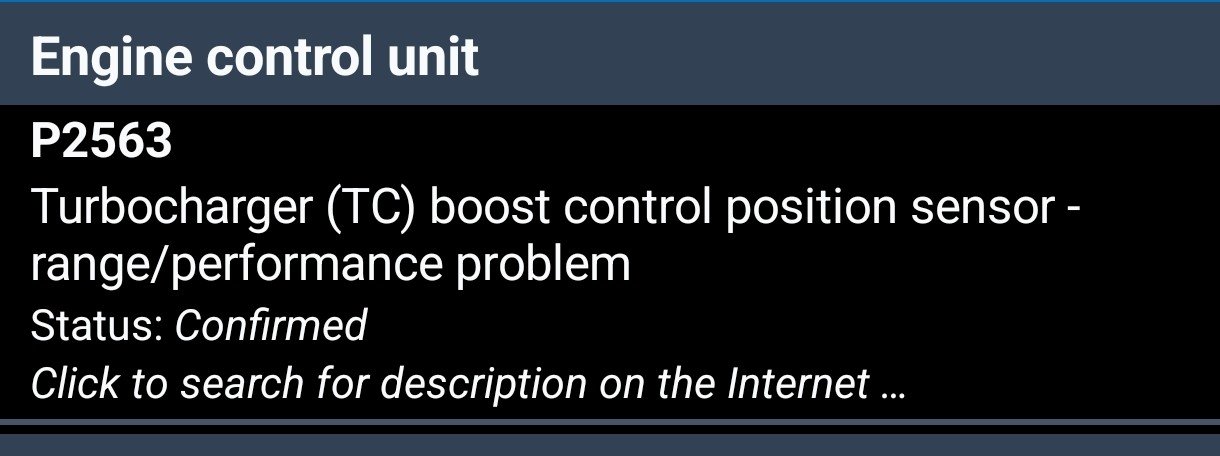
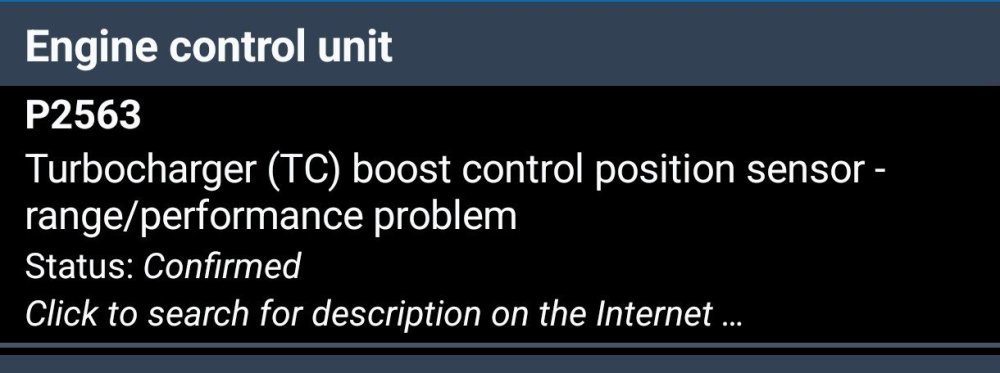
Hi, Has anyone else encountered this error, P256300? The yellow coil light appeared 2–3 times, followed by the "check engine" light. How did you resolve it? From my research, it seems to be related to the "turbo actuator." The vehicle is a 2014 model with a 2.0 CFGB engine and DSG transmission.
-
there is difference LHD are using right inner light part number 5E6 945 308 A and RHD 5E6 945 308 C and to make sure do you have Full Led lights (Matrix,Top Led)
-
Hey guys, Just picked up a 2010 Octavia mk2 about a week ago, so I'm still very new to the car and trying to figure out all the quirks. Running into a weird Bluetooth issue and hoping someone here knows if this is an easy fix or just how it is. The car has the standard Bolero radio (with the factory 3.5mm AUX in the center armrest) and a Kufatec FISCON Basic Plus module installed (Maxi-DOT shows Mainboard 2.16, PBoard 3.31.6). Regular hands-free phone calls work great through the steering wheel buttons and Bolero display. But whenever I try to play music from my phone, the car basically acts like I'm on a phone call. The audio comes out in flat, tinny mono with zero bass. Meanwhile, on the Bolero display under the MEDIA menu, the "BT-Audio" button is completely greyed out and unclickable. Could this be as simple as the wiring being plugged into the wrong pins behind the radio? For example, the Kufatec harness output being wired to the mono TEL+ / TEL- pins instead of tapping into the stereo pins (like the AUX or CD changer inputs)? Or is this specific Fiscon box just hardwired to only do mono audio like that, or maybe missing some VCDS coding to wake up the BT-Audio button? What I’ve already checked/tried: Radio Settings: Went through the Bolero setup menus to ensure "Bluetooth Audio" and "AUX" are enabled/ticked. The settings are turned on, but the actual on-screen button under Media stays inactive, grayed-out. Phone connection: Checked the Bluetooth profile on the phone, it shows connected for both "Calls" and " media audio". Re-pairing: Deleted the device, re-paired from scratch, and tested, same result. Just wondering if it's worth pulling the head unit out to inspect and repin the harness, or if I'm better off not wasting time and just plugging a small Bluetooth modulator receiver. Thanks for any help or advice!