langers2k
Resident Member
-
Joined
-
Last visited
Everything posted by langers2k
-
-
-
I believe so - unless someone knows better? Even in park there is a good chance if you lift both front (or back) wheels off the ground, spinning one will cause the other to spin in the other direction
-
-
Maybe try this: - Switch off screen (in 10 seconds) - Enable/disable the automatic power off function It won't be limited to when you're playing music but might get you closer to what you want.
-
-
If you've confirmed there is no power to the door controllers, I'd suggest running a temporary fused supply to them. While it's connected see if you can communicate with them using VCDS. Assuming that works, you've found your problem and either need to find the break in the power supply or run a replacement. Just looked at the owners manual for your VIN here which suggests fuse 14, 23 and 32 are door related. Official source for wiring diagrams is https://erwin.skoda-auto.cz/erwin/showHome.do it's a pay per timeslot service but an hour should be fine. Use a 'print to pdf' function or similar so you can check the WD in your own time and save printing everything out
-
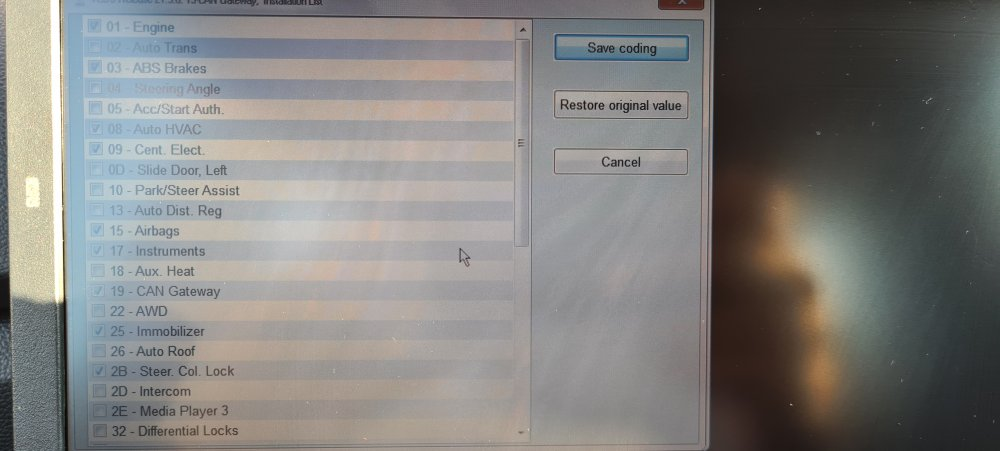
Sorry, I assumed everything was sorted. From what I can tell, you still have work to do on your installation list From your latest scan: When you get to this screen: You need to tick: 04: Steering Angle You need to untick: 2B: Steer. Col. Lock 3D: Special Function 47: Sound System 4B: Multifunc. Module 55: Headlight Range AD: Brake Sensors Then press 'Save coding'. You can make all the changes at once so it should only take 5 minutes. Once that's done, clear all the DTC's and make a new autoscan and post it as you did previously. Hopefully, that should get rid of most of the remaining errors If you have an unrelated problem, I'd suggest making a new thread as it'll make searching easier for others. This thread will continue to exist but won't be archived or locked. If people have similar issues they can post them here and if you have further questions related to this, you should also add them here
-
The stock rear clusters have a single bulb fitted so it's impossible with the stock hardware. You might be able to fit some kind of kit inside but it'll take some modification to the clusters. I'm not convinced it would look great either as the light is quite square rather than a longer thin strip you'd normal associate with dynamic indicators... There might be some aftermarket rear clusters somewhere that support it but I've never looked 🤔
-
Check the wiring and scan the car for fault codes?
-
Have you checked the fuse has power? Given you know the door module hasn't got power, it should be possible to trace the wire back to find the issue or just run a replacement to the fuse box...
-
There is no indication that a regen is taking place. You might notice a slightly higher idle or a drop in economy but that's it. It's fine to interrupt a regen, the ECU will continue if it needs to. As long as you're mostly doing journeys that are long enough to get everything up to temperature, it should be fine As for the data, soot is what the DPF catches. There is both a calculated (by the ECU) and measure (by the pressure sensors) level, when it's suitably high, it'll cause a regen to occur. The soot level will then reduce but there is residue left over, mostly from burning small amounts of oil, which becomes oil ash. This cannot be burnt off and will determine the lifespan of your DPF.
-
It's not unusual for exhausts have a small drainage hole to let water out. Cold exhausts will also cause condensation which shows as water dribbling out.
-
Pretty sure it only has mirrorlink...? Pab or Sasha will confirm
-
You'll need to add a GPS antenna, it'll connect to the unit that's in the glovebox. You can either use an aftermarket GPS puck or use a OEM sharkfin with an extension wire. If you just fit an Amundsen, nothing will work... You need to: - have component protection sorted - FEC/SWaP codes added - the headunit correctly coded for your car - possibly other modules coded - I think you also need to replace the USB socket for CarPlay/AndroidAuto too Just to point out, I think the part number you've linked (5E0035864A) is a MIB1 unit and might not support CarPlay. I think you'll need a MIB2 unit. If you haven't bought anything, I'd suggest contacting @pab567 as he supplies units and knows exactly what needs doing Good luck.
-
That style of steering module probably isn't correct for your car. There are three different, incompatible versions depending on when it was built. An autoscan will confirm which you need. If the buttons are correct for a Yeti, they are correct for a MK2 Octavia. Both need the same PQ style buttons I imaging the blanks can be removed but I've never tried so I can't be sure. I'm not sure that's the correct loom, I think it might be for a MK2 FL wheel rather than a MK3 style? I'm pretty sure the button connector is different. It might be 5JA971584 you need but I'm not 100%.
-
Erm, I don't think that wheel is correct for a Yeti or a MK2 Octavia... More correctly, the wheel will fit but I'm pretty sure it'll have MQB style buttons rather than the PQ style you need. No idea why the shocks should make any difference or the RS/Scout limitation. You might want to look at 5L0064241FKM instead as that is a Yeti part. If you haven't got a MFSW already, you almost certainly need to replace the steering controller as it's unlikely yours will support a MFSW. An autoscan should confirm.
-
If the DSG is in neutral, surely you can just spin the disc round?
-
-
I removed the plastic grommet from the bodywork with a small screwdriver. It's easy to get the rubber gator back on and push the plastic grommet back in place afterwards 👍
-
Do you have the adaption map from before your changes and also a current autoscan? Can you also update the latest VCDS version: https://www.ross-tech.com/vcds/download/current.php
-
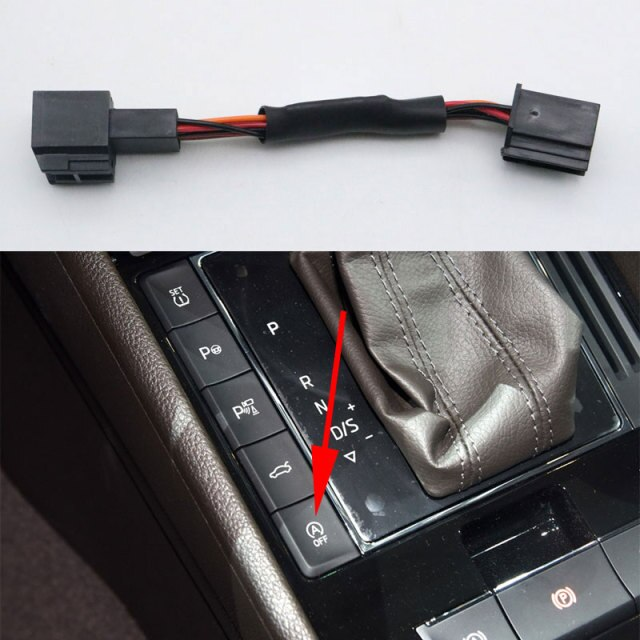
As PetrolDave mentioned, it some extra hardware that connects to the buttons to press it for you. Random example that's probably correct for a Superb: https://www.aliexpress.com/item/1005002491684461.html
-
It seems to be this: https://www.veepeak.com/product/obdcheck-ble-plus/ Veepeak lists compactivity with Carista which in turn is suitable for a MK3 Superb: https://caristaapp.com/vehicles/skoda/superb/mk3 I've never used Carista so I'm not sure how user friendly or powerful it is. It's probably fine for checking error codes but I'd be wary of any automated coding changes. I don't think it's possible to 'reverse' stop/start but you may be able to disable it completely depending what year the Superb is. Most people seem to use a stop/start memory module that effectively presses the button for you
-
It's not plug and play, various buttons won't work I'm afraid. You'll probably need a lin convertor as mentioned here: https://www.drive2.ru/l/581371172306813158/ And demo'ed in a Rapid here:
-
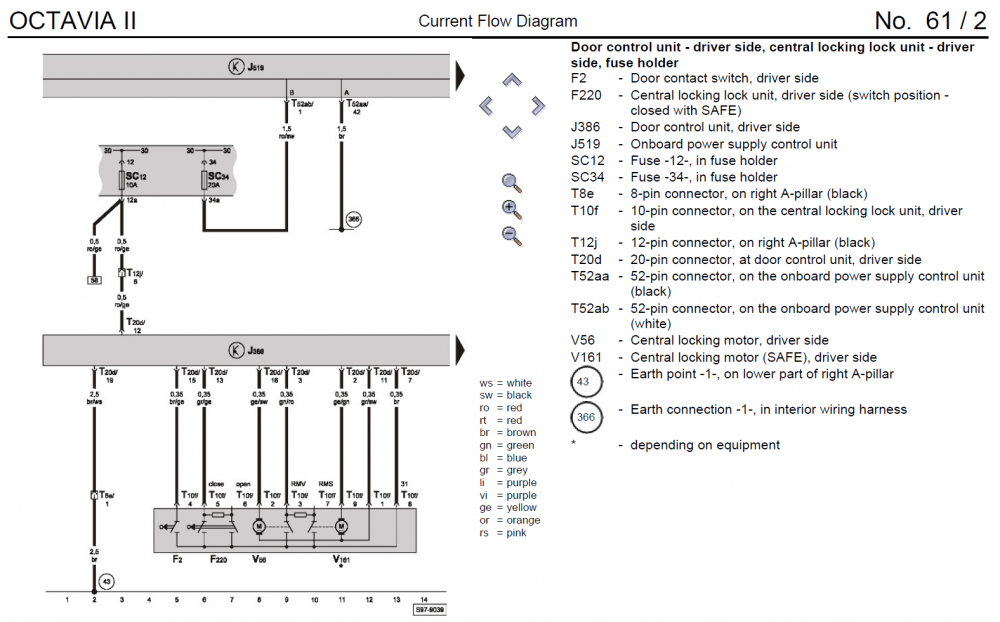
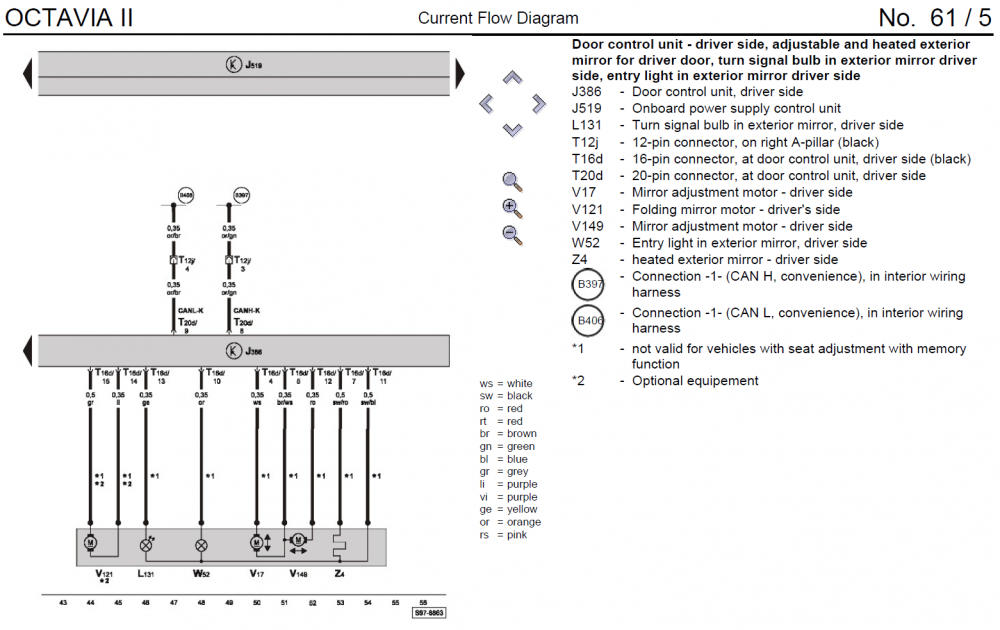
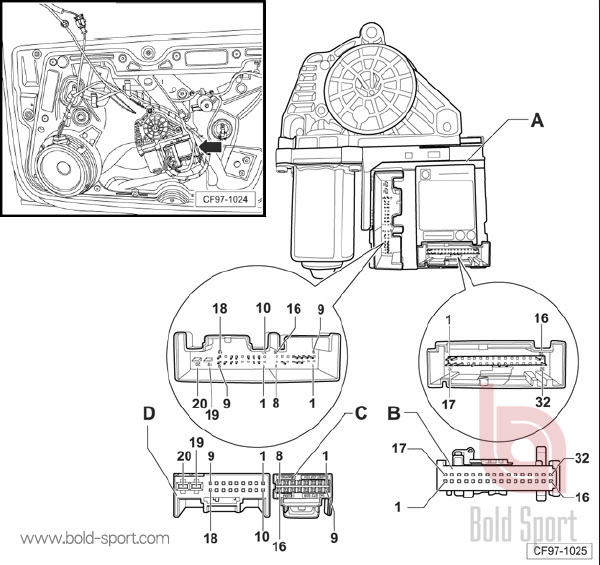
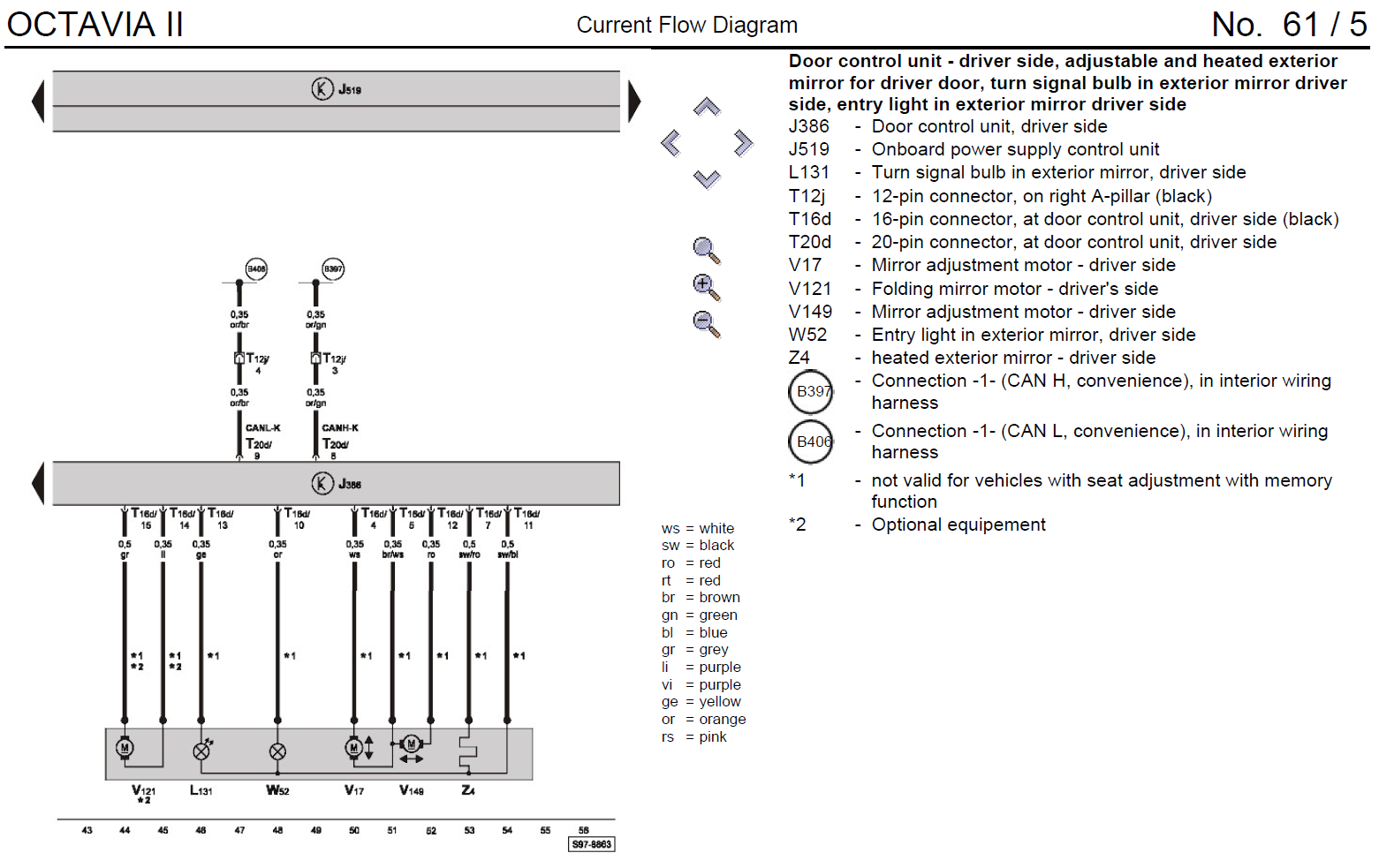
T20d/12 and T20e/12 are on the front door controllers. That means connector T20d pin 12 and T20e pin 12. There should only be one 20 pin connector on the door controller so it's easy to find pin 12 on each side. The 20 pin is labelled as connector D below: The Octavia WD I have isn't super helpful but you can see: - pin 12 on connector T20d/T20e is power - pin 19 on connector T20d/T20e is ground - pin 8/9 on connector T20d/T20e are CAN-bus IIRC, T20d/T20e pin 20 is also power but that's only used for the electric windows. Still worth checking though.