Breezy_Pete
Sponsor
-
Joined
-
Last visited
Everything posted by Breezy_Pete
-
The wiring comes into the cabin under neath the rear seat base I think, so that seems the obvious place to join replacement wires in.
-
This turned out to be spot on, by the sound of it.
-
Welcome back Phil.
-
-
So which fuse is this (27?) and where is the relay? Where I'm looking, cabin fuse 27 feeds the 'fuel pump control unit' which I think would be near the fuel pump, as opposed to a relay, with lots of connections (10 pin connector)??
-
If you can tell me the engine code I may be able to help. Won't be for a little while though, just off to't pub.
-
If anyone has been near the battery recently, I would check that neither clamp is loose.
-
What do you see as the problem with doing that? Are you thinking the alternator will not be able to supply enough current to meet this load?
-
The excitation current comes from the onboard supply control unit, via that skinny blue wire. Approx 50mA only (from memory).
-
There's no direct electrical connection between the alternator excitation and the illumination of the cluster LED, so it may be model-dependent as to whether the light coming on means the wire is intact or not.
-
Yes, more common on diesel-engined Fabias due to greater vibration levels, I think, and obviously more common the older the car is due to 'wear and tear'. The alternator will tend to self-start above a certain rpm level, but on low-revving diesels this can take some time and lead to charge loss from the battery in the interim. And systems that are 'current hungry' noticing that the system voltage is below what it ought to be and complaining. Measure the voltage across the battery immediately after starting the engine, and then again after a 'blip' on the accelerator pedal that takes the revs above, say 2000rpm. You may see this occurring. Before alternator 'boots up', you'll see 12V approx; after it starts it should be around 14.2 +/- 0.2 (with some temperature variability).
-
If the car has A/C, then the blue excitation wire from pin 1 of the alternator signal connector goes to pin 2 of a 4-way connector pair at front left of engine compartment, from where it continues into the cabin, destined for pin 32 of the brown 52-way connector at the Onboard Power Supply Control Unit (also known as BCM). When I talk about 'left of engine compartment', that's left as experienced sitting in the driver's seat facing forwards, so right side as you look into the engine bay from the front bumper. I'd try to locate that four-way connector and check the wiring there; seems most likely problem area if the alternator connector itself is fully 'home'.
-
That's what you did by observing the presence/absence of the battery light at ignition on. Please share some info about your car such as the year it was built, and the engine type. Here's a thread with some pictures of mine of the connector pair where most problems with the alternator wiring occur: https://www.briskoda.net/forums/topic/287467-load-signal-alternator-cable/
-
Check to see if battery light comes on when you switch on the ignition. (Key position before starter turns).
-
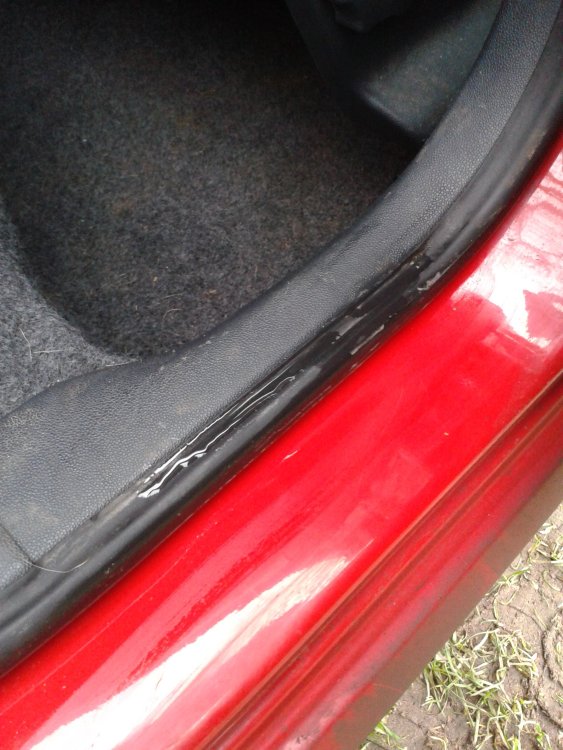
1. Check for leaks from the rear door ancillaries carriers. Most obvious by small puddles on the horizontal section of the seal in the doorway when you open a rear door after rainfall. Check front doors for similar puddles, but it's usually the rears. 2. There's a relay called the X contact relief relay which powers the fuse for the cabin fan; it also powers front (if fitted) and rear fog lights, so try to see if the fan non-function correlates with fog lights not working, and vice-versa. If it does, you may have a dirty/worn contact on the relay; it's in position 11 on the relay panel near the steering wheel.
-
Look for broken wire(s) in the rubber boot between doors and a-pillars. A thin grey/white wire would be the prime suspect.
-
If there was no physical difference, they'd have the same part number. Differences may be small, presumably to work optimally with springs with different properties. You would want to fit new shocks as well as springs though, wouldn't you? Especially at the front, unless you knew they were recent?
-
Well done sep.
-
Fair enough. Don't think you'd mentioned that to date. PCV system fault? Not sure how these work on the CR engines.
-
Maybe needs a clean out as suggested by PipH.
-
That's rather the point; you're trying to test if the handbrake is indeed weak on one side. I am very strong too though. 🤣
-
Reminds me, I need to check our Fabia over in the next month or two in this area. It's been a while. I think @Bertie90 you can test the handbrake function yourself fairly easily. Apply handbrake to normal position, chock front wheels and put in gear; Jack up both sides of the rear until the rear wheels are off the ground, then see if you can turn either wheel by hand. If that shows one side not getting braked as much as the other and the equaliser bar is also pulling to one side it would be fair to think that there is a real problem. A stretched cable on one side could also cause these type of symptoms, I guess.
-
Unless it stops working well after 3.5 years...
-
That kit did contain the wheel cylinders: Pagid Brake Shoe Kit | Euro Car Parts 3.5 years is possibly enough time for something to seize up inside. Take the cover off that allows you to see the equaliser bar behind the handbrake lever, and see if it skews sideways when the handbrake is applied. That usually suggest a seized pivot inside one drum.
-
It will change angle as demanded while running (if working correctly). You may have wished to mean "it only closes completely when/as the engine is switched off" but that's not what you said. I never claimed it shuts completely during engine running. I never claimed anything about manifold vac levels either. Just trying to help the OP understand his car. 🙂