



All Activity
- Past hour
-
I've searched Aliexpress with each of these numbers, and nothing. The're probably the references of the individual bits rather than the complete part.
-
When the car was driving normally, or when the wheel was turned or moved while on a lift, it didn't make any noise. Sometimes it wouldn't even make a noise on the road; for instance, I could go on a 200 km trip and it wouldn't make a sound at all, while other times it would start making noise just ten kilometers into a 200 km journey. In other words, it wasn't a continuous sound. Additionally, the left wheel was removed multiple times, and the hub, bearing, etc., were checked numerous times; because the play was just a fraction of a millimeter, it wasn't very noticeable.
-
Even by telephone if you say to your mechanic "i listen a Yyyyn" sound when the car rolls in low-mid speed and stops when i brake he will answer "ball bearing". That's the first thing that will do,the sound is characteristic no matter if it's car or motorcycle and there is a specific (funny) slang expression: "this ate it's own bread" which means "his life is finished". Fitting a ball dearing it's a serious task because in case of mistake you need triple work-time to remove it plus the cost,in repair/machine-shops here No newbie employee is allowed to do it. He only carries from the self to the hands of the mechanic,mustn't be dropped down not even thrown to the bench carelessly.
- Today
-
iks95 joined the community
-
i have an RPM Anti-drone Resonator Delete Pipe on mine. mine being the FWD 220, i got the version that is for the mk3 Octavia RS. combined with the IE downpipe, it has changed the exhaust note, but not crazy, as i still have the twin factory mufflers at the back. i might one day change the muffler back boxes....
-
actually its very likely possible, especially if ur car is "old" now. normally the VIN number has an expiry on the skoda update portal. u'll get updates up until a certain date, after which it will tell u no more.
-
scalaPTscala joined the community
- Yesterday
-
As far as I can remember, I also had to delete some countries to make space and then just copied over all the files without the dropdown menus open
-
apocalys joined the community
-
Ashfak_Ahmad joined the community
-
Hi Tim ( @kempus ), I've asked my AI assistant to investigate this because my own 2026 Superb L&K behaves differently. Here's what it found: AI ASSISTANT RESPONSE BEGINS HERE: The issue appears to be the distinction between the Individual driving profile and the Individual ambient lighting setting. When ambient lighting is set to MODE, the car automatically selects a colour according to the driving profile: Eco – Green Comfort – Blue Normal – White Sport – Red Individual – White So your experience is entirely consistent with the way Škoda has programmed the system. However, there's a solution! Rather than choosing MODE in the ambient lighting settings, select Individual within the ambient lighting menu itself. You can then choose your preferred colours and brightness independently of the driving profile. For example, we have selected red ambient lighting in our own Superb L&K, and it remains red regardless of whether I'm driving in Normal, Sport or Individual mode. I found confirmation of all this on the German Škoda Community forum. A Superb Mk4 L&K owner, posting as stbufraba, describes exactly how the system works, including the five MODE-linked colours and the ability to select colours independently. Here's the discussion (see post #9): https://www.skodacommunity.de/threads/ambientebeleuchtung-l-k-farbanzahl-erweiterung.151263/ In short, you don't need to put up with the bright white lighting when driving in Individual mode. Just separate the ambient lighting colour selection from the driving profile. Hopefully this resolves one of your frustrations! END OF AI RESPONSE I hope this helps. Best wishes, David.
-
Ah I see. Thankyou.
-
No, I meant you just go to the service menu to find the software train. Then enter it into the MiB helper website. This will then guide you to the right maps and software versions.
-
Possibly. Wouldn't surprise me if I entered it wrong. Didn't think mine would have updates via the unit as its a 2016 .
-
SKYDELIS joined the community
-
Unusual that your VIN wasn’t recognised. Are you certain you got it correct? Perhaps 0 and o mixed up? Also you can find/ source the map updates: Press and hold the MENU button for about 3 to 10 seconds, then select Software update or System information / Service mode to view the installed SW train string Enter it here https://mib-helper.com This will give you latest software version and latest maps. Also has links to how to videos for updates. From personal experience, make sure your battery is in good condition and fully charged, and charger connected when updating MiB firmware. The maps update will carry on in the background as and when the car is on so that’s less crucial!
-
Only joined the page yesterday, mainly to get an answer to this question, as when I put my VIN in. It wasn't recognised. Followed your link and its worked as it should. So once my sd card arrives. I will be giving this a go. I emailed my local main dealer. But they were unable to help. Cheers
-
I finally worked out how to get the red led's when in Sport mode by setting the ambient lighting to Mode to link it to the driving profile. But, why oh why when you are on indiviual driving profille (which I use a lot) does it not use your individual colours but the brightest blinding white which makes the whole feature completly useless IMHO. Any why can't they still make switching in and out of daylight saving automatic! I have a 2025 L & K with the new logo in the steering wheel. Just grumping Tim
-
saormel joined the community
-
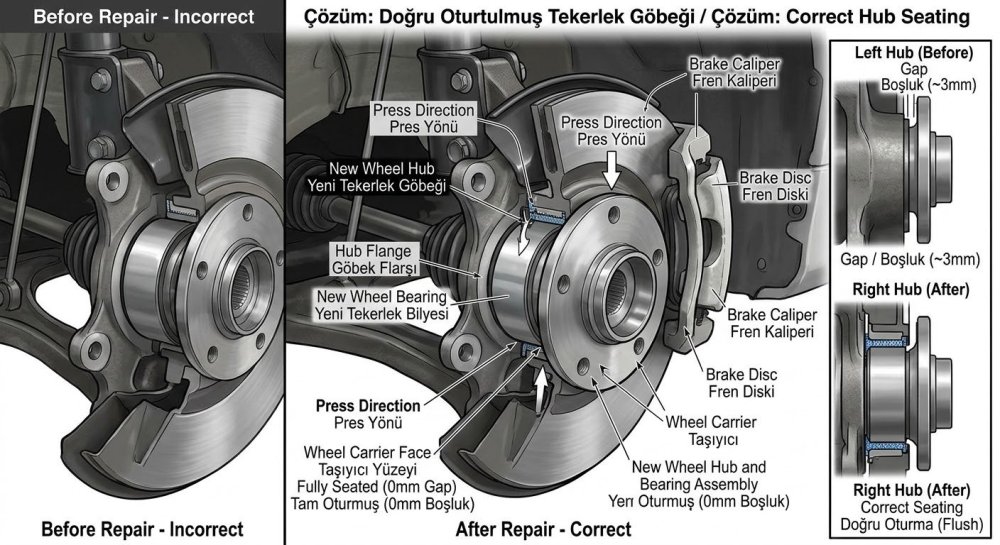
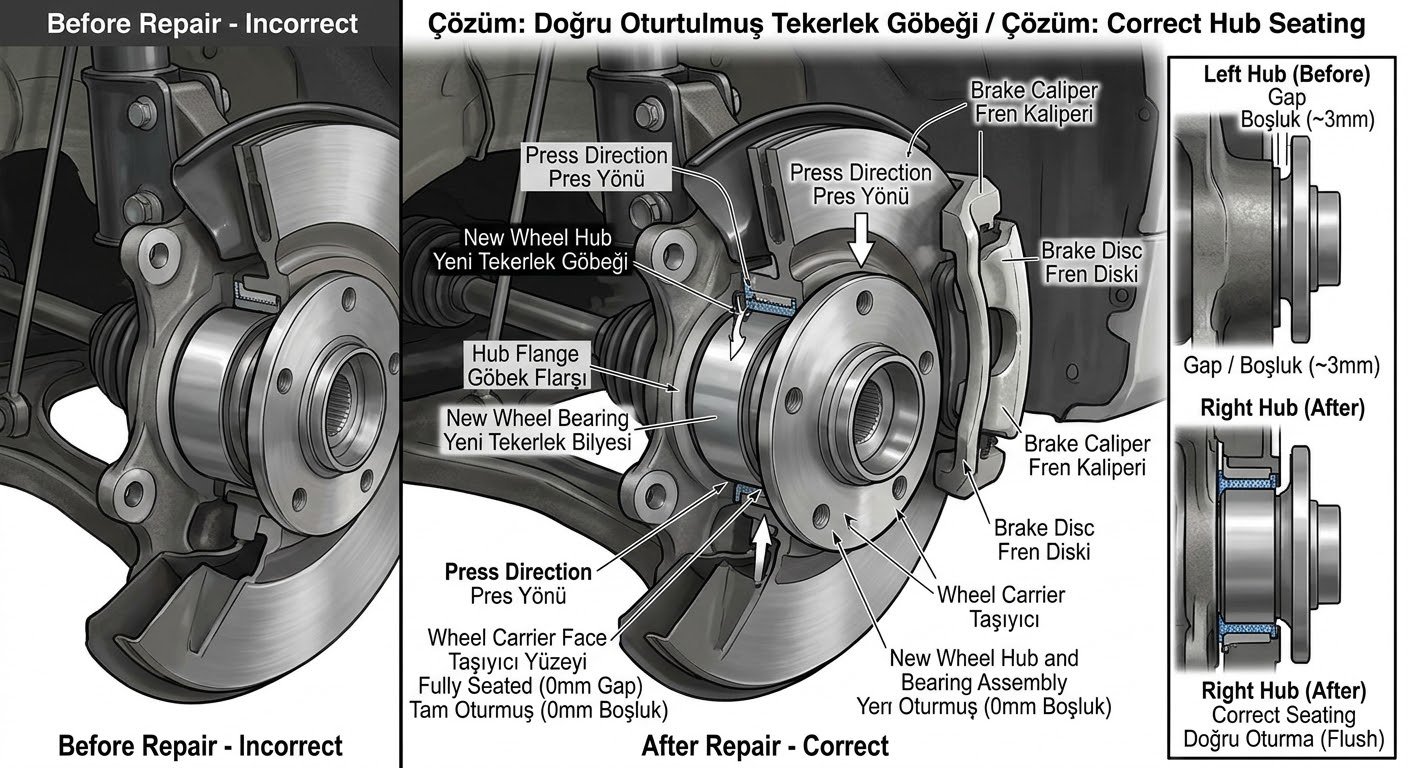
Yes, I think the two descriptions could be related, although they are not exactly the same. In my case, when we removed the left front wheel, we noticed that the hub was sitting a few millimetres further out than on the right-hand side. The hub was not seated correctly in the wheel carrier, and this appeared to leave some play in the brake caliper assembly. We replaced the hub and bearing with new parts, making sure the new hub was seated correctly, just like on the right-hand side. The play disappeared, and after a long test drive, the noise has not returned so far. So, the second explanation is consistent with what I found, but I cannot say for certain whether the original problem was caused by the bearing being pressed incorrectly, a problem with the old hub, or another issue with the fitment. The important thing is that replacing the hub and bearing resolved the symptoms, at least for now. Thanks for comparing the two explanations!
-
-
-
Hi, Thanks for the tips! I’ve checked the battery, and it’s in good condition. I’ve now scheduled an appointment at a Skoda service center—partly because there’s an active recall for my model—and asked them to perform a targeted diagnostic regarding the errors mentioned above. I’m hoping to get more detailed results there than what you’d get from a standard, off-the-shelf diagnostic scanner (like one from Bosch, for example). The recall involves replacing a bolt on the steering gear; I assume that’s unrelated to the issues I’m experiencing—what do you think? I’d be grateful for any further ideas or advice! Best regards
-
Thank you for your reply On the part with th metal key, there is: >PA86-GF50< On the part with the 3 buttons: >PA-GF/TPE< On the part holding the battery: 01 563 802 and >PA6-GF/GK30<
-
There is information on here. If you search. The solenoid is knackered. Change it. About £50 new or cheaper for a pattern part. Very common issue.
-
Glow plugs on modern cars aren’t just to start the engine. They maintain the cylinder temp for a duration after initial start up and after moving off for some time.
-
“Never Stop Fighting and Believe in Yourselves,” Says New Champion Robert Virves “Never Stop Fighting and Believe in Yourselves,” Says New Champion Robert Virves The club of world champions who have won titles in Škoda rally cars has welcomed another name. Meet Robert Virves, who has won both the WRC2 and WRC2 Challenger titles*. He secured the victory of a lifetime at an especially fitting moment, in the very year that Škoda Motorsport celebrates 125 years. https://www.skoda-storyboard.com/en/lifestyle/never-stop-fighting-and-believe-in-yourselves-says-new-champion-robert-virves/
-
My 2019 Skoda Kamiq is fitted with a genuine Skoda factory harness that runs from the dash fuse box and BCM to the back of the car? Fitted by me. I have information that the correct trailer module is 5Q0907383L. I don’t want to purchase this and to then find that it cannot be coded due to incompatibility with the BCM , CANBUS etc. Note that i can find multiple listings of module 5Q0907383L but a 5Q0907383L being sold for a Fabia has different codes on it than a 5Q0907383L being sold for a different model. Very confusing.
-
Today I plugged in a flash drive containing maps from 23.06 (if I recall correctly, I currently have 24.12 installed) I wonder if the MIB3 system will actually update to older maps? I didn't think that was possible. I’ll keep you posted on any progress; my commute to work takes 30 minutes, so I’ll give it a few days.
-
Can you share this version? Thank you!
-
Hi . Can anyone tell me where the Auxiliary water pump is located on a 2018 Fabia petrol 1.0 TSi please? I've got an Fault code on OBD 11 P2B6300 telling me there is a problem with the Auxiliary water pump. I want to check the connections and replace the pump if necessary, but don't actually know where it is! Thanks in advance. Tim









.thumb.jpg.9dd3f612ba7f13d10be5c518d3c8d255.jpg)


