Leaderboard
-

ColinD
Administrators10Points16,763Posts -
MikeTheThinker
FREEDOM7Points8,537Posts -

mac11irl
FREEDOM6Points16,806Posts -

john999boy
Honorary6Points11,233Posts




Popular Content
Showing content with the highest reputation on 01/08/20 in Posts
-
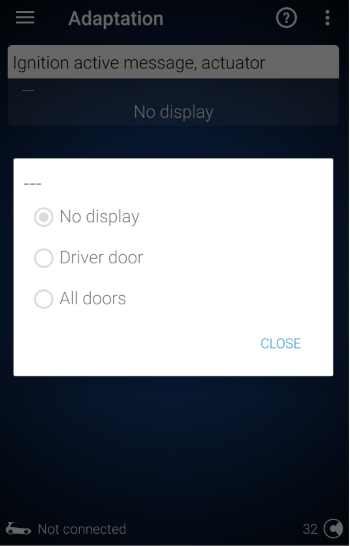
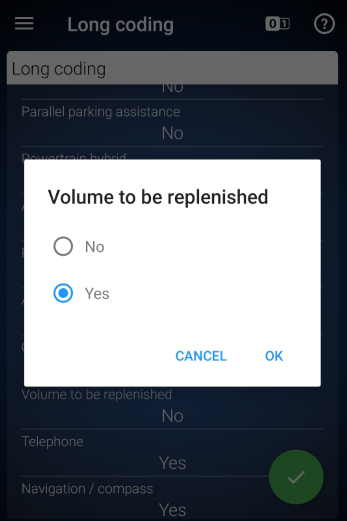
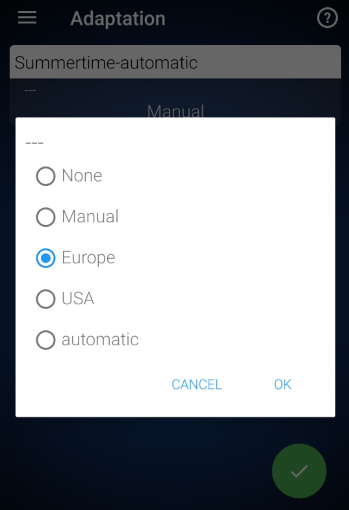
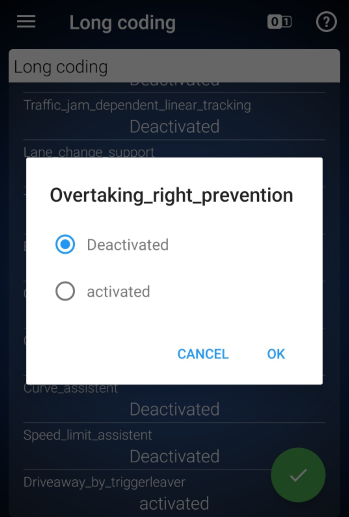
1 pointHi all, just recently purchased an OBDeleven Pro and made a few tweaks to my Karoq so thought I'd share the working tweaks done via coding (as opposed the the built-in "apps"). There's a lot of information on various forums but it's often not quite right for the Karoq or needs some translation. Disable ‘Ignition On’ Alarm This disables the ignition on alarm which is activated when the drivers door is opened. Control unit 17 (Dashboard) Adaptation Search "Ignition" Select “Ignition Active Message, Actuator” Set to "No Display" Show Refuel Quantity in Dashboard (Volume to be Replenished) Show the number of litres / gallons needed to fill the tank in the MFD / maxidot Control unit 17 (Dashboard) Security access > enter code 25327 Long coding Scroll down to "Volume to be replenished" Set to "Yes" Note: the units are controlled in the car settings (separate from consumption units) Enable Summertime Automatic Option in Time / Date Menu Enables the option to update daylight savings time automatically in the car menu Control unit 5F (Information Control Unit 1) Adaptation Search "Summertime-automatic" Set to "Europe" Disable the ACC Function to Avoid Undertaking Stops ACC slowing the car down if a vehicle in the right hand lane (UK) is moving more slowly. Obviously I'm just testing this one as nobody undertakes! Translated from clubskodakaroq.es and bear in mind the language is written for right-hand drive cars. "The adaptive cruise control (ACC) has a function to prevent overtaking on the right (RUV). If to the left of the vehicle there is another vehicle that runs at a slower speed, it is represented on the multifunction screen. To avoid "overtaking on the right," the system brakes the vehicle itself gently. The RUV function is active from a speed of 80km / h and the driver can interrupt his intervention at any time." Control unit 13 (Adaptive Cruise Control) Security access > enter code 20103 Go to Long coding Search for "Overtaking_right_prevention " By default it is set to enabled . Change to disabled . Restart the infotainment (hold power for 20 sec) - not entirely sure this is necessary More to follow. Working on a guide to enable lane assist and high beam assist for cars with the A5 camera.
 1 point
 -
1 pointTime to change front brake disks and brake pads. I always had thoughts that my 340mm kit from 280hp Superb is a bit on heavy side. 340mm ATE vented disk Caliper with pads And I decided to assemble kit with better braking characteristics and lighter. So , I took Brembo calipers from Renault Megane 3 RS 275hp Brackets to fit 354mm disk My favourite brake pads + few grams for pins and springs. Brake disk temporary took EBC simple vented , as two peace cost to much for test. This EBC rotor weight 11.800kg Plan is to migrate to two peace rotor later on. ECB tuning 345x30 two peace rotor weight 8.500kg. Ideally some forged wheels later on as well. But will need to rob a bank first Brembo DOT5.1 purchased as well. This calipers better to run on 5.1. In theory everything have to be bolt on , but this is what I think might not be the case, have a filing that bolts a bit to long, but when I install my new brakes , will put here step by step guide for ANY MQB car1 point