Leaderboard
-
Lady Elanore
FREEDOM7Points25,085Posts -
.jpg.1006585dfe4e2977315b67c3d642e37b.jpg)
Guest_
FREEDOM7Points83,824Posts -

john999boy
Honorary7Points11,233Posts -
MikeTheThinker
FREEDOM5Points8,538Posts




Popular Content
Showing content with the highest reputation on 11/09/20 in Posts
-
Step 1. Install the free VW Pre Compiled Database located on the download section of this site to your PC: https://free-speed-cam-updates.web2diz.net/ Step 2. Unzip/extract the files on your PC and copy the contents of the resulting folder onto a SD card. ( Important points to note: Only copy the contents of the main folder i.e. Do not copy the resulting extracted folder named Volkswagen PersonalPOI - just copy the contents that are displayed inside that folder which is a folder named PersonalPOI and a metainfo2.txt file. Delete the readme.txt file as well as that is unnecessary. Also further note that despite trying to use 2 different usb sticks unsuccessfully only an sd card would work for me. I used the sd card which contains my music files but remember to delete the copied files off afterwards as sometimes they may prevent your music from playing and they are no longer required as they have been copied to the internal memory of the Amundsen ). Step 3. Using the "manage memory option" of the nav settings upgrade the software. Step 4. In the "map" settings chose poi categories, scroll to the bottom and the newly added items should be displayed there. Tick these to activate them. Step 5. In the "nav announcement" settings of the nav settings make sure that there is a tick in the "My POI" item. This enables an audible speedcam alert. To sum up - it's pretty easy to do and it's free and there are monthly updates on the site. On the downside - I'm not sure how reliable and up to date the database is as I've already had to manually edit and remove an out of date camera from my location. IMO the audible alert is a bit feeble and can't be changed but it's better than nothing. I'm not too fussed on the camera icons either. I hope this post is of help to others and I would like to thank the contributors of the other threads regarding this topic on this forum from whom I have gained my insight. I have compiled my own version with my preferred choice of speedcam icons limited to UK fixed cameras and traffic light cameras using the VW database on the above site which I've attached below to share if anyone wants them. Remember to only copy the files as per the above instructions. My Uk Speedcams.zip1 point
-
Just upgraded from OEM DMF (12,68kg) clutch kit to performance light SMF (7,2kg) clutch kit. It was a must after 85.000km under APR stage 1 (316HP & 516Nm). Tested...and I love it! Numbering advantages wold take time, more of it in detail soon. For the time being, let me mention the only downside, literally: I need to rev engine just a little bit higher, in order to start smoothly. Let's say 1.200rpm - 1.500rpm. Yes, somewhere outside town in quiet winter landscape discreet shatter can be heard: From the outside in neutral. Barely from the inside only when pressing gas pedal in neutral within 750rpm to 1.000 rpm range, beyond that and while in idle: nothing. In total. I feel like I am driving another, much better car. Looking forward hearing about your experience with OEM DMF vs after market Light SMF.
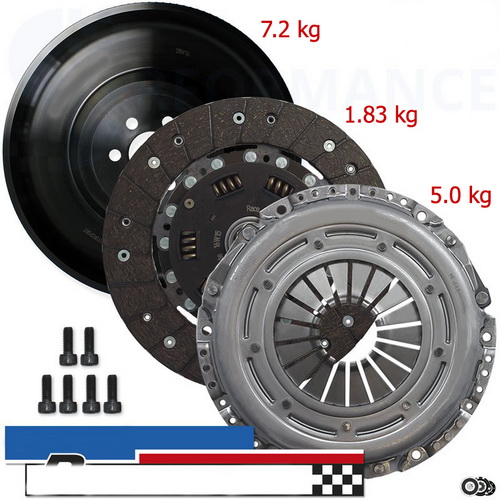 1 point
 -
1 pointMy replacement car was delivered Monday and has now done all of 70 miles. At a high level it is essentially the same as the car it replaced - a 2.0 tdi 150 Manual hatch SEL but this one has hill start assist that I didn't spec on the last one. I is even the same colour. Differences: As expected Amundsen instead of Columbus, slightly smaller screen but has wifi which I think is new on Amundsen(I never used it on the Columbus) but doesn't have the HDD (which I never used). It doesn't have a CD drive which the last one did (I never used it). It does have two USB ports so I can plug the ipod in and one of the i-phones. Need some time to play to find my way around apple play. It has the side assist warning - not expected It has KESSY which I would rather not have although it does allow me to close the boot from the fob. It doesn't appear to have the adaptive lights which were on the spec list in January but are not even mentioned in the brochure now. It has leather instead of alcantara - from my point of view a step down. It has rear vehicle assist to detect approaching cars when reversing It has front and rear parking sensors - the last one was rear only. It also gives an overhead picture on the infotainment screen. Fancy LED lights and chrome trim on the boot but I don't see them from the driving seat. I don't like the wide white/pale grey rim to the dials, it makes it harder to read the numbers but I will get used to where the common speeds are on the dial. It has adblue and is saying Range is 12,500 so at that rate it will need filling once a year! There is only one umbrella - as expected. Drives just the same as you would expect but needs running in which in current circumstances will take me a year! Will add to this if I find any more differences1 point