




Danoid
Members
-
Joined
-
Last visited
Everything posted by Danoid
-
That’s rather unhelpful, like I said earlier I’d remove it personally for now until you know for sure the best way to fit correctly. If it is Skoda part then you should be able to remove it easy enough and still use original connectors and give both sides a decent clean
-
Hmm, I wonder if previous owner installed this https://www.kopacek.com/skoda/superb-iii/superb-iii-combi-genuine-skoda-autoas-roof-spoiler-in-monte-carlo-edition-black-magic-metallic#description Looks the same/similar If it is you can email them and ask for install documents and explain the issue you have
-
To be honest you can pull that off as it’s not a factory fitted one at all
-
Might be a right pain but if it was my car I’d take the door card off first then go for a drive and see if it goes. I take if you’ve removed the umbrella and made sure the huge cup holder area in the door is completely empty? It goes back quite far so hopefully just something in there
-
I’d say your gut is telling you something and always best to listen to it. If they can’t prove it did indeed come from a valet or open window then yeah get your money back
-
Are those wheels actual Superb ones? Not sure if I like them or not hmm Pretty sure I’ve seen them on kodiaq’s
-
They do the full black ones, but to me looks cheap Talking of costs the kopacek not at all cheap but don’t think I’ve seen complaints here from people but plenty of complaints of eBay specials
-
Like this? https://www.kopacek.com/skoda/superb-iii/superb-iii-original-skoda-emblem-int-version-front https://www.kopacek.com/skoda/superb-iii/superb-iii-original-skoda-emblem-int-version-rear
-
£280 is very reasonable
-
Just out of interest how do you bleed the system? My old Passat B5.5 you had to pull one of the pipes out a little bit going through the firewall until water come out of the hole on the pipe
-
There’s good news and bad news… Bad news is official way is to remove the bumper Good news is when looking at the front of your car, it’s just below the left of your number plate Top right of my picture is the edge of my front number plate My fingers are big, not like King Charles’ though and if I wanted to I reckon I could get that off as the grille bits are quite big As you can see the grey part has some plastic tabs which will need to be pressed in and pull it back I imagine, might be handy to have 4 hands
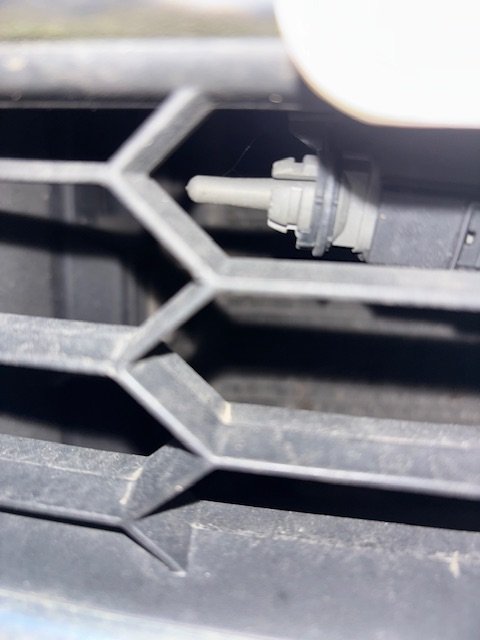
-
I’ll have a look at the repair manual, but not sure when. If it’s on my downstairs pc I’ll have a look shortly
-
-
Not sure where it on a Superb but there should be 2 pipes going in through the firewall, feel this when the engine is up to temp and they should both be warm/hot. Pretty sure that’s a simple way of checking heater core, correct me if I’m wrong anyone. If all is well there then it could possibly be your actual hvac controls are duff, I’m guessing when you have your controls to 20oC then turn it to 25oC you hear the flap moving? Just wondering if it’s something simple like that and not sending the correct message, might even be worth removing hvac controls then plug back in and drive the above?
-
I’ve never owned a car with bang on centred steering, mine is also just to the right, but remember that most roads are cambered slightly to aid drainage. Mines enough to remember if anyone mentions it like you just have 😁 but I do not have uneven wear on tyres which is the main thing for me as I just live with it but it’s only marginally off
-
-
Have you tried the reset of hvac system? Wwhen it’s done, take care out of auto then set your heat to like 20oC and should feel warmth as long as it’s cold enough outside and inside
-
Awesome glad to hear it and good to know that much bigger sd cards have no issue For the 1 file and 2 folders is was just selecting all three at once but kinda hard to explain
-
Awesome, maps are released bi annually, after a few goes you’ll be doing this with your eyes closed
-
You would need to inform insurance company as it’s a change
-
Ah different layout completely so most likely not that From your video I believe that sound is normal, just about to go in mine so I’ll see if it does the same, never noticed it though
-
If it’s a similar setup to the Passat when you press the pedal down it’ll push on the brake pedal switch. Have a look for that and push the switch down and see if it’s that making the noise, if it is then some silicone spray and applying some grease on top of the switch should sort it
-
I’ve noticed more cars having tyre size 235/40/19 so I don’t think it’s the case of a huge difference in cost compared to a few years ago, about the same these days
-
I’ve got the SEL with 235/45/19’s and it’s very comfortable, standard suspension with a wheel arch gap the size of the English Channel. Wofts along nicely and can have a conversation unlike my father in laws Audi a4 black edition, literally shakes you to death that as it’s much lower than mine. Is your model sportline, l&k as they are lowered by 15mm I think but seems to make a big difference
-
Any questions let me know I forgot to put at the bottom, go for a drive whilst maps are updating, when safe check the progress is going Once it’s done it’ll go back to the maps screen, then go back to version info and you’ll see all the versions have changed from your current 2017 version. Also something to note, one of the pictures you uploaded has the update button which looks different to mine, but it’ll do the same thing

