Breezy_Pete
Sponsor
-
Joined
-
Last visited
-
Currently
Viewing Topic: Wanted: wiring diagram for blower motor
Everything posted by Breezy_Pete
-
OK, so a mk2 Fabia, but same applies. Don't think I can assist any further.
-
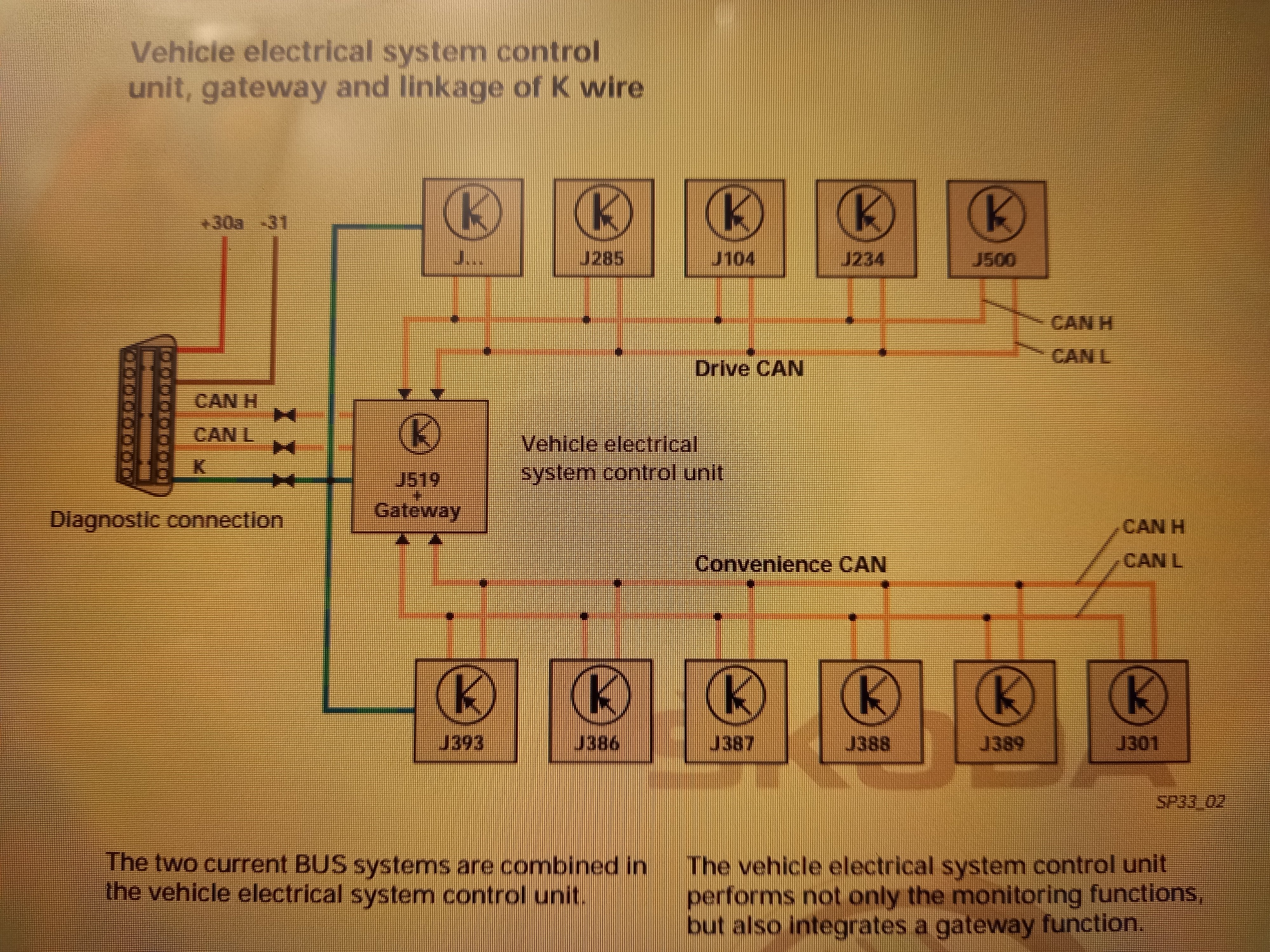
J285 is cluster.
-
What year is the car? As I said, rpm data gets to cluster by CAN; VCU has CAN connections to every other module that uses CAN.
-
To test the stepper motor that drives the rpm needle you could maybe swap the motors between speedo and tacho, I have a feeling they are the same.
-
If you have the onboard supply control unit (vcu?) you should be able to talk to that with VCDS and do what Nige suggested.
-
Good thinking Nige.
-
Info about rpm will come by CAN messaging from engine ECU, I expect.
-
Did you ever drop the sump of your AUB?
-
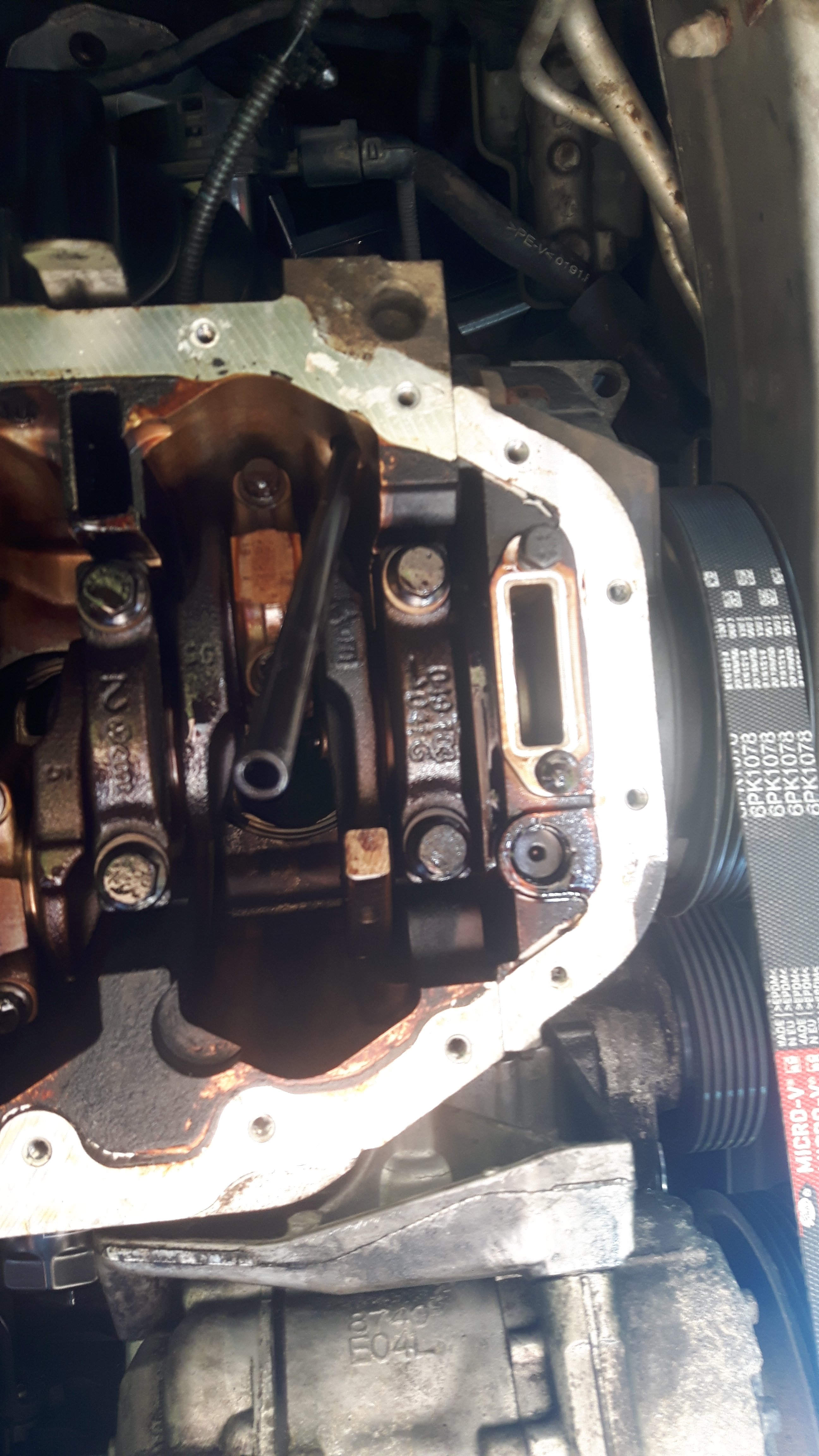
Well I distinctly recall headbutting the end of the one in my BKY engine while under the car with sump off, and thinking, "better not stick that in an eye..." Just found a pic:
-
The top end of the dipstick has a seal against the top of the tube, I think. The air above the oil in the tube will be hot during engine operation. After shutdown it will cool and contract, pulling the oil level within the tube up as it does so. Experiment to try: tomorrow morning lift the dipstick just a few cm to break the seal to equalise any air pressure difference, don't bother looking at level. Put the dipstick fully down again. Come back an hour later and see if 'false level' is or is not now showing. Just a hypothesis, not tried that experiment myself.
-
I'll still go with mk3. Mildly confusing though. Škoda Octavia - Wikipedia
-
Skoda/VW say you should check it warm, so I wouldn't worry about it.
-
If it has 1Z as the 7th and 8th digits of the VIN it's a mk2, if they are 5E instead, mk3. Parts look-up here, Skoda Parts catalog - ETKA Online, Skoda EUROPA, original Catalog Skoda EUROPA (7zap.com)
-
My gut feeling is that ^ may well be cheaper, but no personal experience to go on.
-
Might be worth asking this lot on the phone if they can really get it https://www.lllparts.co.uk/product/expansion-hose-from-vane-pump-br-to-steering-gear/mpn/3B2422893C
-
I'm a touch confused about where this has come from? When I look for PAS hoses for v6 diesel 2007 Superb these are the ones I'm seeing: LLLParts Don't see the one you've mentioned @cheezemonkhai? Item 10 or 12 if it's one that connects to the pump? Would be the second item 10 part number for a RHD car, and not to sure how to work out which of the two item 12s apply. Some difference between versions of the 2.5l diesel I think. Am I being daft?
-
Oh wow, much cheapening.
-
Seems like a great idea to me. Gives the observant owner an early heads-up about an alignment issue well before a new tyre or two might get ruined and wasted.
-
Oh, I'm surprised @AGFalco, does it not work on face-lift mk2s (either)?
-
Keep an eye on fuel economy. Even a small leak can affect the info the rear lambda sensor feeds back to the engine ECU with potential impact on fuelling. The flexis, in my experience, tend to be more broken than they appear when both ends of the section are still attached and supported by the rubbers. Disconnecting the front end to allow more exploratory movement may reveal significant damage.
-
Looks like it might be ambient air temperature sensor, often mounted just behind front bumper.
-
Hmm, I agree. Possibly just lacking an employee with relevant experience, and not bothering to try to research it. @langers2k is another fella who may well have relevant knowledge.
-
I'm pretty clueless on the mileage adjustment side of things, but vaguely remember once reading that mileage can be increased on secondhand clocks but not decreased. Was the replacement cluster you acquired higher mileage than your original? @hutchysrs50 is clued up on this stuff if I remember right.
-
YES Putting the switch in the thick brown earth wire would work just as well.
-
Does the car have RF remote central locking? If so, try holding down the lock button if you want to close windows.