Leaderboard
-
Lady Elanore
FREEDOM20Points25,084Posts -
Lee01
FREEDOM18Points36,943Posts -

mac11irl
FREEDOM12Points16,806Posts -
.jpg.1006585dfe4e2977315b67c3d642e37b.jpg)
Guest_
FREEDOM11Points83,824Posts

.thumb.jpg.9dd3f612ba7f13d10be5c518d3c8d255.jpg)


Popular Content
Showing content with the highest reputation on 05/06/25 in Posts
-
Any dealer worth buying from should just hand you the keys and let you take a 15-30 minute test drive. Walk away and tell them that you're walking away as you weren't able to have a proper test drive of the car. If they shrug and say "Okay, goodbye." you've just dodged a bullet.4 points
-
2 pointsJust had a look in the MyŠkoda app on my iPhone (prior to updating it) so still 8.2.0. Driving score has gone. There is a v8.3.0 to install tonight. Also I had a reply from the DPO office; seems my email has got them thinking! An extract from their reply "... due date on your request has been extended due to the complexity of your request ..." Let's hope they really are taking it seriously. @HenPen makes a good point. Just 'cos we can't see the data doesn't mean it's not being collected. Perhaps a subject access request to the DPO is also called for.2 points
-
There is an issue. AI. Or the Welsh one DAI. Now you get given the answer with all the crap I have posted over the years.2 points
-
That deserves it's own sticky in https://www.briskoda.net/forums/forum/22-briskoda-community-help-and-suggestions/ IMO. Excellent guide for newbies (and us oldies) alike.2 points
-
Ah yes, the age-old ritual of entering a car forum, full of hope, typing in "weird rattling noise when reversing uphill on Tuesdays," and being rewarded with 200,000 results, including one about a kettle in Lithuania. Classic. You're not alone, Chippers. Search functions are a bit like that one relative who means well but gets confused and brings a fire extinguisher to a birthday party. The trick is using quotes for exact phrases otherwise, the search engine breaks your sentence into individual words and invites every possible result containing any of them. It's like asking a dog to find your slippers and coming back with everything you've ever owned. So instead of: Try: And if the forum lets you, use filters to limit results to specific sections like "MK1 Octavia" though let’s be honest, sometimes the search engine ignores that like your car ignores the check engine light. So with that in mind, let's explore a little more on how to use the search function... How to Actually Use Search (Without Losing Your Sanity):Use Quotation Marks for Phrases Type: Use the "Advanced Search" Options (click the gear icon near the search bar) Don’t just smash the Enter key. Click that little settings icon or "Advanced Search" link: "Find results in..." → Choose Topics or Posts "Search in forum..." → Select MK1 Octavia to avoid results from Fabia, Roomster, or the Bermuda Triangle. "Content titles only" → Tick this box to only search thread titles (not every post). Very handy for common issues. Use the “+” Sign for Must-Include Words Type: Use Filters After Searching After the search runs, refine your results on the left-hand side (if visible). Sort by date, relevance, or even by forum section. Still Lost? Use Google... but point it at Briskoda (This is especially helpful, and my go to... I'd much rather use this type of search, and best of all it can be used for any site). Sometimes it’s easier to search Briskoda from Google. Type: And yes, "tabs," "topics," and "threads" sound like something from a 2003 tech startup brainstorming session. All we want is a big shiny button that says “Find my damn issue.” You're doing great! Mechanic or not, you're navigating a maze designed by caffeine fueled web developers with a grudge against clarity. I hope this helps! As we were all there once!2 points
-
dont go by that video it's way over complicated! use this video: https://www.youtube.com/watch?v=GZOiYGHoCOg&ab_channel=GSOUP He does the whole thing with one hand it's that easy.. Could be worth just buying an obdeleven to do the task - it's really useful for other things as well, scanning for faults and making adjustments to the car set up. For the brake change it's one click to open the caliper, then one click to close it again. fool proof2 points
-
2 pointsFor those who have been told their car will now have 135kW charging instead of 175(?)kW, here is Bjorn Nyland's 1000km challenge in a Cupra Tavascan with the same MEB 135kW battery. It shows a flat charging curve which leads to very rapid top-ups up to 80%. I don't think its something to be worried about.2 points
-
2 pointsIm pleased the driver aids work for you, and make life easier. But im firmly in the other camp. If im driving the car, im driving. Im not reading the newspaper, im not surfing i am watching the road and concentrating. The Octavia I mentioned was loaned to me while my Karoq was serviced, so i could drive the 10 miles home and back again. The lane assist was switched on, and I couldn't find out how to switch it off. It was tugging my grip this way and that way, I never felt in control. It felt a dangerous journey. Can it allow for swerving for a deep pot-hole and a wobbly cyclist? Or would it pull your steering wheel back? I have been driving since I was 17, so thats 50 years now. I read the road, leaving a good distance behind the car in front so achieve a smooth drive.2 points
-
Engine bay fuse 9, I suspect. Seems you do have the telephone preparation package, according to car data. "Telephone/telematics 9ZG - preperation [sic] for mobile phone with hands-free system" Not sure how you'd go about uninstalling/deleting that, but you could try simply removing that fuse and seeing if that causes anything else to stay awake. "Whack-a-mole" springs to mind. 😆2 points
-
You do not need to leave the ignition on after putting the EPB into service mode so no need for a battery charger. Make absolutely sure that the brake caliper, pads and discs are fully assembled before doing the 'end lining change'.2 points
-
2 points
-
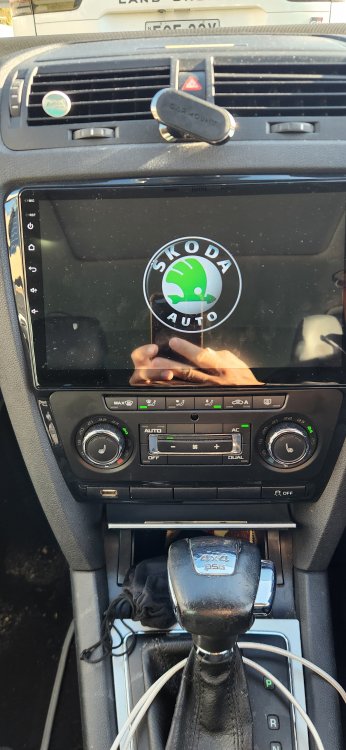
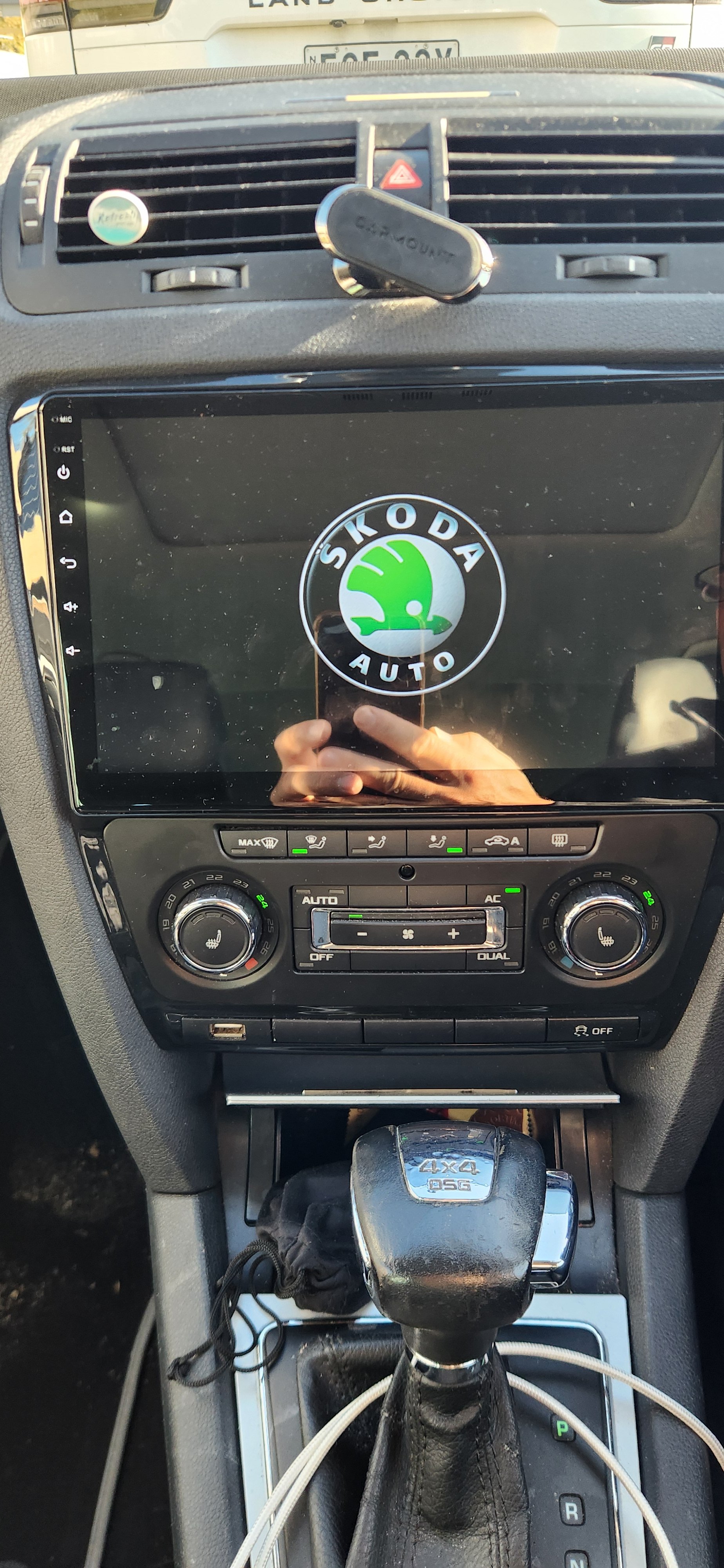
I installed a cheapo replacement from AliExpress it was about $300 Aussie. Came with the right connections to plug it straight in, all the climate stuff works fine on the screen and the reverse sensors too. I assume if I had a camera it would show that as well. It's has wireless apple car play and android auto, it's a brilliant upgrade and makes the old 2011 octy feel much more modern. Even has a Skoda logo on the screen when booting up! I also managed to find on AliExpress the right USB plug that fits in the row of blank buttons under the climate control so no loose USB cables dangling out the dash either.
 2 points
 -
My policy would be not to buy from them. If they want to sell the car to you they should sort out a longer test drive and facilitate your mechanic - perhaps they've had cars stolen, staff issues or something and want more security - or they have these policies because they want easy quick sales of stock they're not 100% confident about - or company, management, staff are just usual English motor trade shysters. There are two parties to a sales if either one isn't reasonably satisfied then it might be best for one, other or both to walk away from making a regrettable contract.2 points
-
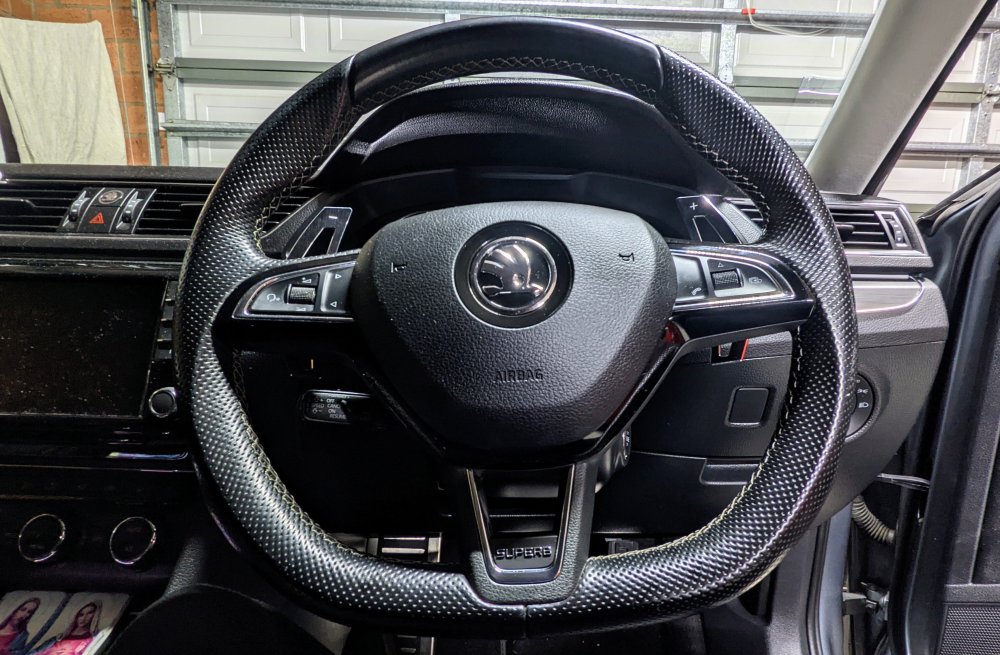
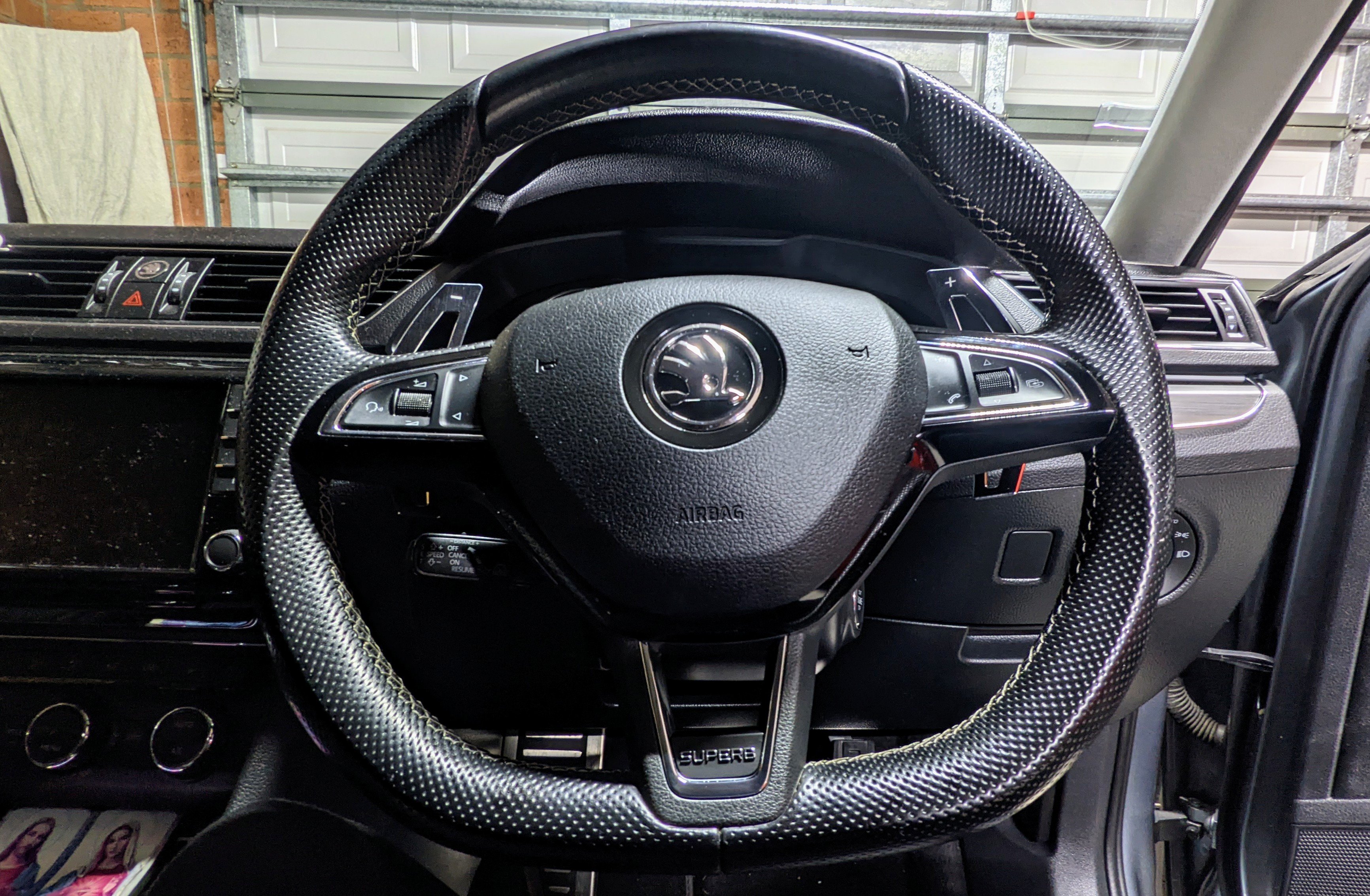
2 pointsReplaced the steering wheel with a Sportline version. Dressed it up with paddle shifter extensions (AliExpress) and a Superb nameplate (Kopacek). Old Wheel: 3VO 419 091 S CWE New Wheel: 565 419 091 E BGW
 2 points
 -
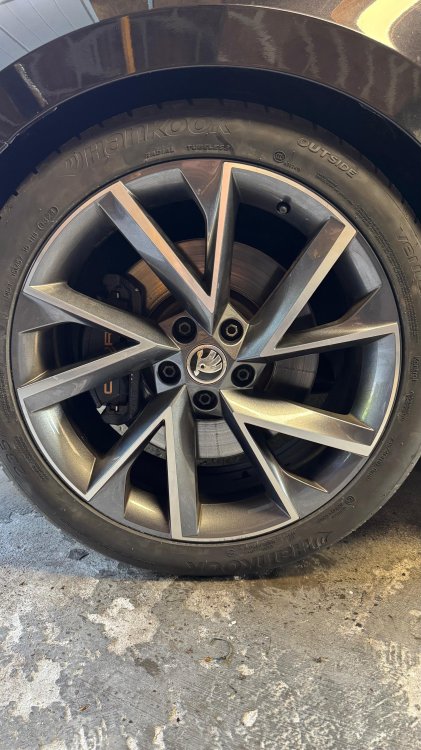
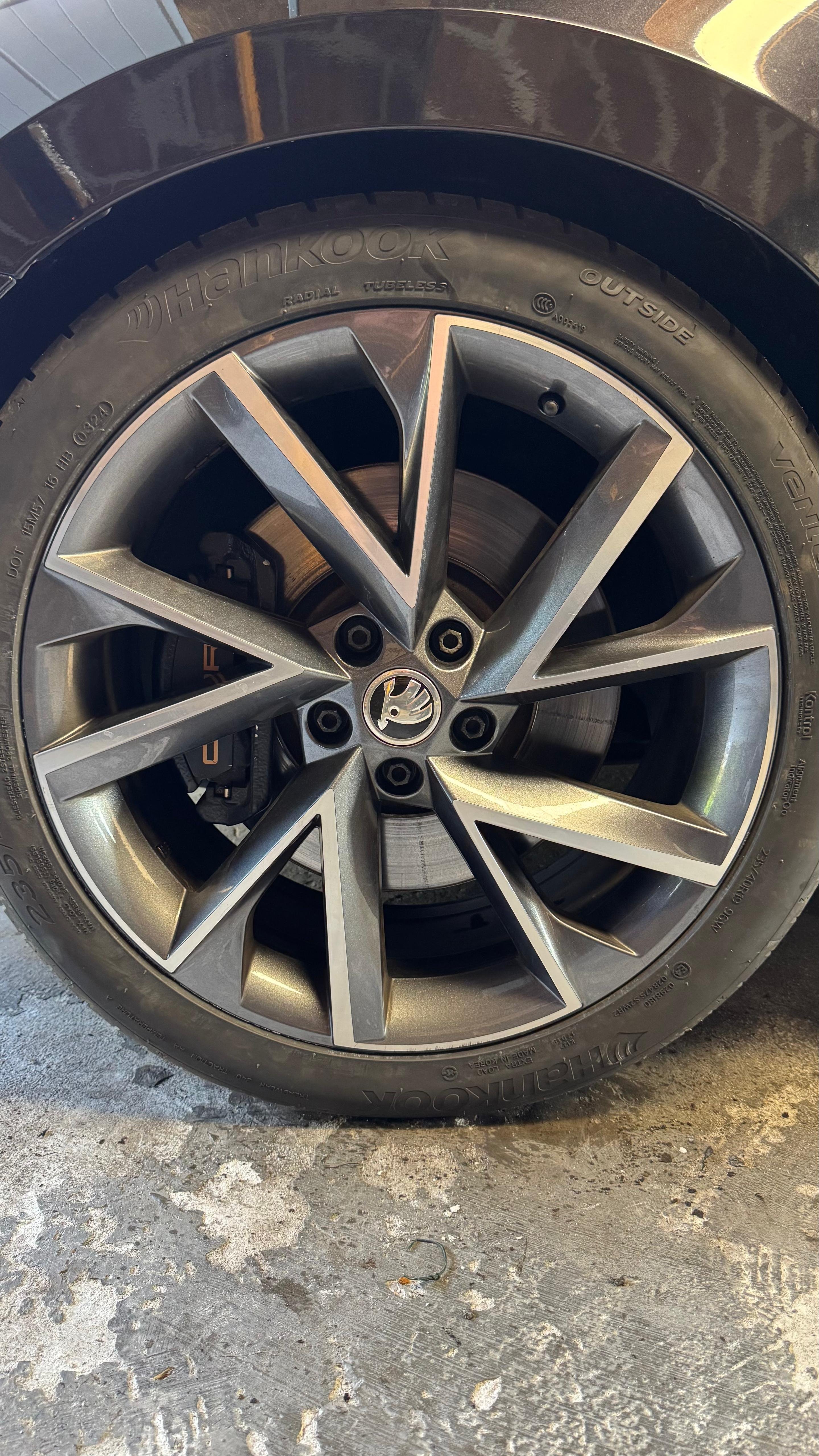
Why this upgrade? (I'll post some more pictures of the process today)I drive a Skoda Superb Combi 1.4 iV PHEV Sportline (MQB platform), and while it's a comfortable cruiser, I always felt the stock 288 mm brakes were underwhelming, especially during emergency braking. As a volunteer firefighter, I sometimes need to get to the station quickly. I found the stopping power to be insufficient for such a heavy car (1.8 tons), I also own a 2004 Audi RS6 C5, which has 8-piston Brembo front brakes — and the difference is night and day. While the RS6 is more powerful and performance-focused, it made me realize just how undersized the brakes on the Superb iV are, especially when you need to stop hard from higher speeds. That’s what motivated me to upgrade to a proper 340 mm OEM front brake setup, as found on GTI/Cupra models. so I upgraded to a 340 mm front brake setup. Similar to what’s used on Golf GTI / Cupra Leon / Golf GTE. MQB(Evo) platform I also installed: Hardrace rear sway bar DCC module tweak greatly improved braking and handling stability. Eibach Pro kit I sourced all parts from a scrapyard, except for the dust shields, which I ordered new from the dealer. That makes this a budget-friendly OEM-style upgrade — not a fancy aftermarket setup, but a factory-matching improvement that fits perfectly on the MQB(EVO)-based Superb. Good donor cars to look for: Golf 7 GTI Cupra Leon (5F or KLCF) Golf GTE / Octavia RS / Cupra Formentor Most of these use the exact FN3 caliper with 340 mm front discs. Partslist: Part OEM Number Qty Notes Brake caliper + carrier 5Q0615105EG (L) / 5Q0615106EG (R) 1 set FN3 calipers from GTI/Cupra/Formentor Brake discs 340x30mm 5Q0615301G 2 Vented, for FN3 caliper Brake pads – 1 set Match FN3 caliper (ATE, Ferodo, etc.) Carrier bolts N90678001 4 Stretch bolts, always use new ones Dust shields 5Q0615311F (L) / 5Q0615312F (R) 2 Required for 340 mm clearance Brake fluid (DOT 4) 1–1.5L ATE Typ 200 recommended InstallationIt's easier to turn the wheels in the direction you're going to work on. Raise the car and remove the wheel Remove the old caliper and disc ( You can leave the old caliber hanging on the line until you have the new one in place.) Install the larger dust shield (or trim the old one to fit) Fit the new 340x 30 mm disc Clean the hub and apply copper grease to prevent rust Bolt the caliper carrier in place Torque spec: 200 Nm + 90° angle Mount the brake pads and caliper on the carrier (DIS)Connect the brake hose Keep it upright or temporarily plug it to avoid leaks Bleed the brakes With a helper or transparent hose in fluid Sequence: RR → LR → RF → LF Check for: Leaks, Firm pedal, Fluid level in reservoir Test drive at low speed Verify pedal feel, brake balance, and straight braking
 1 point
 -
1 pointThanks for your help and suggestions. It looks like the car is driving as Skoda intended, and I can live with that.1 point
-
1 pointThis afternoon (5 June) my iPhone updated the MyKpoda app to version 8.3.0 and the Driving Score function has been removed without explanation. I checked my Android tablet and, yep! It's gone from there as well. On the Skoda website (skoda-auto-com) the page that used to esplain about the Driving Score function (https://www.skoda-auto.com/connectivity/driving-score) no longer exists, giving a 404-error. This can mean one of two things. 1) That, after criticism, the car's monitoring function has been removed; 2) Simply that I can no longer see what score Skoda is still recording about me. I am afraid that the "spy in the passenger seat" has just gone hidden. This might be the worst of the possible outcomes: me in the dark and Skoda selling my data to insurance companies? Has anybody had any solid information about the Driving Score's withdrawal?1 point
-
I am fairly certain that the majority of people who visit Briskoda do so because they have a problem with their car and/or they wish to ask a question about it. So-- visit a forum to see if anyone else has asked the same question, and perhaps has had it answered. They choose a forum from the twenty or so on offer, in my case the MK1 Octavia, and start looking. Shock! Horror! There are almost 1200 pages, each with 30 posts, about 36,000 in total! My god, how long have I got left on this planet? Ok, I'll use the search facility, I was'nt born yesterday (chortle chortle). I put in my search words---press the go button---and the search engine searches the entire website including the toilets and tells me proudly it has found 200,000 hits on each word of my search terms. Try as I might, I cannot get the damn machine to restrict its search to just the one model of car. Is this even possible? Part of the problem may be my fault, of course, not being a computer nerd, just a lowly mechanic with a good grasp of English. Unfortunately, computerspeak left English behind a long time ago and is now a different language. It would be nice if the people who create websites could incorporate a translation/explanation when they throw around words like topics, titles and tabs to enlighten us, the hard of understanding. Anyway, rant over, if any body wants me I'll be in the bomb shelter.1 point
-
1 point
-
Manual says yes, but I have never bothered. Everything seems to work fine and no problems in MOT.1 point
-
1 pointCorrect standard Octopus Go works fine. It’s the smart tariff that’s the problem. IOG is six hours off peak 23:30 to 05:30 but will schedule a charge outside of these times if you have asked for a large charge and/or there’s an excess of energy in the grid (all charged at the cheap rate). Some have found that IOG works for them but others not (not limited to vehicle manufacturers or charger brands). Some have more success with the Ohme chargers but even then there are some with issues. If it doesn’t for you then as long as you charge (or try to) once a month on IOG you can stay on that tariff you just turn off smart charging in the Octopus app and use the car scheduling or charger schedule to take advantage of the longer off peak hours and cheaper rates. IOG is currently a beta version and I’m sure it’ll work as intended at some point… I think it’s important for many users to try and get IOG (plus other smart tariff providers) to work because that will allow the energy providers to balance the load on the grid and could potentially mean lower ev charging rates. If you want the certainty of a charged car in the morning then maybe IOG at this time may not be for you?1 point
-
1 pointDiermot The data on my Skoda Fabia’s EC Certificate of Conformity indicate that its build-date was 16 January 2024, that it has a 3-cylinder in-line motor with a 999cc capacity with a power output of 81kW (110PS) at 5500rpm, and that its transmission is “automatic”. It’s an SE L model with an ANALOGUE instrument-cluster and an Amundsen touchscreen infotainment display. My car’s Owner’s Manual has a June 2023 publication date and covers all Fabia Mk 4 models irrespective of their specification. The Manual’s “Driving modes” section does not apply to my car that has no 'Mode' button. My car’s DSG automatic transmission has 7 forwards ratios and 4 ‘states’. Using the gear-selection lever I can choose the ‘drive’ state that will cycle automatically between D1-D7 (as shown on the instrument-cluster ). Or the ‘sport’ state that will cycle automatically between S1-S7 (as shown on the instrument-cluster) and result in gear changes occurring at higher speeds than in the ‘drive’ state. Or the ‘manual’ state that will show as M1-M7 on the instrument-cluster depending on which ratio I have chosen. The 4th ‘state’ is under the transmission’s control. For this 'state' to occur, my car must be in D7 with neither the accelerator-pedal nor the brake-pedal being depressed and must be travelling in the 12mph-80mph speed-range. The transmission will disengage from the motor, the motor’s rpm will drop to around 1000 and the car will ‘coast’ with D showing on the instrument cluster instead of D7. Accelerating or braking the car while it is ‘coasting’ will cause the motor and transmission to re-engage and a D1-D7 ratio to be selected by the car according to circumstances (or the car’s whim!) Now, it needs emphasising that my car does NOT have the ‘Virtual Cockpit’ instrument display. So, if your Fabia has the Virtual Cockpit, it may well be that “ECO” (instead of a digital mph reading) will appear on the display when your car starts to coast. What I’ve described above is how my 2024 Fabia SE L’s DSG functions.1 point
-
1 point
-
1 pointChills - true, there's an optimum level of driver assistance, too much and you stop taking an interest in the road, but too little and unless on a rural A road, surrounded with scenery, with nice sweeping bends and not too much traffic - driving at it's most enjoyable, possible even with a manual car - things soon becomes frustrating and tiring and you (well I) begin to lose concentration. When in a stream of traffic, I find I'm still watching 6-20 or more cars ahead of me and sometimes notch the speed setting down gradually 1mph at a time if I think I might soon have to slow. Without ACC I don't think I was quite so attentive. Additionally constantly having to manually change gear on a longish journey, with it's accompanying cramp in my left leg, is a tedium I was so glad to escape from, years ago when I went automatic. So for me, I reckon that ACC takes me nearer that optimum level of assistance for staying alert. With the sort of distance my ACC maintains to the car in front with ACC set at default (this distance increases as the road speed increases), I wouldn't have had any trouble slowing sufficiently if for some reason the ACC failed in that fast decelerating situation I described, but it has never let me down in such a situation. Maybe though that's a good reason for not resetting ACC to reduce the distance to car in front and make it faster acting. The only trouble with the default setting is that it encourages cars to move into my lane in front of me - but I try not to get annoyed and ACC helps here (in staying calm) - I don't own the fast or any other lane and other drivers have as much right to use it as me. Exkiwi - interesting to read a positive (but seemingly minority) view on lane assist. To satisfy my curiosity, I would have had it on my car, if I'd had the choice, just to make up my own mind.1 point
-
There wasn't an "A" and a "C" in the selling dealership's trade name - was there?1 point
-
1 pointBetter luck at 123,456, bonus points if you remember to reset the trip meter at 122,667!1 point
-
1 pointThanks nta16. I have read and re-read the manual without getting the answer. I don't actually find it an easy read!!1 point
-
While returning from the trip: 94778 Km and i had 53,4 litres 94940 Km and i had 63,4 litres ,that’s 6.13 ltr/Km or 46.08 British MPG (very good) Then the City Traffic started and unfortunately the fuel consumption start rising. 94948 Km and i had 64,4 litres 94957 Km and i had 65,5 litres 94961 Km and i had 66,4 litres 94972 Km and i had 67,2 litres, that's 11,87 ltr/Km or 23.80 British MPG (not so good). and counting...
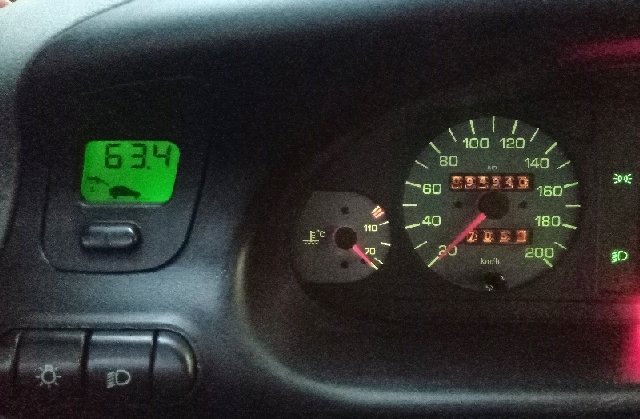
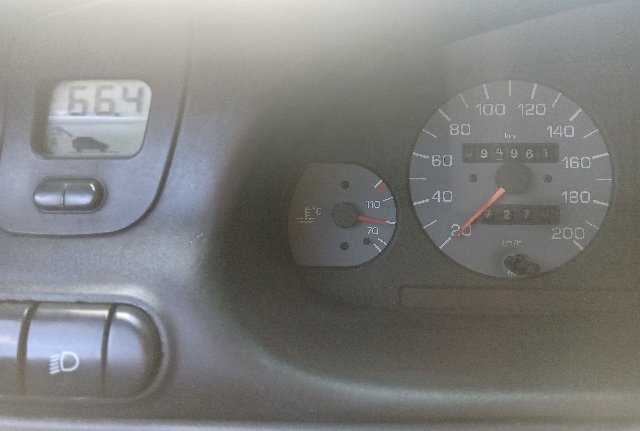 1 point
 -
What fuse number is this 5 Amp 'phone' fuse? Glad they sorted a fully working alt for you. 🙂1 point
-
1 point
-
1 pointH and welcome along, I was foing to say have a look in the Superb section for your car's model, but i see you already reposted the question there. Hopefully you'll get a good response 👍1 point
-
Probably DAB antenna broken due to water ingress. Pls share VIN so I can check antenna system you have.1 point
-
Welcome. Try a search engine like Google. Use key words. briskoda Octavia MK1 vrs alarm siren. Or whatever.1 point
-
"B2000 49 [00001001] - Internal Electronic Failure [Control unit defective Analog circuitry]" based on this fault code, i would assume ur telematics control unit is no good at all and will need to b replaced entirely.1 point
-
1 pointEnyaq 85x works with iog and zappi charger, it sets up the zappi rather than the car1 point
-
I'm a week into my Superb, and having given the onboard nav a try, I'll be sticking with tried-and-tested Waze. My suggestion would be to do likewise! The onboard nav seems OK for street addresses, but for POIs and named places it's dire (certainly around my locality, anyway). And its routing algorithm is just bizarre. On the short journey I tested it on, it twice attempted to take me off the main carriageway, through a bus stop, and back on!1 point
-
Just some BS about "that's out policy". The mechanic who came out (got him via ClickMechanic) said he'd been to do an inspection at that very branch some months before and was allowed. But he also said they seemed to have upped their security - he was required to provide various ID etc that he wasn't asked to do previously. It was the same BS about only being able to do a 5 minute test drive - "it's out of our hands, it's all we are allowed to do". It may well be their policies, but it is definitely irritating for a customer.1 point
-
1 point
-
NEDC was a car on a rolling road inside a building going through a programme, so not Real World. Even the WLTP is not real world, possible real ambient temp etc etc. & then VW / Audi can somehow manage to get a heavier car with the same drivetrain as a Skoda / Seat get better test results / figures.1 point
-
1 pointWe see very few EFB + battery here I have no idea if VW even have a coding for such, OBDeleven might but that is not the same thing. I find it best to charge to the battery to full 100% charge (if the battery will take it) not the VW 70, 75, 80%, using an appropriate battery charger maintainer following the instructions of the charger and those in the 'Owner's Manual' for the car, using a charger of lower amps, currently I use a 4-amp charger on my wife's 2015 Fabia. It can take many hours to top that up. You charging every 6 months to however you do it might be enough and ideal only taking readings would really tell but it is much more than most do and you get your batteries to 5 years still with more useable service life in them and as you are passing them on they are not wasted. At the moment in my shed I have a neighbour's car battery and I am using my 30+ year old semi-"smart" 1.9 amp charger maintainer, I expect it to take a minimum of 24+ hours to fully recharge to 100%, if it can, judged on first connecting it up to my 40+ year old (not "smart") battery charger with a useful swing needle display on it to see how much the needle moves in 5-10 minutes based on decades of experience doing the same for other neighbours. Photo from internet. Batteries like about 20C weather temperatures, IIRC(?) at 30C they self-discharge at double the rate and double again at 40C. AGM batteries are supposed to have more insulation around them if fitted in the engine bay (the one I fitted to my wife's car doesn't even have the full insulation for the factory battery as the car came with the lid part missing, I have just risked it as it is, I have a low hassle tolerance with German marque cars as generally I don't like them. As a general rule the bigger the physical size battery the power it holds and often cars have smaller batteries than the space available can allow for, but not always. Do not get too attached to mere numbers as it is also about performance of those number and longevity of that performance also there are many standards for the CCA (cold cranking amps) specification, see below for pdf on 4 of them. Bear in mind I am NOT an expert in car batteries, or anything else. I have the VW Self-Study pdf on VW stop/start and batteries if you want them or they are available on the internet along with lots of information about batteries, though some battery manufacturers seem to be shy with information thy put on their websites and some information that was previous there is no longer there. HTH. CCAspecs.pdf CarBatteryInformation.pdf1 point
-
1 pointNot much of a sunset earlier, but a colourful Sun nonetheless..................

 1 point
 -
Ed-Hunter, I also had problems setting the primary user in my 2024 SEL Super because of the privacy settings which I didn't set. Had to go back t the dealer to get it sorted. Cheers, David1 point
-
1 pointFile is too big to upload here so I uploaded to my personal server. Will delete after 48hrs so download it please :) https://zip.lit-sl.com/u/tlgAE6.pdf1 point
-
1 point😒 i asked about timing belt for 1.5tsi , if you have answer please tell me otherwise i am not interested to read your dad story 😄1 point
-
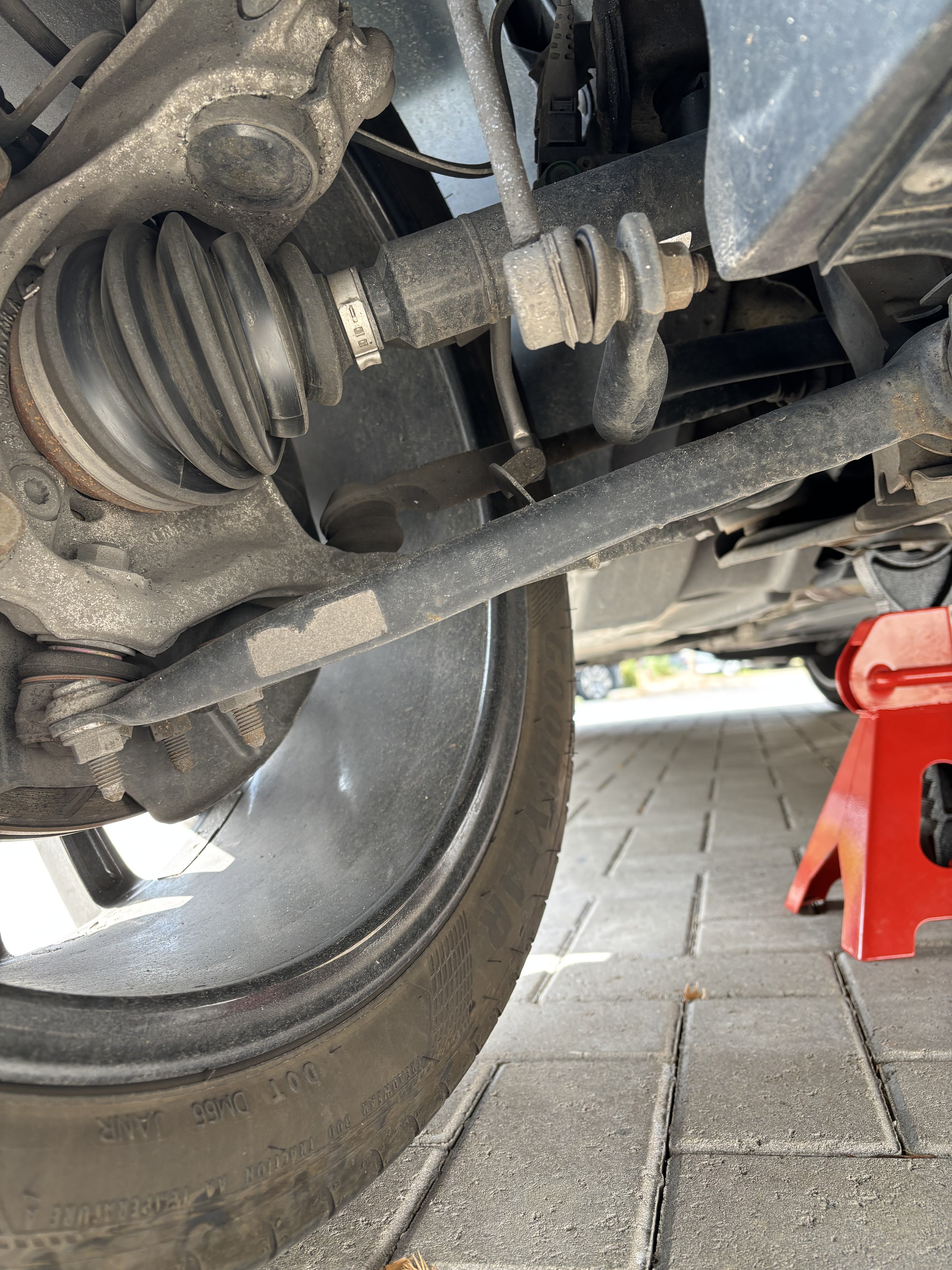
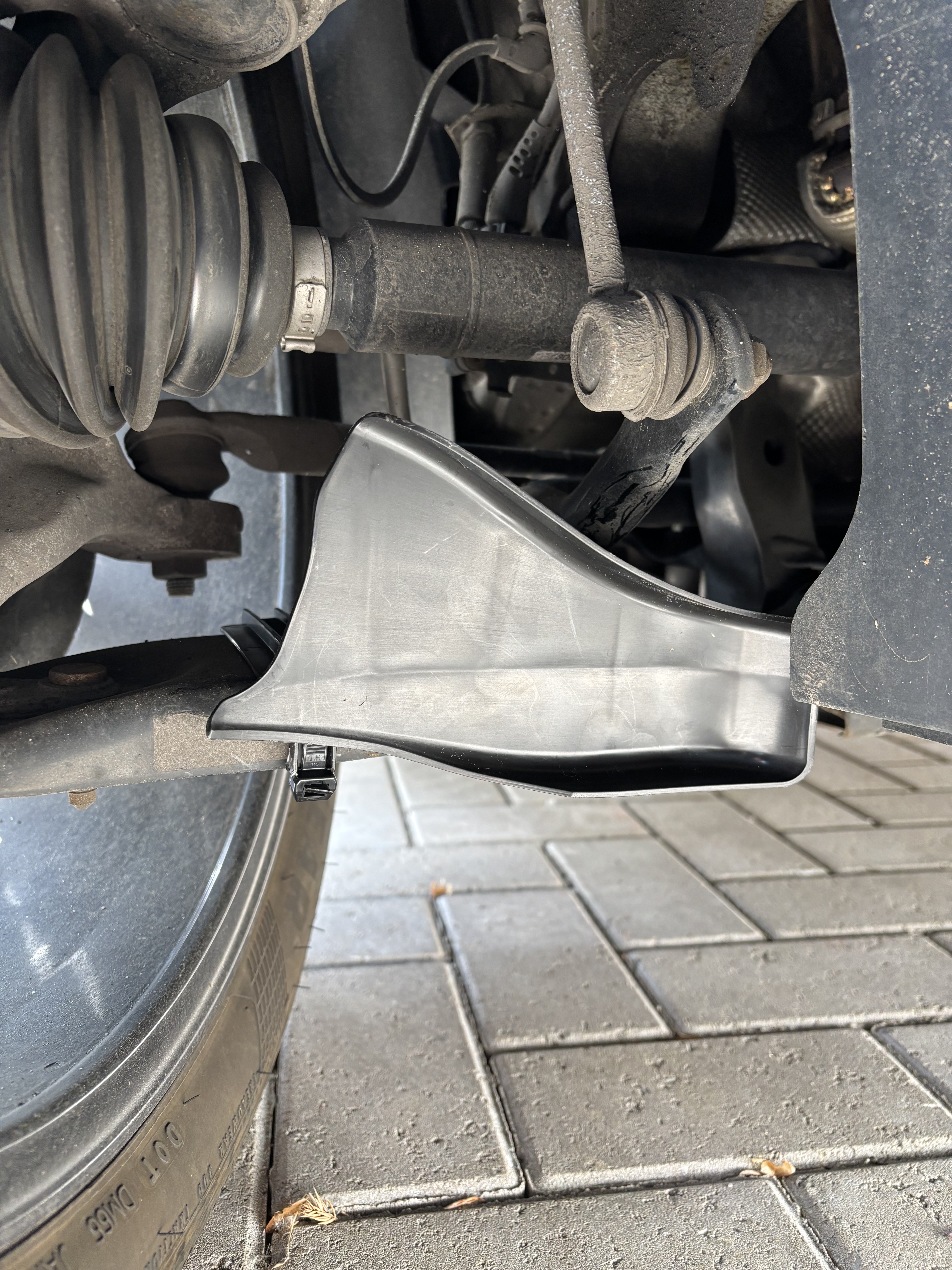
1 pointMost recent addition to mine is the RS3 brake ducts. Developed by Audi Sport they sit on the lower arms and feed air on the back of the disc to help cooling. Whilst I don’t always do any heavy or repeated braking I do have stints braking down from dual carriageway speeds to a roundabout with the car loaded up and the aim is these will help to keep the disc from not hitting too high a temp.
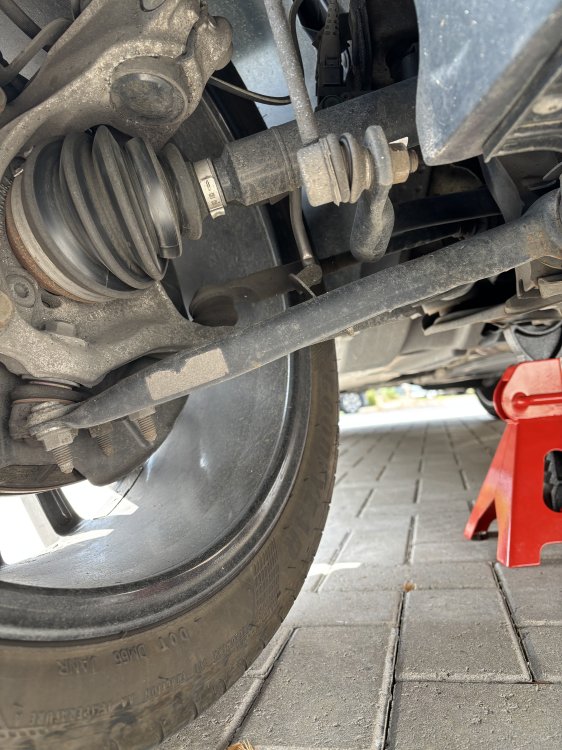
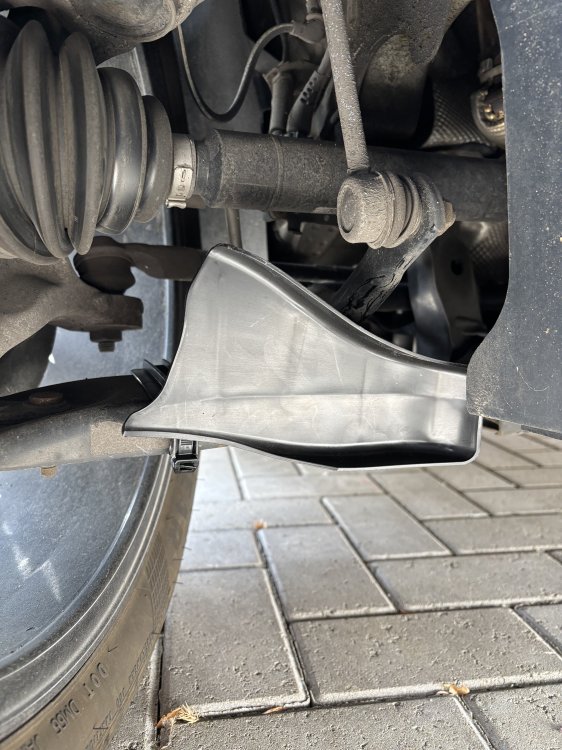 1 point
 -
1 pointDelighted that it ends with an old 'Briskoda friend'1 point
-
1 pointIf you have a multimeter check your battery a lot of starting issues are related to that1 point
-
This turns out to have been premature. Had three rather odd fault codes pop up this morning on my commute to work. About 10 miles in, EML comes on, no perceptible difference to how it was driving, nor any odd readings on gauges. Found a layby off the A420 and scanned with a handheld I keep in the glovebox: 17nnn (I forget) which was throttle actuator fault, 18088 something to do with unrecoverable limp mode, and 16500 coolant temperature sender implausible reading. Couldn't see anything wrong under the bonnet, and it still started and ran fine, so off I went again. The handheld thing wasn't able to clear the faults, and although I had a VCDS cable with me, no laptop. Got to work no bother. Scanned it again on arrival, and cleared codes with a different handheld that was on my bench. Still starting and running fine codes didn't instantly return. Went to give a workmate a lift to pick up his car from MOT and it wouldn't start 😆. Same kind of juddering and trying to but not catching as per 23rd/24th April above ^. This time I was a lot quicker to blame the fuel pump. No sounds when opening door or switching on ignition. Checked electric feed to it: present. Luckily GSF down the road had a Bosch pump that fitted. And car now runs again. Fixed? Bloody hope so! 🙂1 point
-
Forgot the vacuum cleaner, but took along a pal to help with unscrewing the lock ring that holds the pump in (two hammers opposite sides of the ring 'turrets'). Wouldn't have got it off on my own, I think. Also wouldn't have got the fuel hoses off, cos I hadn't brought my glasses and couldn't see how the latch worked. He did. Anyway, having ordered the business part of the pump from GSF, but not yet collected, we went to the car to eyeball the pump, to see how easy it would be to fit just the above 'fuel pump swirl pot' section as opposed to an entire pump assembly (half the price for just the pump). Just before we left, it occurred to me that another thing to check whilst in there would be the connections to the pump motor itself (not the external 4-way loom connector, but internal spade connections. Pic of similar connections stolen from an ebay ad for an aftermarket pump: One was nice and tight, just a plain male/female 1/4" spade, the other was one of the flag type connectors with a latch so it can't come off. It hadn't come off, but it was as loose as a goose, and there was no sign of the usual 'fresh metal scrape' you get when you disconnect a good one; all dull metal. Squeezed each side of the receptacle with some little pliers, reassembled everything. Fixed. 😁
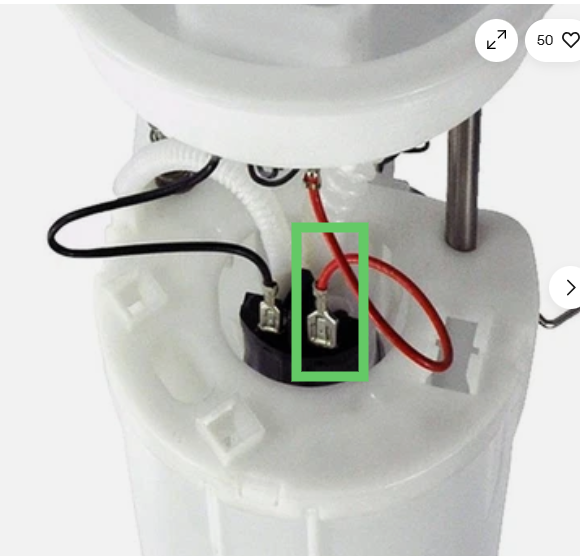 1 point
 -
1 point













.thumb.jpg.dfce960f608493a7a6833935d5939e66.jpg)