langers2k
Resident Member
-
Joined
-
Last visited
Everything posted by langers2k
-
This might be valid given the MK3 Octavia and MK7 Golf are the same platform : i
-
Given the window is open slightly, I'd try and charge it via the 12v accessory socket on the centre console. Pretty sure they are wired directly to the battery via a couple of fuses.
-
@pcbbc - Not sure if you've seen this thread: https://www.navitotal.com/general-discussions-about-tomtom/rds-tmc-decrypted-t18251.html Seems they were able to make a selection of mctx.dat files (used by TomTom) so the user could choose a TMC provider - both TrafficMaster and INRIX are included. No idea if you can extract the location table to use on the RNSE or not I've done some more poking around the MIB2, I expect the location table is in one of the NDS files which is a closed source ZIPVFS sqlite database. A little work has been done on changing these files (Seat Mapcare) but it doesn't seem fully understood: https://www.seatcupra.net/forums/threads/updating-the-inbuilt-mib2-satnav-mib2-tricks-and-lost-mib1-card-solution.388586/post-4702740
-
Guess it depends how many folk use the inbuilt satnav along with TMC. I always use Android Auto with Waze. Without threads like this, I would have never noticed that TMC was down so I'm only really following for mild curiosity...
-
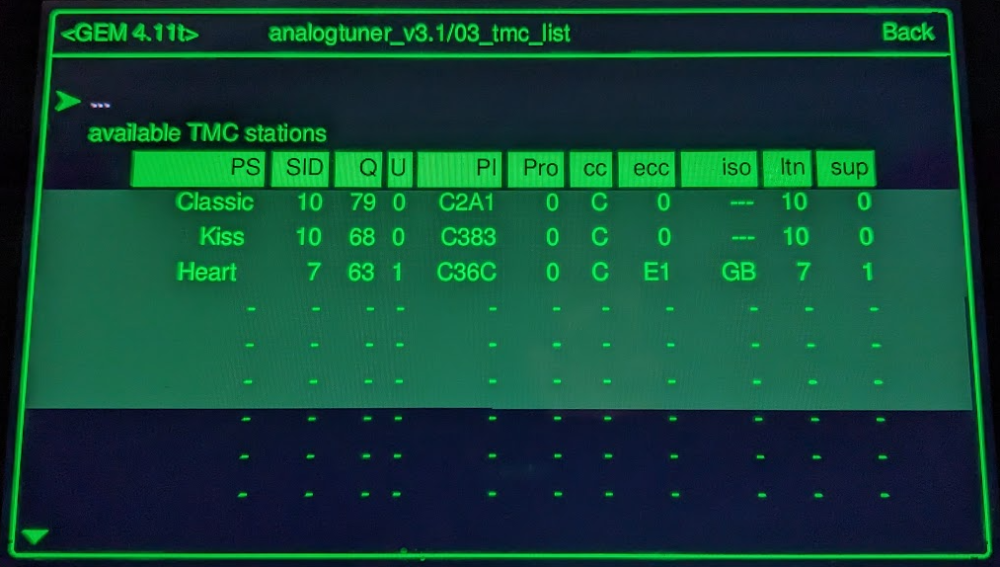
@pcbbc - this might not be too helpful for your RNSE but the MIB2 maps hint at GB INRIX support so it might include the location table for you? Snippets from the latest Amundsen/Discover Media MIB2 map update. maps\00\cfg\mapcfg\SKODA\traffic\tmc\TmcProviders\TmcProviders.xml <tmc_provider name="Trafficmaster" id="2"> <encryption_method>light</encryption_method> <cc>GB</cc> <sid>7</sid> <ltn_transmitted>7</ltn_transmitted> <ltn_used>7</ltn_used> </tmc_provider> <tmc_provider name="Inrix" id="12"> <encryption_method>light</encryption_method> <cc>GB</cc> <sid>55</sid> <ltn_transmitted>10</ltn_transmitted> <ltn_used>10</ltn_used> </tmc_provider> maps\00\cfg\mapcfg\SKODA\traffic\tmc\TmcProviderSets\TmcProviderSets.xml <!-- VW TMCpro --> <!-- 32768 + 3 --> <tmc_provider_set id="32771" use_free_tmc="true" use_online_traffic="true"> <provider_ref id="1" mode="non-exclusive" /> <provider_ref id="2" mode="non-exclusive" /> <provider_ref id="5" mode="non-exclusive" /> <provider_ref id="12" mode="non-exclusive" /> </tmc_provider_set> The factory setting for IDE05111-Fee-based traffic information (TMC) is 32771 for me which suggests it should be using Trafficmaster with the option to fallback to INRIX. The headunit certainly knows that Classic is a TMC source and seems to want location table 10 (0x0A): Makes me wonder what's missing....
-
It seems that Trafficmaster have turned off TMC via FM on purpose:
-
There are two TMC providers in the UK: - INRIX who broadcast via Classic FM - Trafficmaster who broadcast on various local/regional stations VAG use Trafficmaster for TMC over FM in the UK which has now been turned off. They haven't got the licence to use INRIX afaik... VAG need to decide where they want to get TMC data from and then roll out an update to switch to it. This may involve paying INRIX for their service or switching to TMC/TPEG over DAB but it's down to VAG Once they've decided, it might be possible via a map update to switch over but I'm not sure...
-
Pretty sure those are non-replaceable LED's. If you really want to change them, you'll need to: - cut the headlight apart - remove the PCB with the LED's attached - unsolder the original LED's - find suitable replacements and resolder them - reassemble and seal the headlight Probably not worth the effort
-
Probably this:
-
You can with VCDS or similar Individual mode should also take the last colour chosen in manual mode too.
-
That seems like it's lost it's FeC/SWaP codes for some reason. If the nav code is missing, that would also explain why the maps aren't working even with the latest download... I expect you'll need to take it to a dealer or good independent garage with ODIS online access to reactivate the codes - sorry 😞
-
I think it's part number 5E2061550 and google brings back loads of sellers
-
Assuming it was the 30a F16 that's overheating, then yes that's likely the cause. Few examples:
-
It'll be that fuse causing your issues and no it shouldn't be overheating. You need to clean up or replace the fuse contacts in the fuse box and put a new fuse in. It's not an uncommon issue in afraid 😔
-
-
-
It depends on the year. Older versions are still downloadable PDF's, it's only newer releases which are online only. As for the OP, I used your link and choose Superb, 2017/11 and English which took me to https://manual.skoda-auto.com/004/en-com/Detail?model=Superb_3V&edition=11-2017&market=&manualLang=en The final PDF was https://ownersmanuals.blob.core.windows.net/ownersmanuals/en/Superb_3V/11-2017/OwnersManual.pdf
-
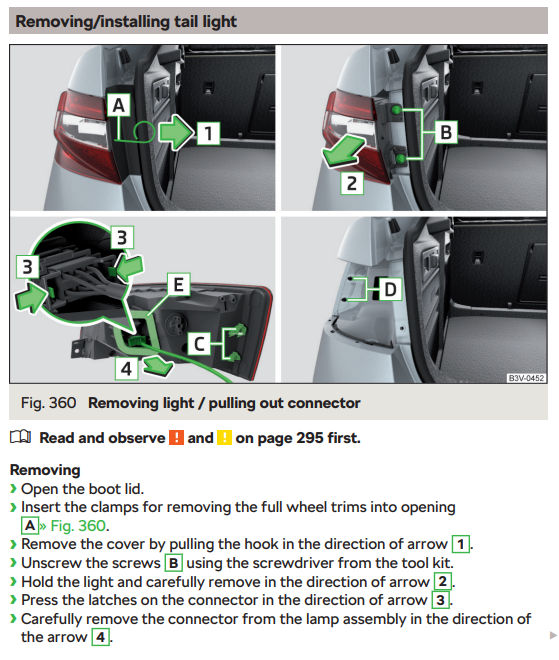
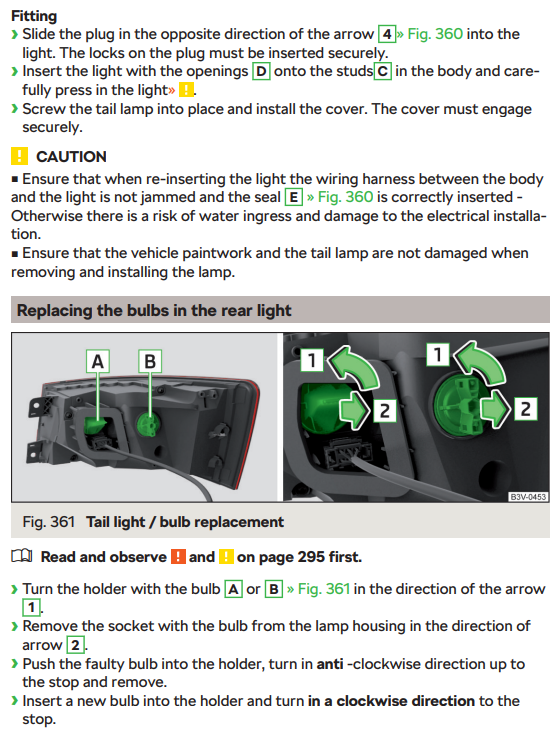
It's all covered in the 11.2017 owners manual, page 297/298.

-
At a guess, it's the voice enhancer...? From the owners manual:
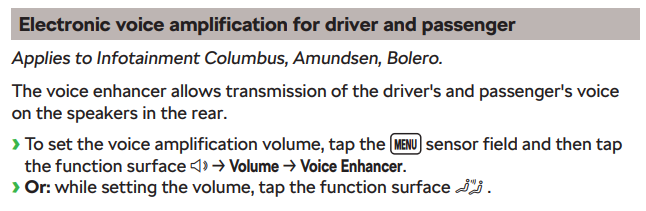
-
It's any car that uses TrafficMaster TMC via FM... At a guess, that's VAG group cars with RNS, MIB 1/2/2.5 head units based on the reports so far. The MIB3 version might be pulling from online sources but I've not heard reports either way. In those above threads there are certainly mention of non VAG brands also being effected 👍
-
There are a couple of threads about this already In short, Trafficmaster have stopped transmitting TMC over FM in the UK. It's unclear if the headunits can take TMC from an alternative source or how that can be achieved...
-
Hard to say! I did some light googling last night: - I found a linkedin profile of a software engineer who had listed working on various MIB versions and implementing TPEG on them - Reports of TPEG over mobile data working on MIB in other regions (via the Skoda/VW LTE Carstick or WiFi hotspot) - Inbuilt support for something called "freeDAB-TPEG", not sure which EU regions it covers - Using INRIX for TMC in other regions Nothing concrete but it does appear VAG have done at least some TPEG work on these units so it's a plausible thing. I've just not sure if it's a firmware, map data or configuration change to get it working I'd be interested to know what you tried to change.
-
At a guess, Trafficmaster have turned off TMC over FM as they want to force manufactures to start using TPEG (TMC over DAB) instead. That way they only need to maintain one set of infrastructure rather than two, especially as the push to move from FM to digital services continues - even if it keeps getting pushed back. I've no idea if the MIB headunits support TPEG or not 😕 Interesting thread here about TMC and related settings, it might be possible to create a suitable config file to add to the SD card to get it working again: https://www.golfmk7.com/forums/index.php?threads/enabling-tmc-in-the-uk-is-it-possible.386243/page-2
-
No, dashcam mounts come in many shapes and sizes. To remove it, I'd use a plastic pry tool to slowly peel it off from one corner, a little heat (warm sunny day) might help soften the adhevise. As to the mount you've pictured, it looks like the GPS section for a Viofo A129: https://viofouk.co.uk/product/a129-gps-base-mount/
-
Yup, only two changes I noticed between the two are the alloys and Amundsen package plus. The April 2023 brochure will only apply to cars ordered after that date, that seems very unlikely for a April 2023 registered car so the previous brochure is most likely to apply Without the original advert it's impossible to say what they're claiming. If it mentions wireless charging then you probably have a case, if it doesn't then you're likely out of luck I'm afraid.