Leaderboard
-
Lee01
FREEDOM30Points36,950Posts -
.jpg.1006585dfe4e2977315b67c3d642e37b.jpg)
Guest_
FREEDOM14Points83,824Posts -
Graham Butcher
FREEDOM9Points6,935Posts -

xman
Resident Member8Points7,537Posts
.thumb.jpg.9dd3f612ba7f13d10be5c518d3c8d255.jpg)



Popular Content
Showing content with the highest reputation on 29/01/24 in all areas
-
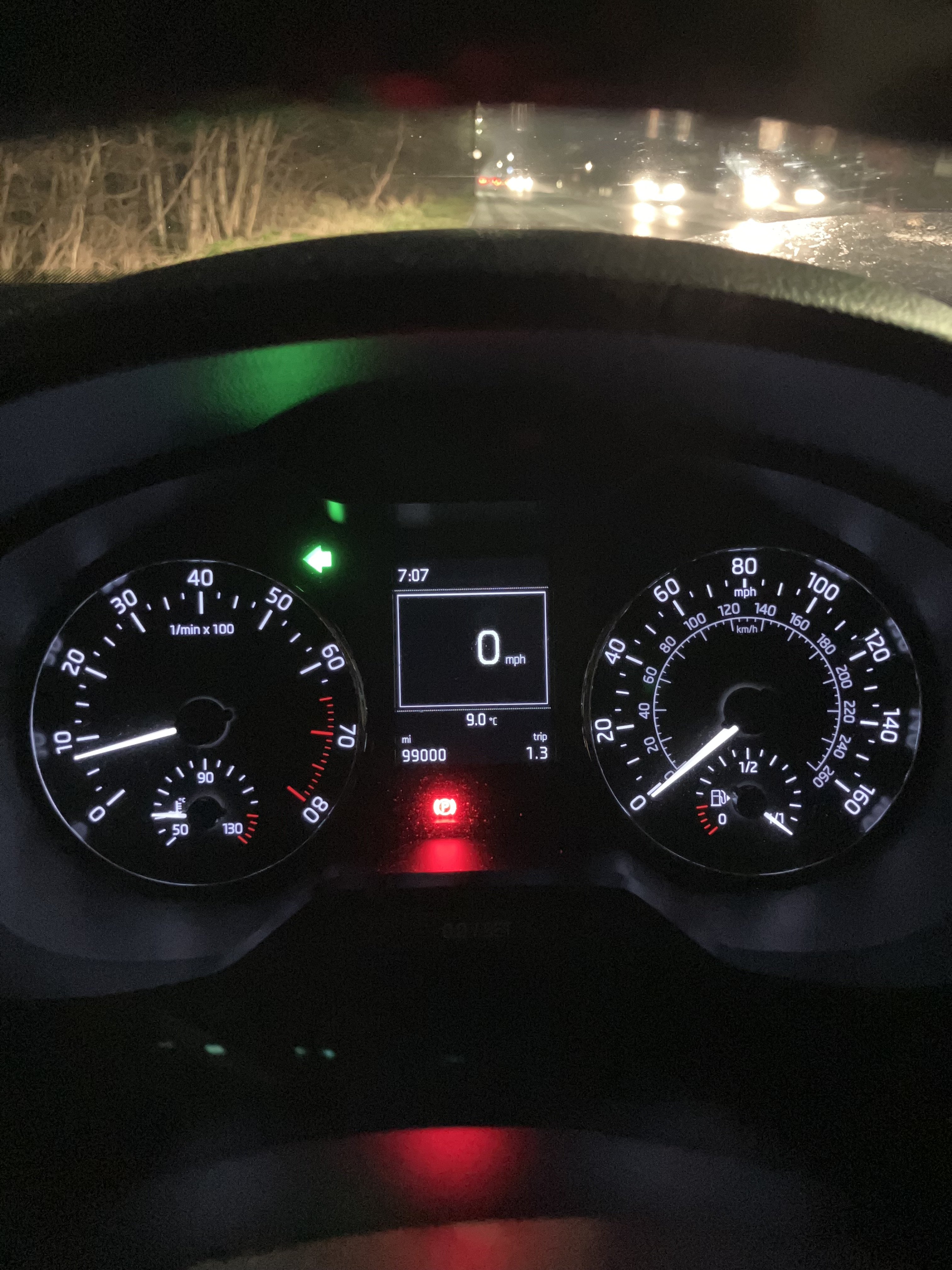
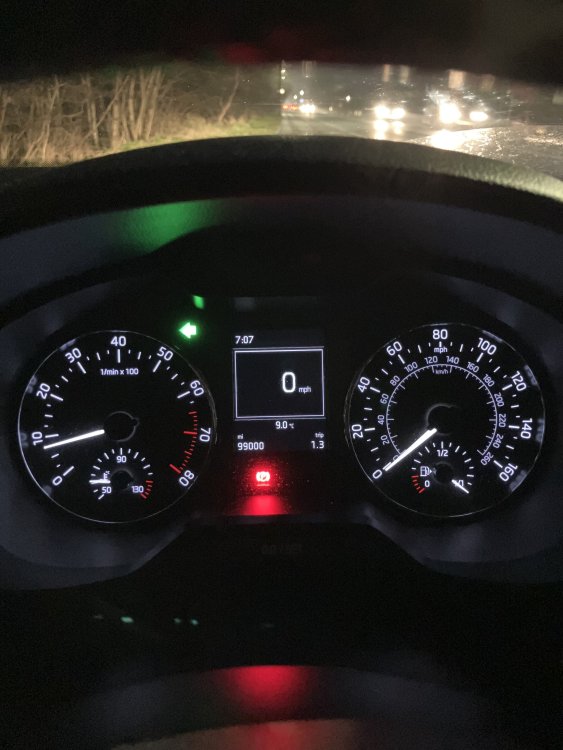
99,000 came up this morning, should hit 100k around Valentines Day.
 5 points
 -
4 pointsIf I were you I'd fight quite hard to avoid this hefty, undeserved bill.4 points
-
UPDATE: So finally threw in the towel on Saturday went to the dealership, rejected the car and they accepted as plain to see that this is a rouge case. Now carless and again on the hunt for a new car, hopefully it wont take too long for the refund of my deposit as I got PCP finance with Skoda hoping it wont be too painful process....fingers crossed.4 points
-
3 pointsLook into it, the advice might be occasional use. What is the difference once a month from once a day? I am plugged in with a max 10 amp draw for 12-15 hours sometimes charging the EV with 18-30 kWh.3 points
-
2 points
-
2 pointsLet me know the vin number by PM and I can get you the service history this evening2 points
-
2 pointsDefinitely a diesel - the 'TDI' marking on the engine cover gives it away. That and the four rubber pipes coming off the diesel filter2 points
-
2 pointsInvite the dealer who carried out the service to cover this. If they decline, reamain calm and remind them that the small claims court procedure is pretty quick and cheap. No way should you be shelling out for this; the sump plug hasn't been touched since the service. More amusement follows if they try to say they didn't touch the sump plug when carrying out the service.2 points
-
2 pointsThere are no service books. If it’s been serviced within the dealer network, they can tell you. Not sure what happens if it’s been serviced out with though.2 points
-
2 pointsSorry to point this out.... kWh for energy capacity Energy is power delivered over a period of time. It is the area under power-time plot (charging curve plots). So power is kW (PS, BHP are non-SI units) and energy is kWh. Although Joules is the SI unit for energy, but we keep it simple with kWh, in line with Amp-hour. ICE car is not so different. Fuel tank contains XX kWh of energy and engine outputs kW. Likely need replacement battery and motor (windings age and short?), probably also new power electronics. But with replacement battery and motor, it becomes the Ship of Theseus. Similarly, are classic cars converted to EV still classic cars? Where do you place the soul of a car? I think there is an element fear of unknown, how will we do all this when it hasn't been done before. But don't under estimate human ingenuity. Where there is sufficient will, it is always possible.2 points
-
2 pointsHave to be *super careful* when discussing anything to do with oil pressure. It could well be the oil pressure sensor has presented inplausable information to the ECM. Firstly, check your oil level. if its low, you know what to do! Secondly - because it could be either the sensor or a real indication of a further problem (such as the oil pump), I would *strongly* recommend getting the car trailered to a VAG specialist/Skoda dealer to be properly diagnosed. Don't EVER drive your car with oil pressure issues (even if its just a failed sensor).2 points
-
I recently just did my first long journey in the Octy SEL iV a few months after getting it. North Yorkshire to London and back in the day. Battery fully charged, hybrid mode and eco setting on - averaged 64 MPG on way down, but interestingly the whole battery was used by the time i reached central ish London. Way back i got 55MPG with no electric help. Got home with approx 130 miles range - circa 1/3 to 1/4 of tank left. i've only done approx 3K miles in 3 months, so engine is still quite tight. Looking forward to it loosening up!2 points
-
2 pointsBatteries can be replaced. & with a bigger battery as is happening now. As in Robert from Fully Chargered,s car. There were EV,s left parked during Covid lockdown (Nissan Leaf) and full of mould, a health hazard, locked and without power and these were uplifted without being opened and removed supposedly for disposal. Council leased vehicles and an absolute disgrace and waste of public money. I should have taken the registration numbers but i might have these in photos so will see if i can check if scrapped.2 points
-
2 pointsYes of course, silly me. I am happier with Joules per second and kJ, MJ, GJ etc, much better.2 points
-
2 points
-
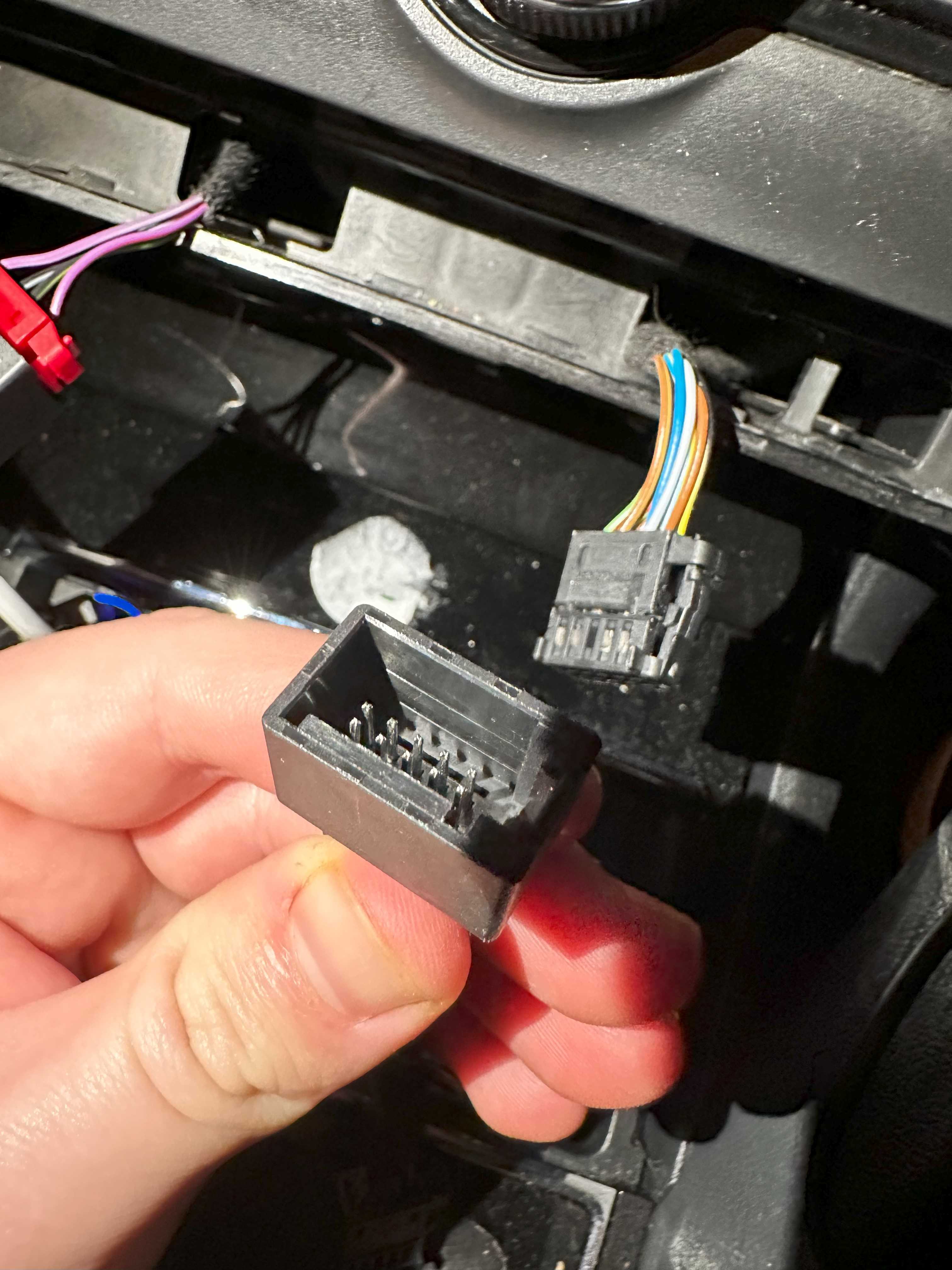
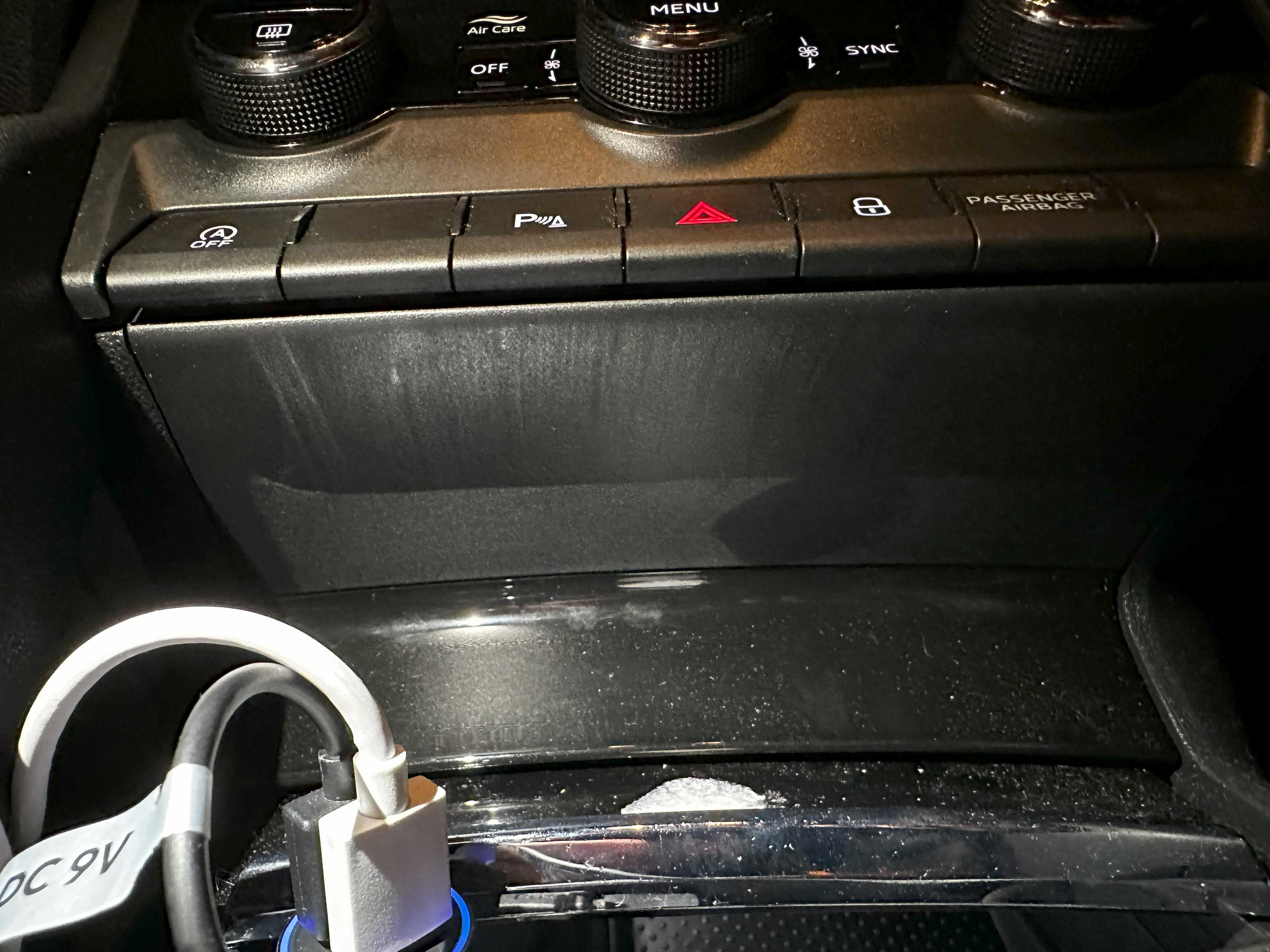
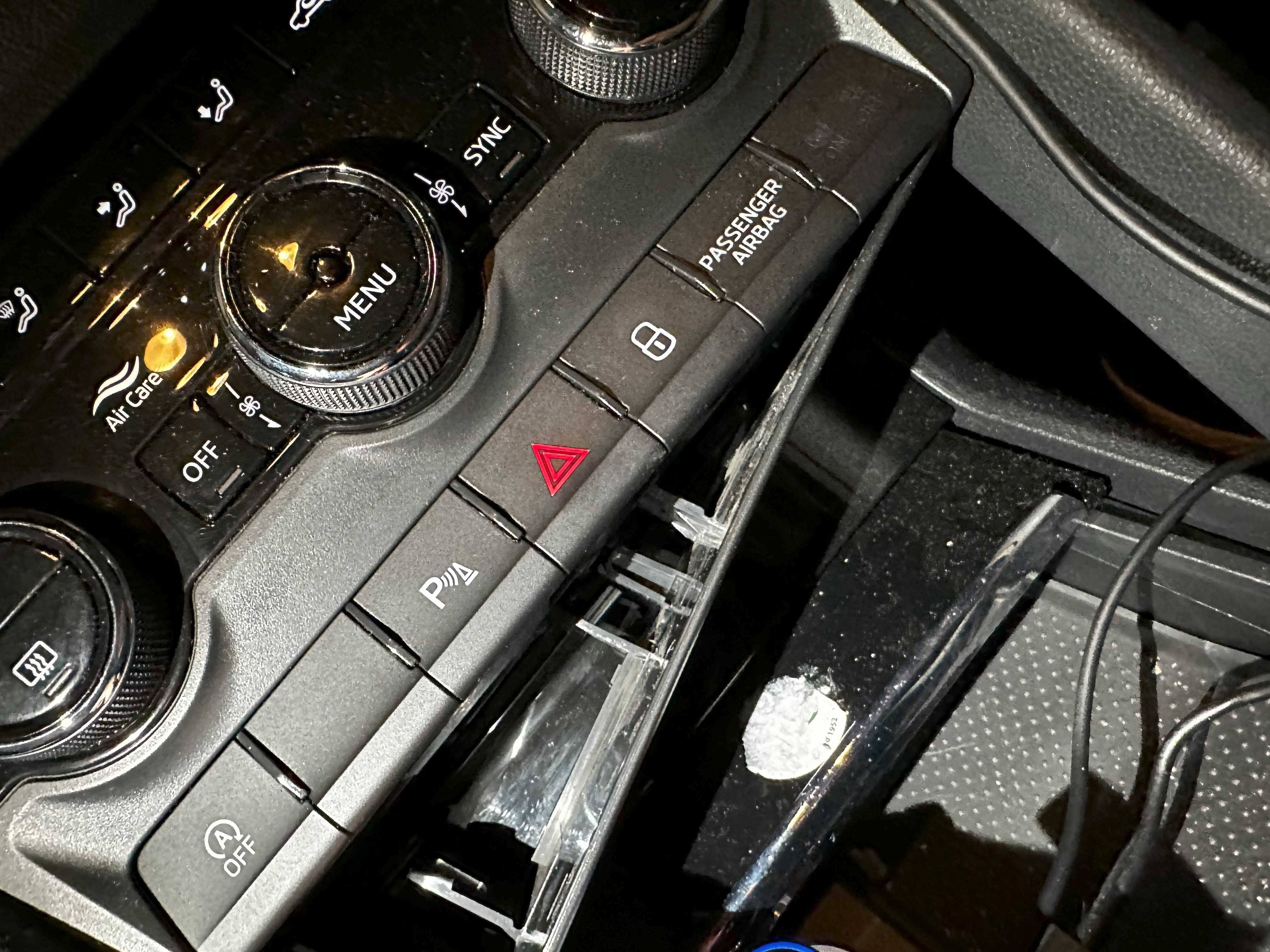
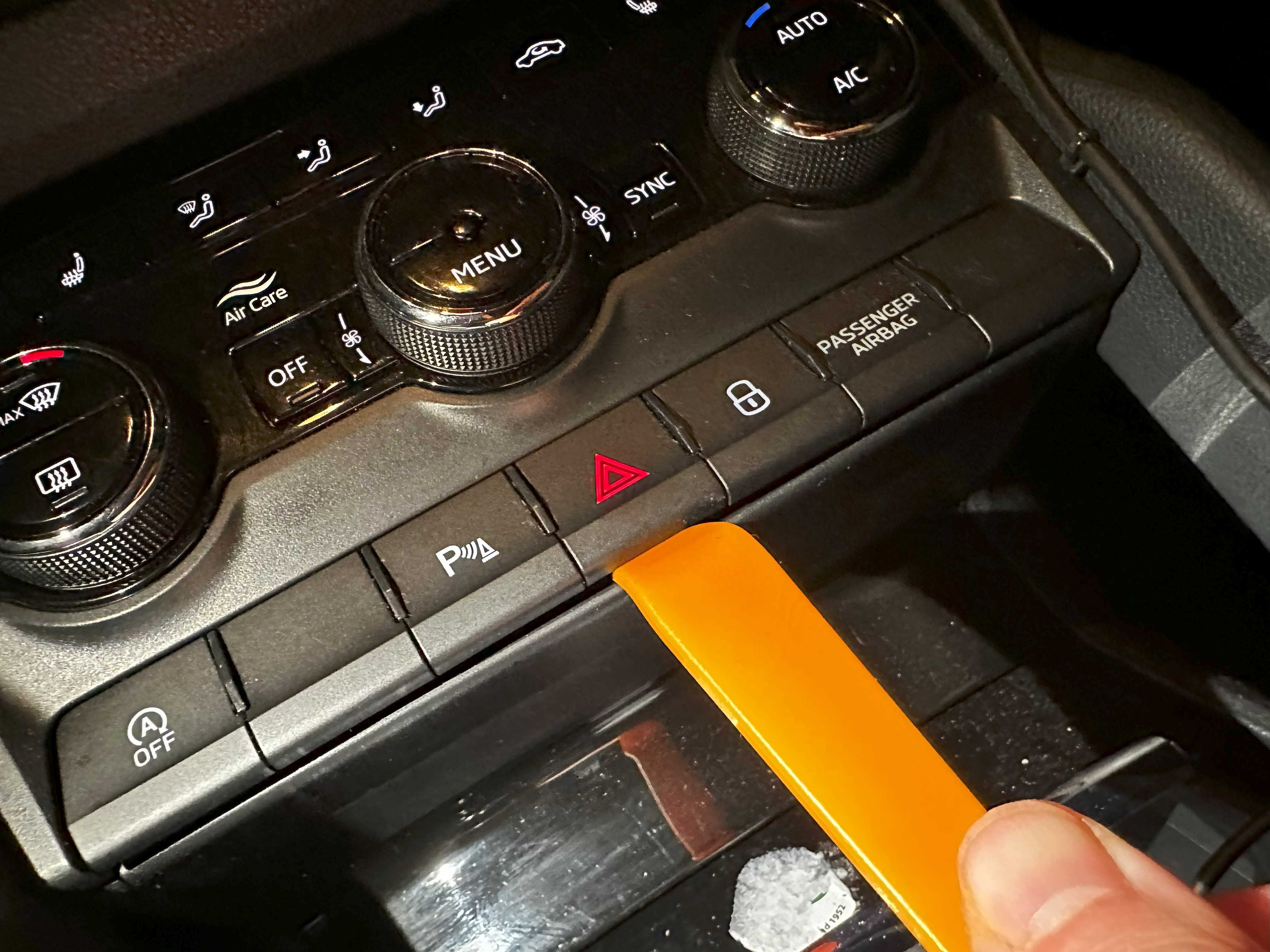
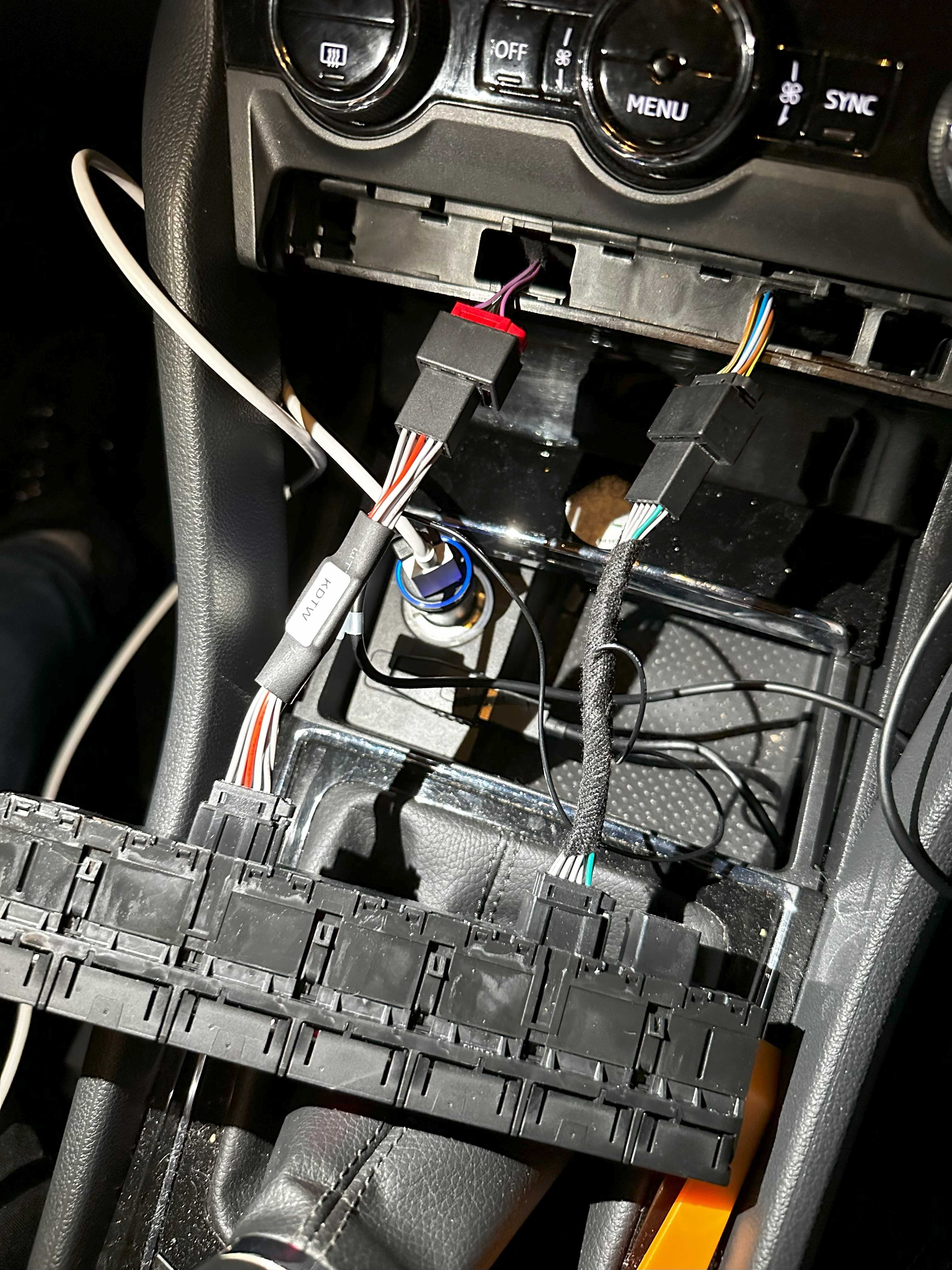
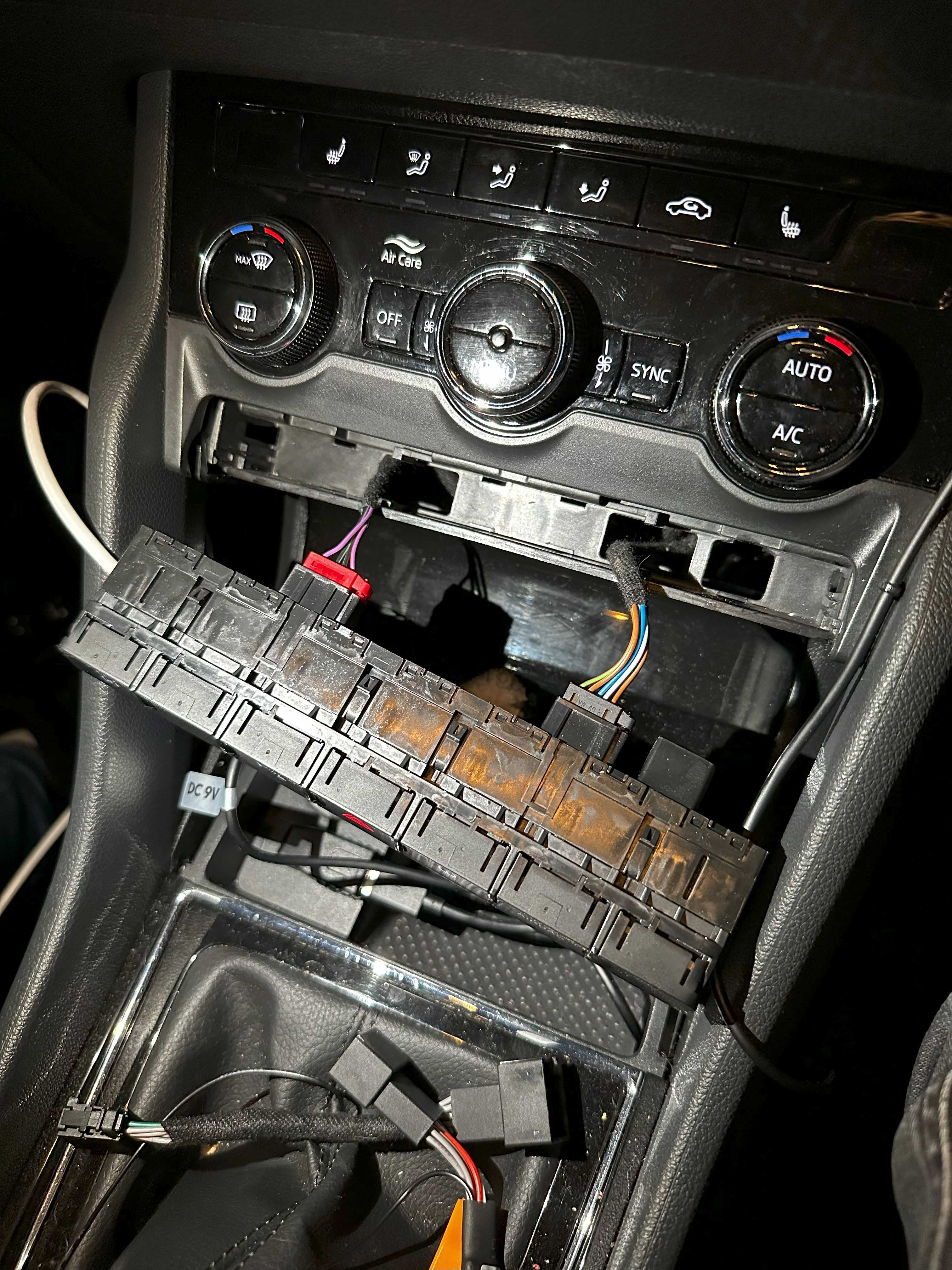
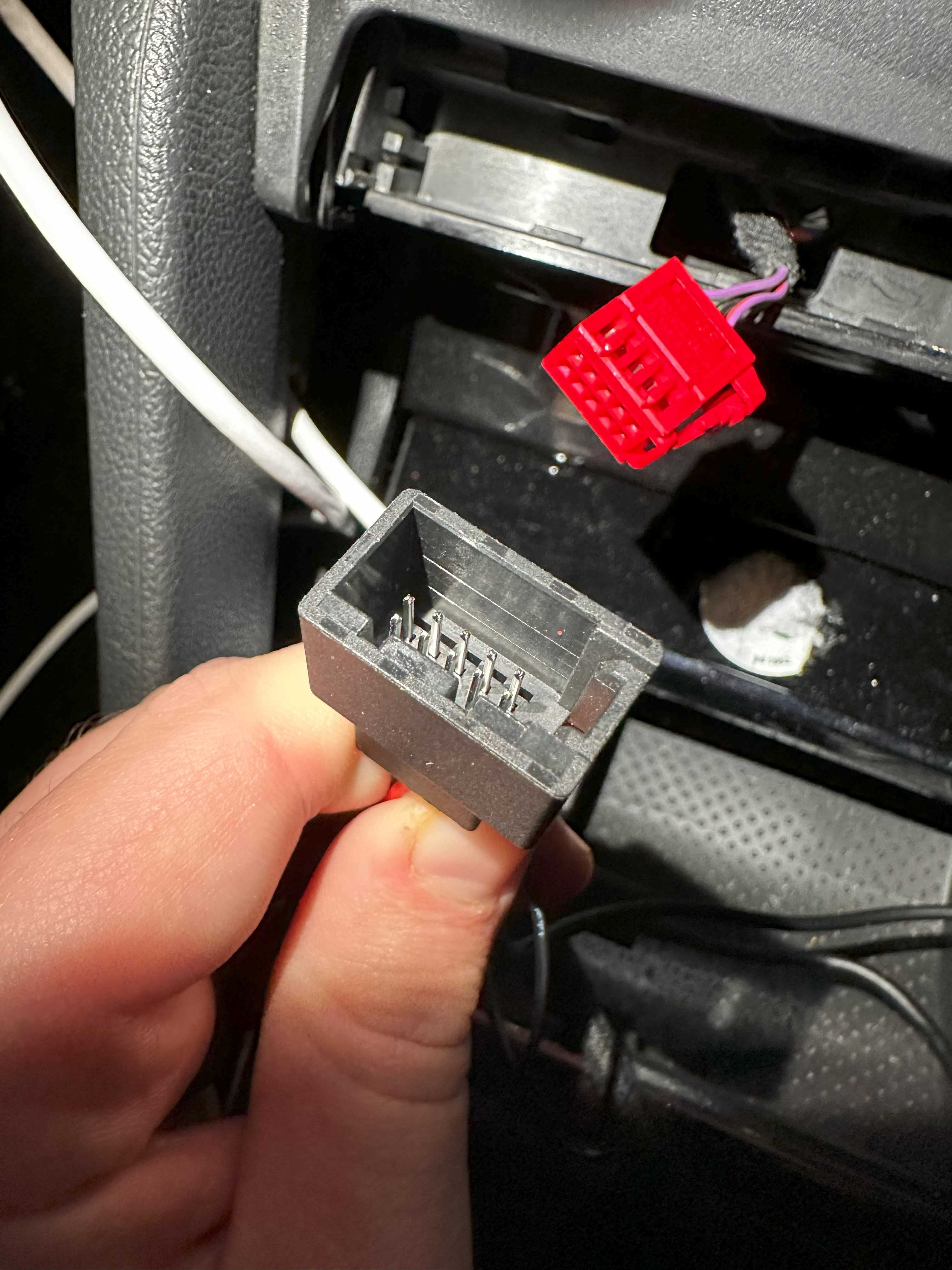
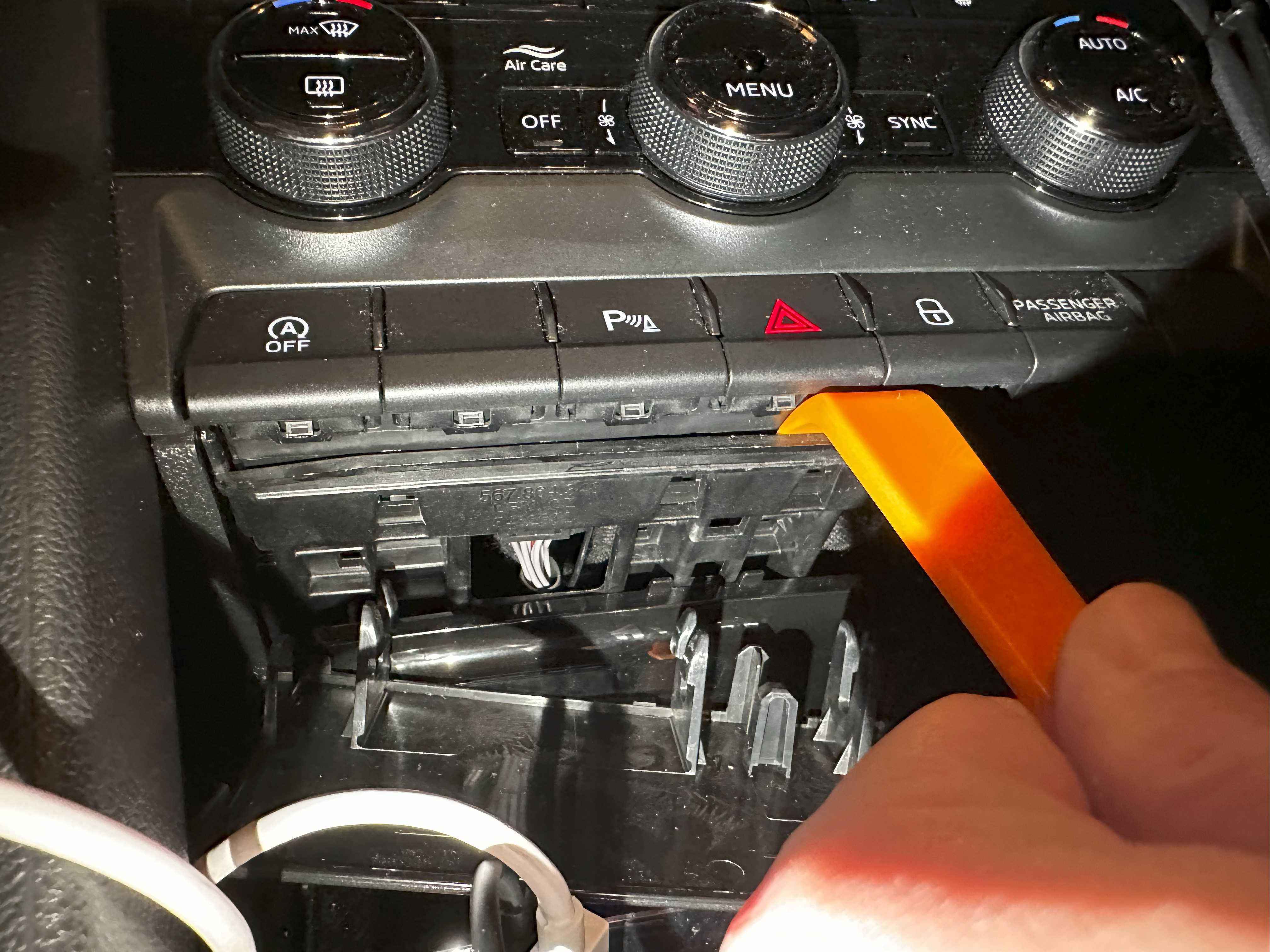
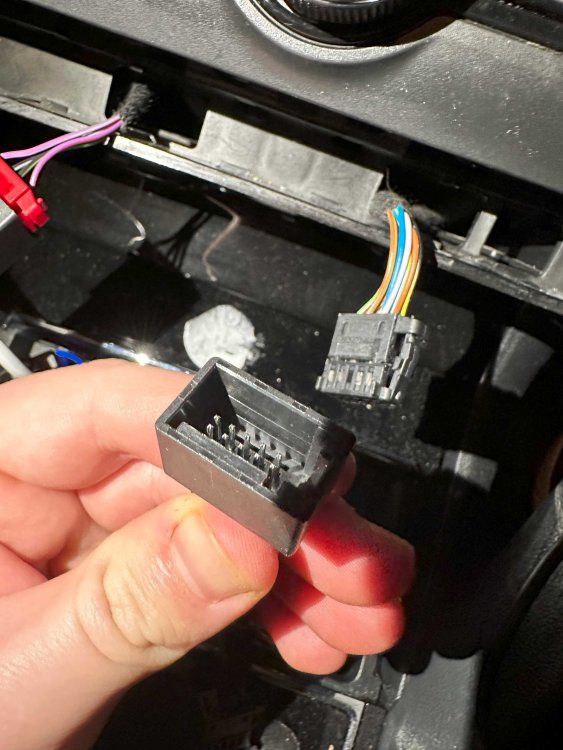
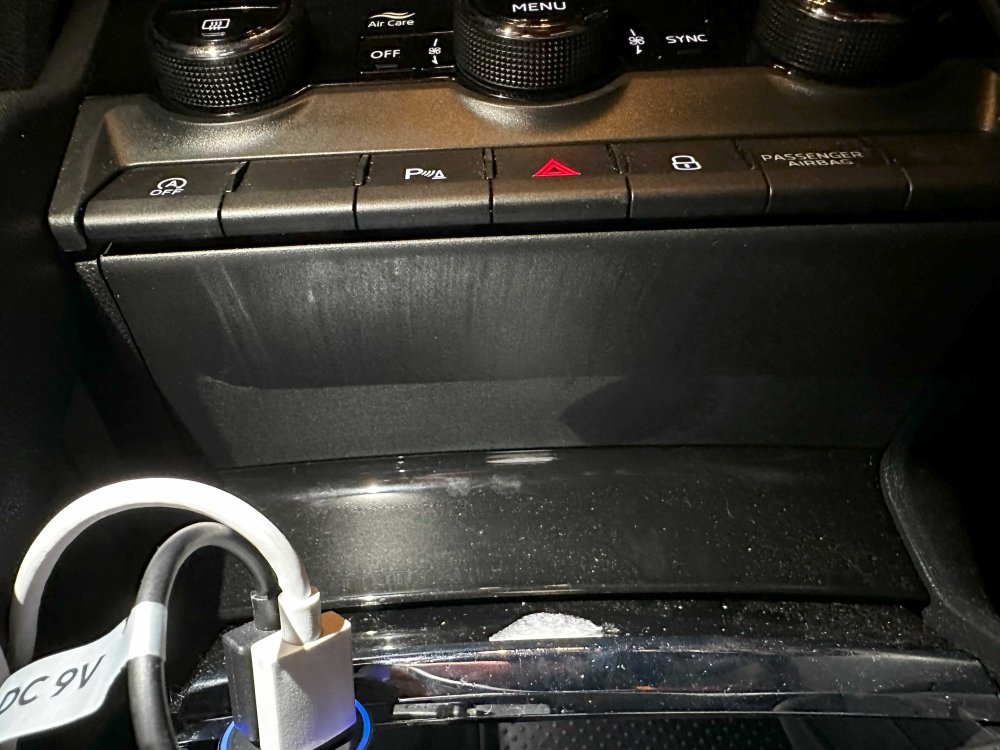
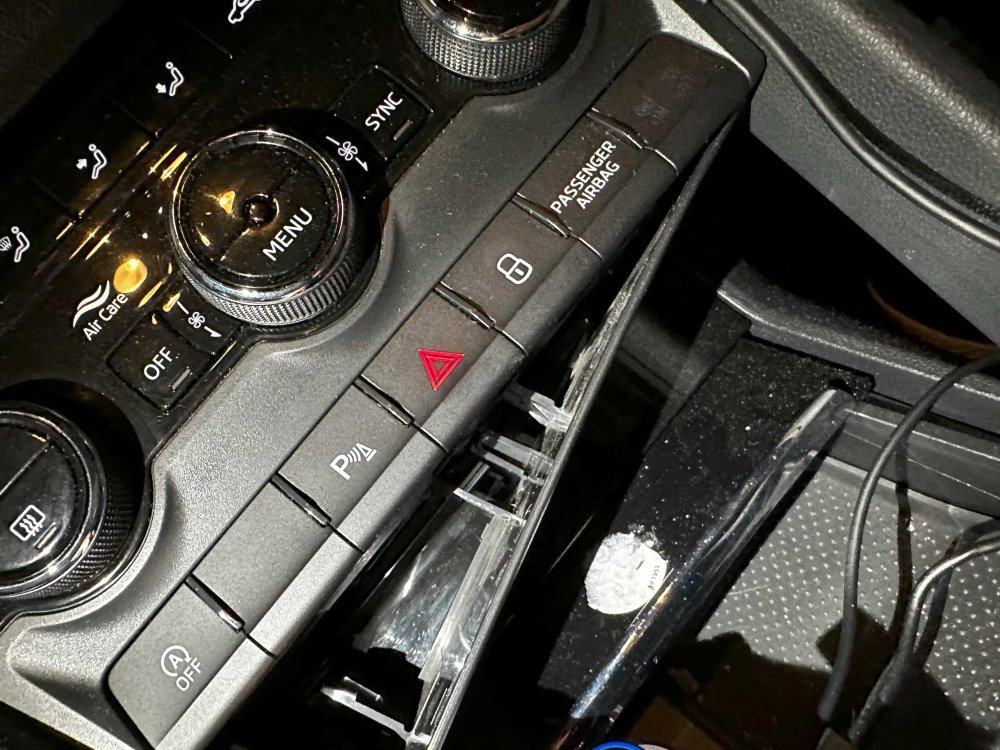
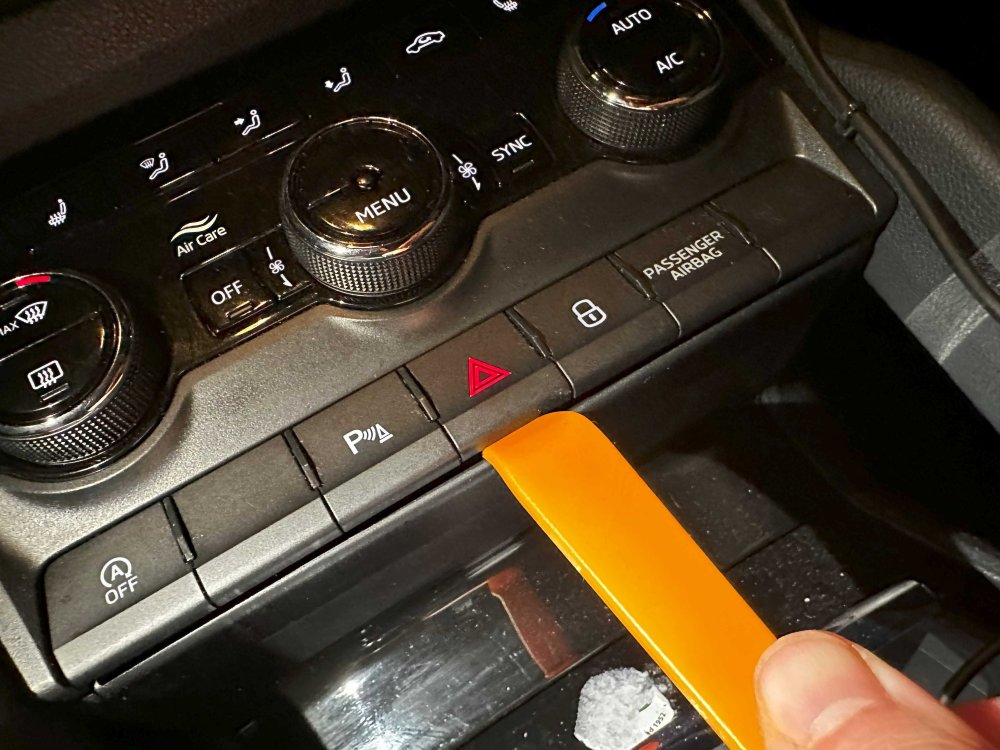
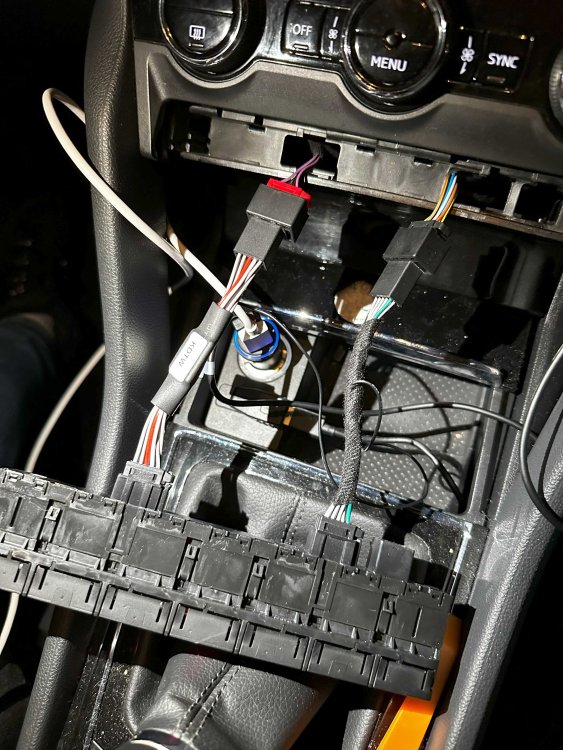
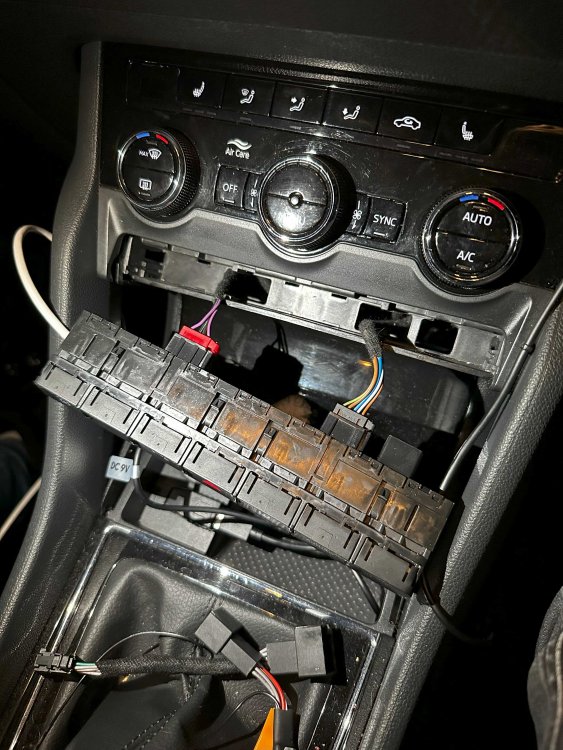
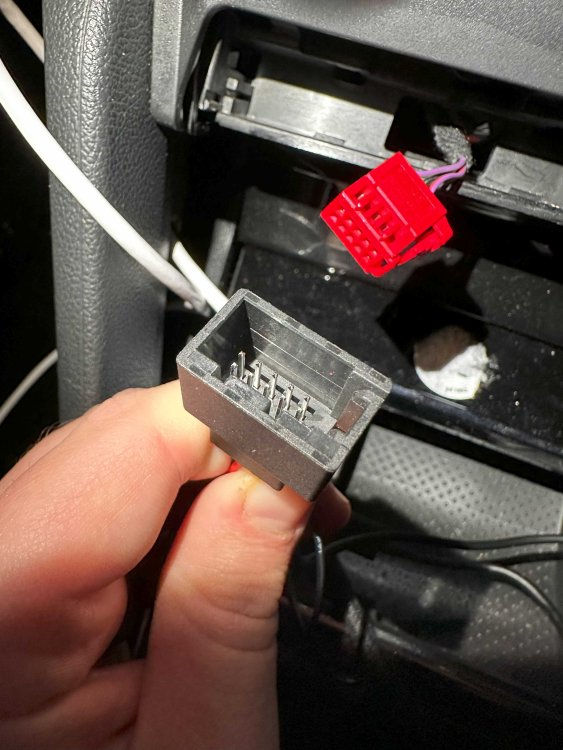
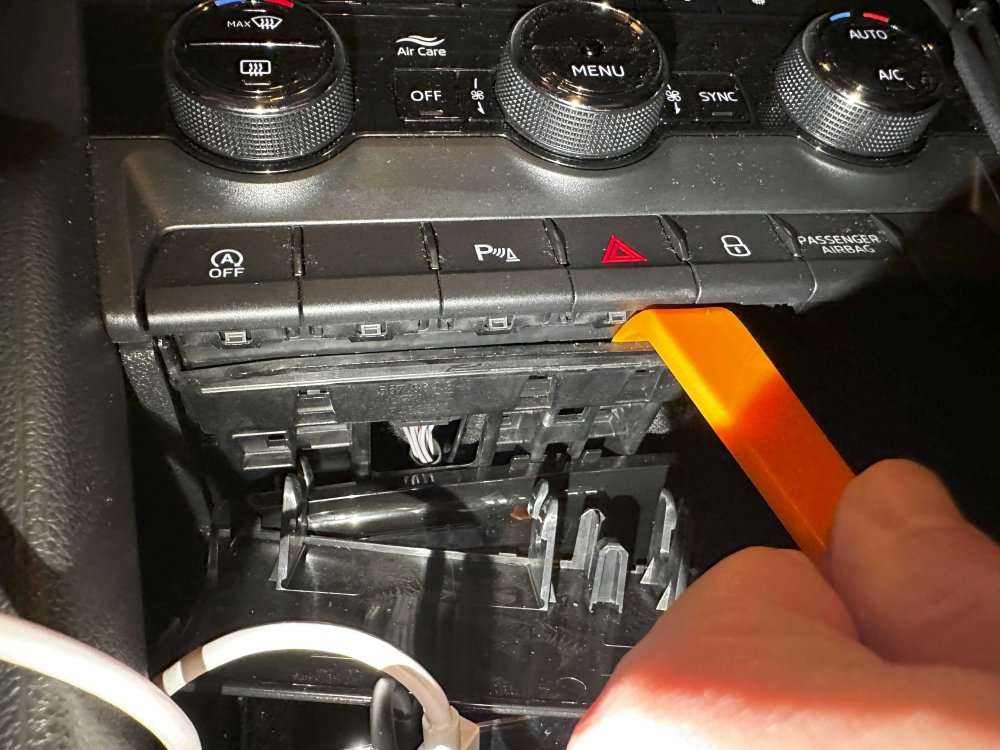
Hi! Little backstory: I have became the owner of a Karoq last year. This is the first car I owned with Start-Stop system which shuts down the engine if conditions are met when you come to a stop and switch to neutral. It was nice to have it for a first few rides, to have a car "intelligent" enough for this, but it soon became annoying. I looked into ways to disable the system, and concluded that I will definitely need some sort of ODB programmer thingy. I found out about VCDS, and ordered a cheaper version of the VAGCOM interfrace from Aliexpress. I realized after the order shipped that it only supported cars up to 2017. Bummer I tought, but when I received it, tried it, and it was able to do everything I was asking it to do. So that's a win. One of the things I did was to enable rear lights with DRLs as I hate when cars are not visible when they're only using the front DRLs, and nothing at the back. It should be mandatory to have DRLs in the front as well as in the rear at all times when the engine is running. But this is for another topic. The second thing was to find a way to disable the Start-Stop system. There are many options to turn this system off, but I tried many and the combination of these, and they were all resulting in a permanent fault message in the car saying problem with start stop system, start stop not available, and so on. After some digging, I found out that there is a adaptation channel in the CAN Gateway module called "Start_stop_voltage_limit" with a default value of "7.6" Volts. Changing this value to "12.0" will disable the Start Stop system as the car will always think that the energy consumption is over the threshold of what the battery can support and won't turn the engine off. All was great, the engine didn't stop at all when I came to a stop and switched to neutral regardless what I was using in the car. However, the by-product of this little trick is a small pop-up on the infotainment screen about "Start Stop system not available". This is why I decided to look into a different solution and when I found out about these cables. These cables are basically an addition between the switch you use to control the system and the connector which is behind the actual switch. This is the link for the actual product I purchased: https://www.ebay.co.uk/itm/XXX//235233297485 I have to add, that originally, I bought the one listed for Skoda Karoq, but turns out that is not actually compatible with my model as the panel on the pictures looked different to mine. The seller was kind enough to replace the modul to the current one before he shipped the order, and sent me the link to the correct one which only lists the Kodiaq as compatible. The cable pair comes with a plastic pry tool to separate the panels in order to pop the module out. Steps: Remove the plastic cover underneath the module using the pry toolIMG_6251.HEICIMG_6252.HEIC Use the pry tool again to separate the frame and the module to allow the module to pop out. You can gently use the unused buttons to pull the module out with. They might pop out a bit, but shouldn't break.IMG_6254.HEICIMG_6244.HEIC Note that the red connector is on the left side of the module while the black is on the right. Connect the cable with the thicker middle part to the red connector, and the slimmer one to the black. The connectors look very similar, but there are little plastic keys on the connectors and they should line up with the appropriate connector.IMG_6245.HEICIMG_6246.HEIC Connect the cable with the thicker middle part to the left side of the module, where the red connector used to sit, and the other slimmer cable to the other connector. Make sure the connections are secure. There is thin wire connecting the 2 cables together, make sure this is not damaged. Carefully slide the extended cables into their original slow and slide the module back into it's place and push until it clips in.IMG_6249.HEIC Pop back the covering plastic underneath and test out the new Start-Stop disable functionality. By default the module should be set to Reverse mode and it should turn the start-stop system off immediately after starting the engine. The module has 3 operating modes: Normal, Reverse, and Memory. Press the Start Stop button to turn the system off. The button should have a solid yellow light showing) Press the Start Stop button 3 times in succession. After the 3rd press the button should not show the light, then the light should come on. For memory mode: Press the Start Stop button twice quickly. The light should turn off. For normal mode: Press the Start Stop button three times quickly. The light should turn on. For reversed mode: Press the Start Stop button four times quickly. The light should turn off. IMG_6247.HEIC IMG_6253.HEIC
 1 point
 -
1 pointLMAO, I'm speaking about these kinds, and now we're deviating from electric cars 😒
 1 point
 -
I mean, the full interior will be getting stripped from my car in the next 1-2 months so dont see why not ill post it in my project thread. The actual dash panel completely, i can get this out in around 2 hours now! Done a fair few1 point
-
1 pointThanks, I hadn't realised the 3 pin cable was for occasional use only. Will speak to my electrician mate and get something sorted. Appreciate the advice 👍.1 point
-
1 pointOn the basis the leak was present when the car was bought and it has not been resolved in a satisfactory fashion under the consumer rights act 2015 you have rights. If the car is financed, contact the finance company concerned. They will persue it as the car is still legally theirs. Section 75 protection applies if any credit card was involved. If debit card, chargeback rules may apply. Check if your insurance has legal cover included maybe. Etc etc1 point
-
1 pointThe 1.4tsi being discussed here has a standard VAG steel sump plug and a pressed steel sump. I'd be worried about the oversized sump plug they reportedly fitted. There's no such thing afaik. Sounds like an incompetent mechanic making matters worse. Negligence occured during servicing. Probably at the recent service. Just because it was leaking prior doesnt mean the sump threads were stripped. Highly unlikely and I cite my experience which had similar symptoms. The OP needs to speak directly to Skoda and threaten legal action. The correct solution now is to fit a new sump pan, at the cost of the dealer involved. Or reject the car for a full refund. https://www.skoda-parts.com/spare-part/04e103602b-oil-pan-1-4tsi-skoda-31107.html1 point
-
1 pointToday, I called the RAC out to tow me to my local garage. On arriving, they insisted on starting the engine as they were unable to simply tow me down the road on my instructions. So we started it up and ran it for 5 minutes and guess what that sound was not there! I felt a right dork! However he did pick up the rattle I do know about which is the dual mass flywheel. The RAC man suggested that the noise I heard could be a sign of further deterioration of the DMF I have the car's MOT booked for 7th Feb so will be driving it locally to see if it reappears in the meantime. Depending on the outcome of the MOT, I shall then decide whether its worth spending 1k on a repair for a 2008 car with 147k on the clock.1 point
-
1 pointAnd do Skoda dealerships use these? Nope. And I don't buy cars with a warranty to do it myself, life's already busy enough thanks. Rob1 point
-
1 pointReplace the sump??? They make helicoil repair kits just for this, 5 minutes work and a fresh oil change and you are sorted. All in with the tool, oil, filter and new plug - probably £100 max £150 if you go buy a jack, axle stands and ratchet set from Lidl/aldi and fancied it yourself1 point
-
1 pointHi, The service was done the day before I picked the car up 11/11/23. I didn't request the service, the dealership said they needed to service it, so assume it must have been due. Rob1 point
-
No they didn’t try to sell me another car and didn’t even put up a fight for the rejection, think tbh they knew that the whole situation was not handled very well from the get go, the car speaks for itself but their communication with me and handling of the situation was poor was too long to list all the back and forth I had over the 7 days. it hasn’t put me off a Škoda as think I have just been unfortunate with that actual car as I had a loan Kodiaq and that was great! But if I do get another Škoda will more than likely not go to that dealership!!1 point
-
1 pointYou make it quite easy to understand really. Really you do. It is about something that really does not matter to you is it? About as relevant to the Truth about Electric Cars as the Fires, the Ship Fires, the Bus fires and the rest of this stuff.1 point
-
1 pointI'd advise doing some research into this as pulling the required current for prolonged periods can put strain on your house electric installation. There is quite a risk of fire if not done correctly. If you have had a plug installed for this task then please ignore me.1 point
-
thats a little worrying....I've not seen a DSG do that before. Its almost like the car is either not sure whether it is in normal drive or manual drive mode - or it thinks its moving. Can you do a gearbox relearn please? Reset Procedure Put the key in the ignition and turn on – Do not start the car. Hold down the accelerator pedal fully for at least 10 seconds (many suggest 20 seconds). You will feel a little click under your foot at you push down the pedal fully. Release the pedal – turn the key in the ignition. Can you also confirm when the DQ250/381 gearbox has its last oil change?1 point
-
1 pointI had something similar with my 2018 1.4tsi Superb. After the 2nd service, I noticed a leak from the sump plug, dripping on my drive. Took the car back, and they checked the plug was correctly tightened to 30Nm. Still it leaked. So they changed the sump plug, and the replacement plug leaked. As they had seen this before, they contacted Skoda technical who told them to use an additional crush washer, which they did and the problem was fixed. They videod the whole process. The standard sump plug has a standard steel washer, sometimes fixed to the bolt with a weld at the side. So it seem that that the sump thread wasn't correctly aligned or the the mating face was machined slightly off. Or maybe just a bad batch of plugs with wonky washers or incorrectly machined seats. Subsequent services (3) I remind them to fit the additional crush washer. In the OP's case I feel the dealer mechanic tried to fix the leak by tightening the plug beyond the 30Nm specified and damaged the thread. Now trying to pass it off on the customer.1 point
-
Well it's a plan... 1: All insurers use a common database so it'll be on record. 2: When you next obtain a quote, are you going to declare you've been involved in an insurance claim or are you going to lie? 3. What happens if the 3rd party's insurer turns out to be the same underwriter as you? ( There are actually very few insurers, many trade under different names. There are even less underwriters! ) Although it could invalidate an insurance policy, if you keep quiet and have the 3rd party pay for the repair out of their own pocket, that could work. However telling the insurance industry you've been involved in an accident but not declaring that accident to your own insurer. 😲 You're playing with fire. It's a non-fault claim yet you could end up in a right mess if you go ahead with that plan. Why risk it?1 point
-
cheers @Kenny Rhad it set to automatic as soon as changed to manual colours came up - good old user error strikes again😁1 point
-
1 point
-
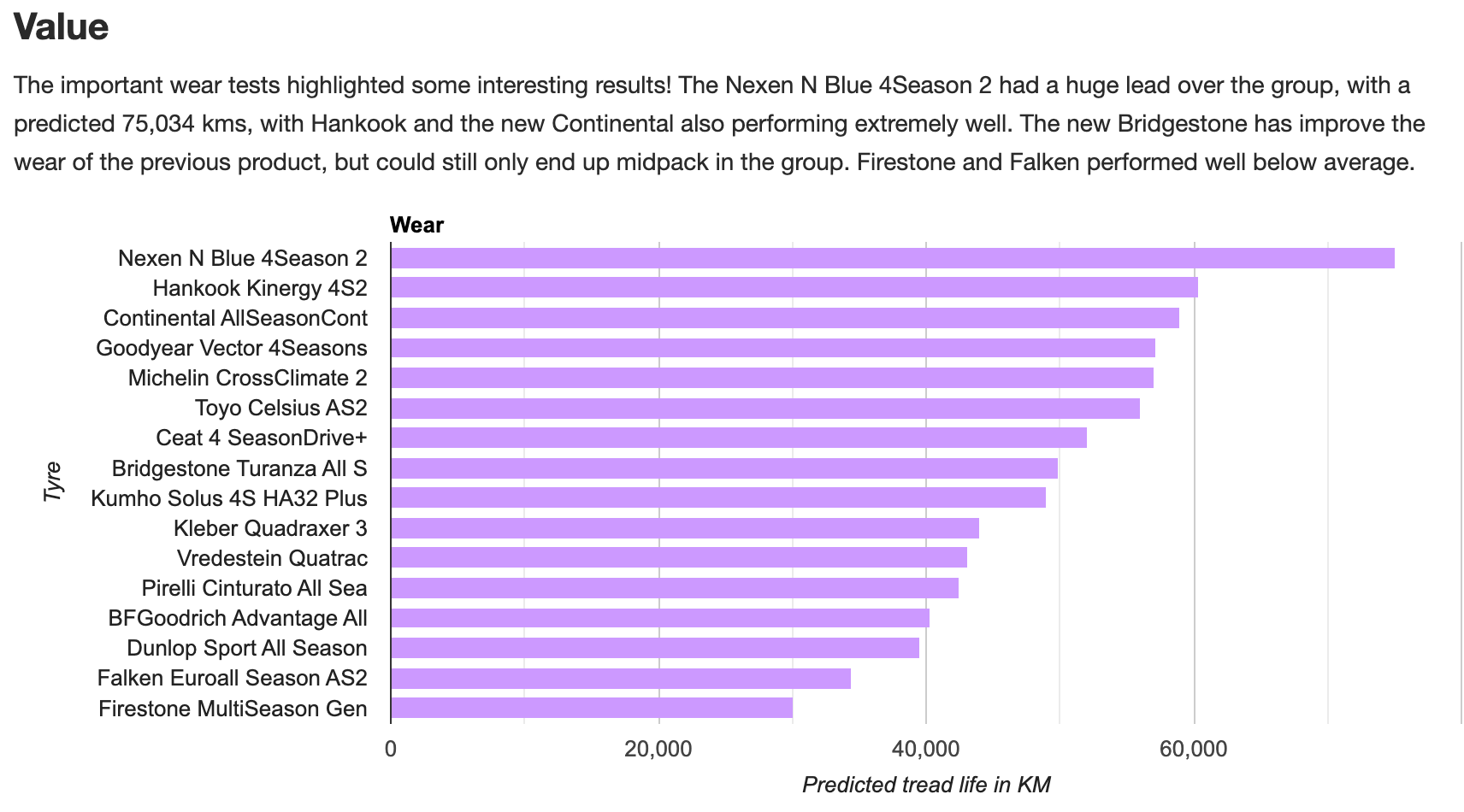
1 pointFor anyone interested in detailed tyre analysis, I came across this guy who claims to be a tyre designer for the last 5 years. His reviews and analysis seem to be the most unbiased I've seen and reveals the compromises tyre manufacturers face when designing a tyre. I.e. there is no perfect tyre... https://tiredriver.com/goodyear-vector-4seasons-gen-3-review/ https://tiredriver.com/michelin-crossclimate-2-review/ https://tiredriver.com/continental-allseasoncontact-2-review/ https://tiredriver.com/improving-dry-performance-all-season-tires/ https://tiredriver.com/comparisons-reviews/1 point
-
1 pointNo, you're misunderstanding what I'm saying, welding is an obvious thing that can be transferred between all kinds of vehicles, what I'm talking about is almost a ground up restoration to concourse standard as will be the fate of that Aston Martin DB4. There will always be classics, or at least I hope, in museums whereby the manufacturers donate vehicles off the production lines, but those are not driving examples that people can own, and use for example at shows etc.1 point
-
It might be useful to other members including myself to know the exact model variant e.g 1.5SEL DSG + colour AND also the last 3 letters of the reg no. So that I or others don't end up buying it thinking its an ex demonstrator with no mention of its history.1 point
-
1 pointNo, I understand that something might well be able to be made to order, but in order to know if its worthwhile doing so, you might like to find out about the rest of the car, body etc, do the electrics and the power unit work. Like people do with ICE cars, they see if the engines are seized etc, and often they can get them started just like in the video I linked to, as that would be a good place to start in deciding a cars possible future. In real terms ICE electrics have not changed all that much from the point of view of ignition coils, plugs, leads, points, starter motors etc on legacy cars, it is always possible to rig up something like a gravity feed tank to get fuel to the carburettor etc. How will we do this with electric cars is the question, they are way more complicated.1 point
-
1 pointTo my mind it makes sense to warn a driver that he or she is leaving the car with the engine running. No doubt complaints about nanny stateism were made when seat belts and air bags were introduced.1 point
-
1 pointListen to this guy. @15.30. 32.6 kW / kWh is a battery size, you can not equate that to power. Just the size of the battery. Max charge is 50kW and the average on a 50 kW charger will be 33 kW, as in 33 kW in an hour. The power is 135kW. 184 hp, 199 lb/f torque. There is no Sport Plus. There are different Dynamic Settings TC, Dybamic, OFF, then 2 regen settings. Battery is under 30 kW usable. What kind of Reduced Overnight rate is is thinking of? 34 kWh @ 30 pence is £10.50 Day time rate. Anytime for those without discount. 34 @ 15 pence is £4.13 So 34 kWh, near empty to 100% at 10 pence is £3.40 @ 7 pence £2.38. Max1 point
-
1 pointIt is indeed kW for chargers, as in 3.5, 7, 11, 22, 43 / 45. 50, 80, 100+ But then it is kW for power of the motor as in kW, or PS or BHP. What you really might need to know with a 30, 50, 60, 80, 100 kW battery is what the Average Charge will be from a 50 kW charger, or a 125, 150 kW etc. So how many kW will you get in am hour, 10-80% maybe, 20-100% etc. No wonder people get confused. The Chargers can not even show what the MINIMUM kW they are about to deliver before starting to charge, maybe because the charger is cold, the cars battery is cold or just it is a crap charger when used with some EV.s1 point
-
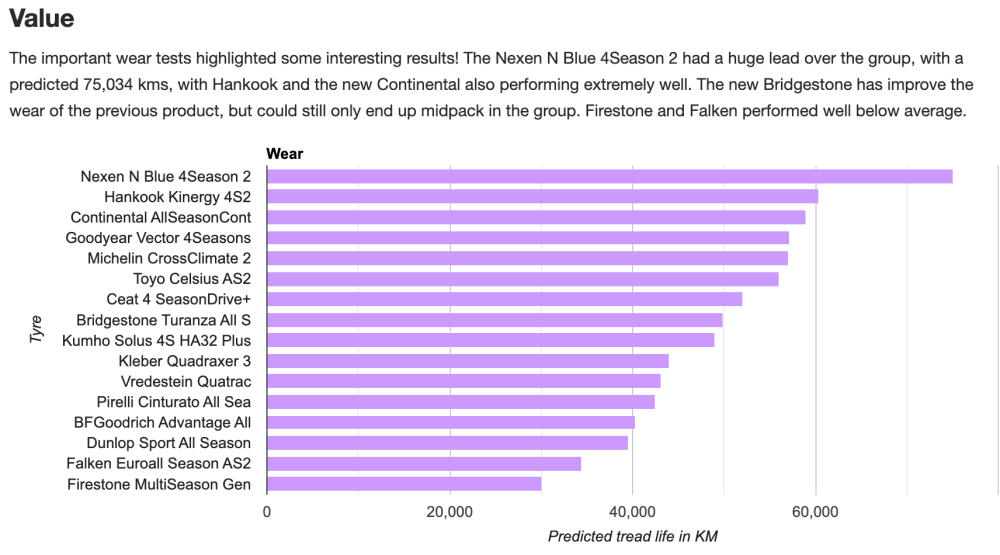
1 pointBugger all difference it seems from https://www.tyrereviews.com/Article/2023-Auto-Bild-All-Season-Tyre-Test.htm
 1 point
 -
1 point63 plate car will have the revised engine with improved chain drive so in my experience chain life is considerably longer (120,000+ miles v 60,000 miles in the examples we owned) A slight rattle on cold start ups for a couple of seconds (until oil pressure is established) is quite common and probably nothing to worry about. But if the rattle gets loud ( heard inside the car) on start up (usually happens after being stood a long time) and sounds painful, like a machine gun , this is the chain so slack it's riding up on the sprocket(s), IMMEDIATELY turn off the engine to prevent disaster. Wait 4 or 5 seconds, then restart the engine and hopefully the loud rattle is no longer there as the oil pressure on the initial start allows the tensioner to take up the slack and force the chain to engage the sprockets correctly. In this case its time to replace the chain kit (entire kit contains chain, 2 sprockets, tensioner and 2 guides). I had replacements done at around £400 each time at my Skoda dealer but the last was around 3 years ago. Tip: Don't leave the car parked in gear. In this design if the crankshaft rotates reverse to its normal direction then the chain tensioner can be forced back and the chain goes slack on the non tensioner side. It will then hang down off the bottom sprocket. If you must park in gear, use reverse gear if the car is pointing uphill and 1st if pointing downhill. Btw the ticking/clicking noise you mentioned in your 1st post is probably from the mechanical high pressure fuel pump located on the cam cover - big shiny hex head on top and 2 stainless steel fuel pipes. Can be quite loud at idle stood outside but inaudible in the cabin. Normal and nothing to worry about.1 point
-
1 pointI think that is one of the many annoying features that the European Union nanny state insists upon, and that's where we get our cars from. At least its less of a pain in the arse than Lane Assist.1 point
-
Please bear in mind there are two types of TMPS. The direct type has pressure sensors in the tyres. This type will display the actual pressure in the diagram on the 'vehicle' page. This type will warn you if one tyre loses pressue, and will warn you wahen you start in the morning if a tyre has lost significant pressure overnight. I have never had a car with direct TPMS, so I don't know what sort of pressure loss will cause a warning. This type means that it is more diffecult to move wheels round as some system, maybe not all, require the sensors in the tyre to be in close proximity to a reciever near each wheel. I suspect the Kamiq has an indirect system, as is fitted to my Karoq. This system, as stated, worksfrom the individual ABS sensors in each wheel. When first initiallised, the TPMS system learns how fast each wheel is rotating in comparison to the others. After it has done this, it continuously monitors for a wheel rotating outside the system limits. It can't be too sensitive, otherwise there would be a warning evry time the car went round a corner. In my experience a tyre needs to lose 5-8psi before a warning comes up. This type will not warn of a blow-out, or a flat tyre overnight as the car must be moving to register. If there is a fault in the system it may give an ABS warning as well. This system allows whells to be 'rotated' with no issues. Restoring correct pressure without reinitiallising the system will not usually cancel the dash warning.1 point
-
1 point
-
In theory you should always go thru your insurance where you pay the excess for the claim to proceed. If the claim turns out to be non-fault then your insurance should refund that money. ( they then claim it off the 3rd party blah, blah blah - but that's not your concern ). I've been in a few situations where the 3rd party have offered to repair the damage without involving the insurance. That of course could void your insurance and in theory, it's illegal, but the reality is it's sometimesit's the best solution for everyone. It only applies to very minor damage tho ( you forfeit any guarantee ). In my experience, if the repair is below the excess then it's benefitial not to go thru insurance because even if it's a non-fault claim, there are pitfalls. When searching for insurance, you normally have to disclose any claim, fault or not, up to 5yr after the accident. I've played around with the systems over the years and obtained two quotes - one declaring the non-fault claim, and one ignoring it. ( obviously always declared it when acually taking out insurance ). I have never seen a rise in the policy cost because of a non-fault claim, but what I have seen is some insurers excluding you from obtaining a quote. Not sure if it's still the case, but Esure used to be one of those who'd say 'sorry, cannot obtain a quote' even if it was only a non-fault claim. So potantially you could be loosing out on a cheaper quote in the following 5 years from the date of the accident by declaring a non-fault accident. I agree, it's wrong, but there are so many other things wrong with insurance in general. Hope that helps.1 point
-
1 pointSent via PM. Guys you need to tag me if you want a link as I don;t have time to follow forum on regular basis... I drop me a PM.1 point
-
I suppose you could. But where's the fun in that? The reason for this tutorial is to help the people who are looking to find a solution to this Start-Stop problem. There's nothing wrong with turning it off every time, but this is a more elegant solution in my opinion. There should be an option to disable it more permanently than just for the drive. Some Audi's have a setting available with VCDS coding that can do the same thing this cable does, but sadly Skoda's controller is different and you cannot enable this functionality without tricks like this.1 point
-
it is common for a new model to have problems in the first 1-2 years. believe me, modern Alfas are a nightmare to own and repair. all major car brands have a lot of problems with software and electronics, even Mercedes, BMW, etc, and if you search on theirs forums you will see.1 point
-
1 point600 is about right. We have to be careful with some of our advice on here, we dont want to be making matters harder than they are. You cant compare the diesel and petrol VRS as they are completely different! The EA888 gen3 waterpump housing is a well know problem across all the various brands, the part is expensive and there is a sh!t ton of stuff to move out of the way to get access = $$$. Unlike some others, I know this for a fact as I have paid for this recently myself, even watched a youtube video to see if I would take it on myself - NO THANKS.1 point