Leaderboard
-
Lee01
FREEDOM7Points36,937Posts -

moley
Resident Member7Points10,258Posts -
skomaz
FREEDOM5Points11,413Posts -
unclerichy
Members5Points896Posts
.thumb.jpg.9dd3f612ba7f13d10be5c518d3c8d255.jpg)



Popular Content
Showing content with the highest reputation on 26/03/26 in all areas
-
2 points
-
2 points
-
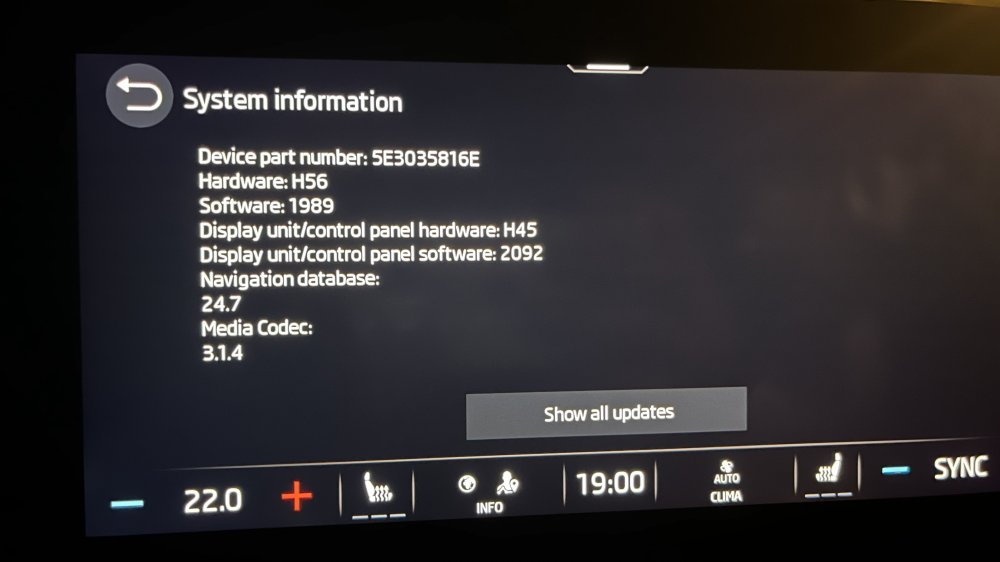
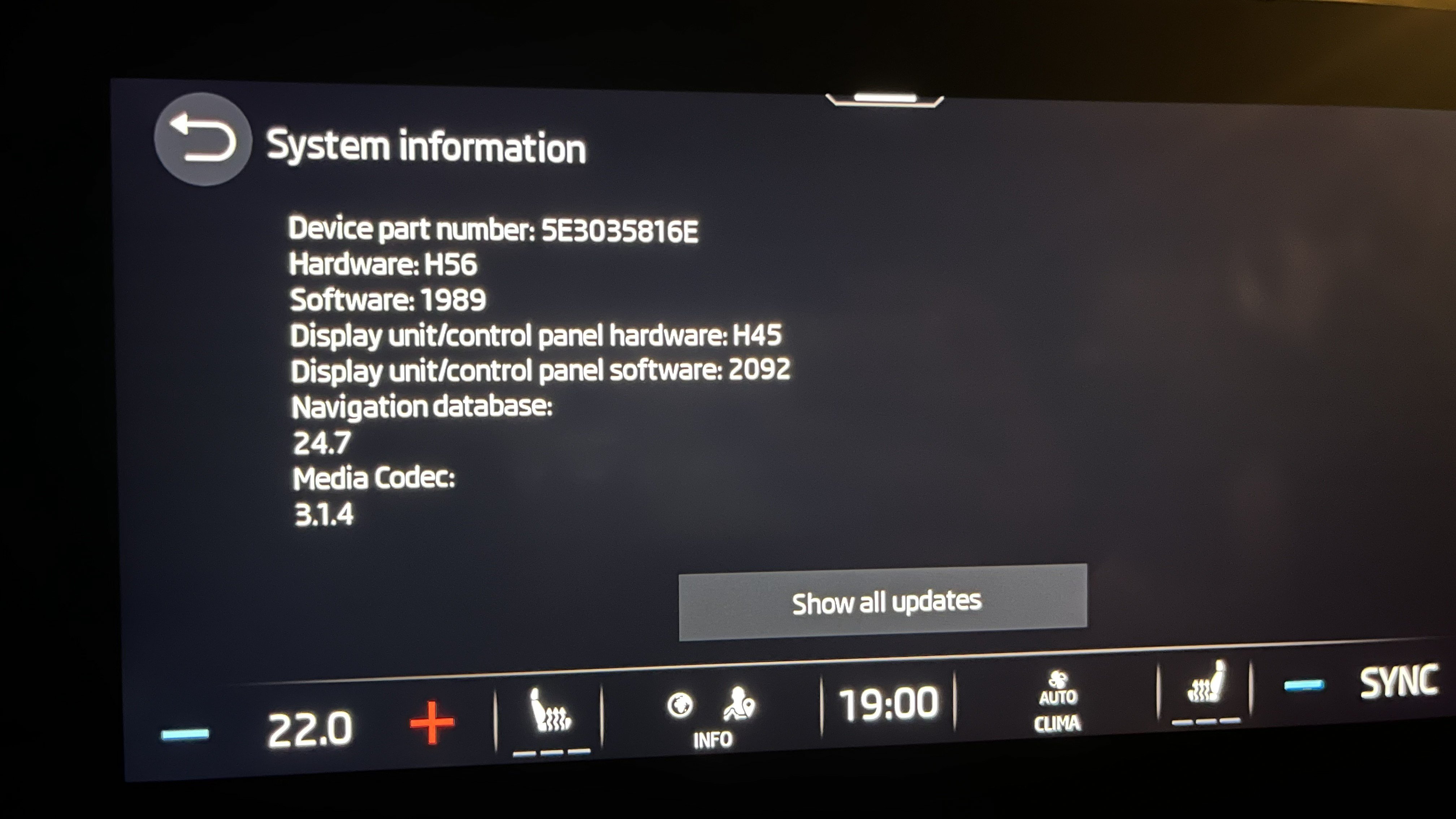
Hi guys, I had the similar issue, as described here (Octavia 2021). I was able to solve it by myself. How it all started? I got notification on Monday that there is OTA 03A8 update that stated I should install it or some things might stop working in the future. I downloaded it in the evening while driving, and after I parked my car and clicked Install I waited 30 minutes but there was not any information that install is progressing. I turned off ignition, left the car, locked Then Unlocked, Ignition on, and Infotainment prompted me to login with my primary user account After providing username and password, hell broke loose with my infotainment Symptoms after update: After loading primary user profile, Infotainment gets stuck, and cockpit starts shining as Christmas tree Screen goes blank, but still on in the background eSIM icon was offline Force shut down, by extended holding of Power button doesn't help Unplugging and plugging infotainment fuse doesn't help Spent 1h trying to troubleshoot, but no luck After 24 hours, eSIM icon changed from Offline to Online (Tuesday evening) Workaround: I've discovered that if you force restart the infotainment (extended holding of Power button) and quickly enter the Guest profile, Infotainment starts working properly If you try to switch profile to primary owner, same issue above starts happening (so don't do it) Deleted Primary profile (only guest remained) Solution (in my case): I suspect that my profile got corrupted on Skoda servers, so when it starts download to Infotainment, corruption starts I used another email to create Skoda account, and signed into My Skoda app I used new email to login to Skoda infotainment, and VOILA - no issues. Infotainment worked perfectly since But I have Remote Access paid until end of August 2026, so I didn't had access to my car via new My Skoda app with new email Thankfully, when you choose and follow thru option to become primary user (via Infotainment + two keys need to be present in the car), exiting Remote Access subscription was transferred to new email. Since, Tuesday evening, everything is working perfectly. Hope it helps. Attached image shows info after fix.
 2 points
 -
1 point
-
Alles gut sagen wir auf Deutsch 👍 😉1 point
-
@JR RS has a guide for upgrading to 2.5 and the bigger screen. I believe the main unit just needs software and then you add the screen as part of the upgrade process. There are other threads about VC. I believe with 2.5 and VC you can’t get the maps on the vc as that would need mib3. Also I think you might need a new bcm but others will probably Correct me on that.1 point
-
1 pointCan't comment directly on the Octavia as I've not yet changed mine from halogen bubs, but I do have an Audi A2 where I've used HID bulbs in the dip beam and LED in the main. Easy conversion and definitely an improvement.1 point
-
You can order one. £2.50 The part number is : - 6V0 010 000 See here : - https://www.ebay.co.uk/itm/366086956551?var=0&mkevt=1&mkcid=1&mkrid=710-53481-19255-0&campid=5338749392&toolid=20006&_ul=GB&customid=CjwKCAjwspPOBhB9EiwATFbi5GLQfzJUkGT6-rgEwJFtaPbUpP_tyMmeyZOdOP3pncYBlBFYFfbNhhoCb9gQAvD_BwE|0AAAAADihhqXd3jTguSHLOVkicrxXdCUfw|CkEKCQjwj47OBhDHARIwAOza9m8KcTUoc8R3-BVbeiipTU8YFu5aOuqBrg0MMZva7TW6hFhueWtAe0DHEvJfGgKs_w&gclid=CjwKCAjwspPOBhB9EiwATFbi5GLQfzJUkGT6-rgEwJFtaPbUpP_tyMmeyZOdOP3pncYBlBFYFfbNhhoCb9gQAvD_BwE&gbraid=0AAAAADihhqXd3jTguSHLOVkicrxXdCUfw&wbraid=CkEKCQjwj47OBhDHARIwAOza9m8KcTUoc8R3-BVbeiipTU8YFu5aOuqBrg0MMZva7TW6hFhueWtAe0DHEvJfGgKs_w&loc_interest_ms=&loc_physical_ms=9215888&adtype=pla&gad_source=1&gad_campaignid=17330494074&gbraid=0AAAAADihhqXd3jTguSHLOVkicrxXdCUfw Thanks. AG Falco1 point
-
Thanks, that is exactly what happened, looking at the codes, there appeared to be an connection to wheel speed this could well have been stored in memory for initial comparison. I generally have a small 12v battery connected to the terminals, sods law I didn't have it today. Thank you very much for your response.1 point
-
Hello, welcome to the forum. Any random faults caused by battery disconnection and reconnection should clear themselves after taking the vehicle for a short drive. Did you carry out the battery adaptation (coding) after fitting the new battery?1 point
-
Personally I always fully charge a new battery to 100% before fitting to the vehicle as this gives a definite datum point and also gives as much margin as possible for any diagnostics and repair work drain, and you may be doing a lot of work that may drain the battery even a new battery is just a store and can be depleted. The computers systems can play up if the battery is low, even if the headlights seem bright enough and well, well before any signs of the engine not starting, there are loads of threads and posts about this on this site for the various models and ages. You don't have to waste petrol by driving the car you can just use an appropriate battery charger and read and follow the instructions for that and read and follow the the instruction for the car in the 'Owner's Manual'. As the battery has discharged slowly then it's best to recharge slowly, using say 2, 3, 4 or 5 amp charger maintainer. The car's battery charging system will take the battery state of charge down to 80% and that is why as my wife's car does lots of journeys of 2 miles (3 km) when I do the very occasional preventative battery charging I have it to 100% of its capacity to extended the expensive battery's useful service life and to avoid the computers moaning, they are already enough of a PITA. Having the battery in a good state of charge may not resolve the main issue you have but it will help with diagnosis and prevent other possibly contributing issues. Good luck.1 point
-
Hi HTH, thats some good advice there. Nice to know there are Swedish springs available. I'm sure the Korean ones are quality too but Sweden is closer to home You have been very very helpful, thank you ever so much1 point
-
1 pointAll I know of that's available to download as a PDF is the pre-facelift from 2021. There's a copy on my Google Drive if you want it. https://drive.google.com/file/d/1TphN15lCGKSCYZ16hwn31TsJe0qDRqUQ/view?usp=drive_link1 point
-
1 point
-
1 pointAt 2016 - so either MY16 or 17 depending on registration month, it will be.1 point
-
1 point
-
1 point
-
1 pointHaving just looked them up for my own car, the paint code for Business Grey is supposedly F7M/2C2C-. (for reference I've got the same car in Emerald Green which is LG6Y/2A2A) As always, test the paint for a match before putting it on the car. And don't forget the primer and whatnot1 point
-
For aftermarket springs matching 5Q0411105HN and 5Q0511121BD I would shortlist Kilen/Lesjofors and KYB. Kilen and Lesjofors are the same springs, just sold under two different brand names. They are made in a modern factory in Sweden, and are the biggest manufacturer of aftermarket car springs in Europe. KYB are from South Korea, and are also a very big player in the aftermarket car spring market. Kilen/Lesjofors and KYB have their own online spring catalogues, as shown in the links below. Kilen online spring catalogue https://web.tecalliance.net/kilen/en/home Lesjofors online spring catalogue https://web.tecalliance.net/lesjofors/en/home KYB online spring catalogue https://kyb-europe.com/catalogue/1 point
-
1 pointIs it a VW/Varta branded EFB+ battery - if so you've done well to get this far - don't let the dealer sell you another the same at almost £500..........1 point
-
1 point
-
1 pointAny random electrical gremlins should always be considered first as the result of a battery on its last legs. Unless you’ve changed it in the last 22 months, I’d do that first and see1 point
-
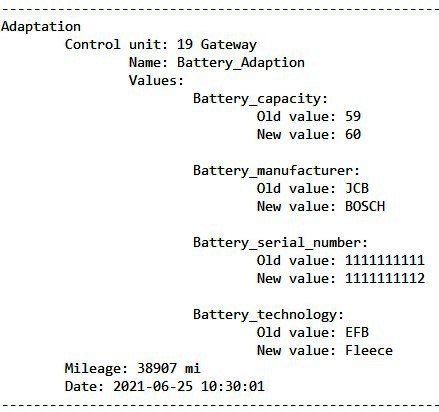
Note VW call AGM "fleece". OBDEleven from a member doing the 'coding' for my wife's 2015 Fabia, from EFB to AGM as you can see the factory didn't bother with a battery serial number and I didn't bother about the VW three-letter battery serial code, important is to change serial number, battery type if required and Ah. I can't find info on OBDEleven battery 'coding' but here info for VCDS. - VCDS How to adapt a new battery.pdf
 1 point
 -
1 point
-
My 2024 skoda octavia went in to dealership last Tuesday told it needed a massive update that can take up to 8 hours to complete update failed no nothing works car still in dealership with 2 other skodas both failed updates. I think skoda have a big problem.1 point
-
You can make OFFLINE update very easy. Buy a USB-C flash (I use this-SANDISK Ultra Dual Drive - 128GB - USB Stick) and download the update for your VIN: https://updateportal.skoda-auto.com/ Then just follow the instruction in the site how to create you USB-C disk for offline install. After finish, insert the the usb in the first usb port closer to gear selector, before driving and before starting the car. Then drive and leave the usb inserted for few days. You need about 2-3 hours of driving. Doesn't matter if you stop the car and go to eat suvlaki, drink beer or sleep. Just leave the stick inside for 2-3 days....it will upload automaticaly. Good luck, yamas!1 point
-
I should add prior to my investigations I did install a new battery to no avail! After that I later purchased a proper battery tester to check cranking power. Also the starter motor was described as an uprated one ie from 1.7 to 2 KW if I remember rightly.1 point
-
I hope you will manage to fix this. I did O3A8 few days ago, while car was turned off while updating and everything went great. I had to log in again, but most of the settings was pulled from my account. I only had to do some minor tweaks (like ambiental lighting for example, and home screen).1 point
-
1 pointThank you. This is super helpful. And I'm definitely not refuting your statement regarding replacing lifetime parts that do wear and malfunction. 🙂1 point
-
0 pointsThere is an interesting video currently on line (26 March) showing a parked pre-facelift Yeti receiving a direct hit from an Iranian missile in Israel and being thrown into the air. Obviously the vehicle is well & truly written off but if Skoda had any sense they would would use this footage to demonstrate the inherent strength of the vehicle.0 points














.thumb.jpg.f83a46b9b3c0d976b9dbffbb523c9874.jpg)