Leaderboard
-
ColinD
Administrators13Points16,763Posts -
MikeTheThinker
FREEDOM12Points8,537Posts -
mac11irl
FREEDOM12Points16,806Posts -
Aspman
Resident Member11Points21,291Posts




Popular Content
Showing content with the highest reputation on 25/06/20 in all areas
-
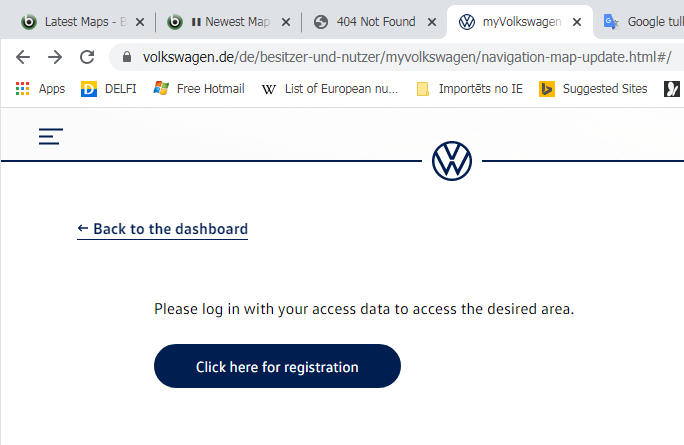
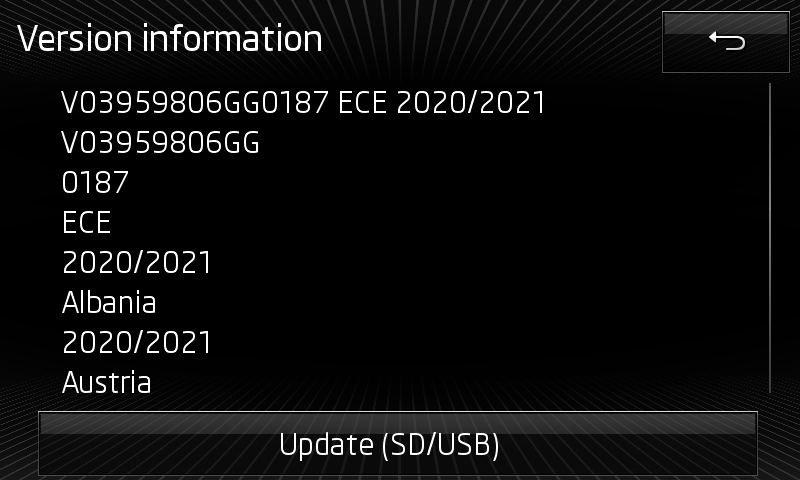
Have to start from bad news - now also VW's portal requires registration to download map updates 😞 previously there was ability of select different car models and choose files for different media systems and regions +++ edit 2020.06.16 17:25 +++ died https://webspecial.volkswagen.de/vwinfotainment/de/de/index/downloads/maps-download#/ but https://webspecial.volkswagen.de/vwinfotainment/int/en/index/downloads/maps-download#/ still alive, thanks to @langers2k for info! +++ edit off +++ another news, style of forming file names is changed # previous # # "P169_N60S5MIBH3_EU.7z" # "P175_N60S5MIBH3_EU.7z" # "P177_N60S5MIBH3_EU.7z" # "P184_N60S5MIBH3_EU.7z" 2019.11.08 5d # "P187_N60S5MIBH3_EU_NT_Q3.19" 2020.05.20 3d interesting how will transform Škoda's absolute random style # previous # # "HIGH12_P169_EU_2018_2019.zip" # "HIGH12_P175_EU_2019.zip" # "HIGH12_P177_EU_201920.zip" # "HIGH12_P184_EU_2020.zip" 2019.12.03 2d # "HIGH12_P187_EU_2020????.zip" ----.--.-- +++ edit 2020.06.18 +++ # "HIGH12_P187_EU_202022.zip" 2020.05.19 2d for Skoda Columbus (MIB1/MIB2/MIB2GP), Seat Navi Plus (MIB2), VW Discover Pro (MIB1/MIB2/MIB2GP), Audi MMI Navigation Plus (MIB1/MIB2 A3, A4, A5, A6, A7, Q2, Q5, Q7) # ECE 2020-2021 27Gb Version: V03.959.806.GG 0187 ECE 2020/2021 VW portal: #- #- #- http://vw-mapscdn.tdd.adacorcdn.com/P187_N60S5MIBH3_EU_NT_Q3.19.7z dead: 2020.07.0? VW portal: http://vw-maps-cdn.lighthouselabs.eu/vw-maps/P187_N60S5MIBH3_EU_NT_Q3.19.7z VW portal: http://vw-maps-cdn.lighthouselabs.eu/vw-maps/P187_N60S5MIBH3_EU_NT.7z Files inside: 2019.12.19 Downloadable: 2020.05.20 3d Published: 2020.06.15 Škoda portal: http://infotainment-cdn.skoda-auto.com/base/maps/HIGH12_P187_EU_202022.zip Files inside: 2020.05.12 (content equal) Downloadable: 2020.05.19 Published: 2020.06.17 Seat portal: - older, 2019-2020 # Rest of World 2020-2021 23Gb Version: V03.959.806.GS 0088 ROW 2020/2021 VW portal: #- #- #- http://vw-mapscdn.tdd.adacorcdn.com/P88_N60S5MIBH3_ROW_NT_Q3.19.7z dead: 2020.07.0? VW portal: http://vw-maps-cdn.lighthouselabs.eu/vw-maps/P88_N60S5MIBH3_ROW_NT_Q3.19.7z VW portal: http://vw-maps-cdn.lighthouselabs.eu/vw-maps/P88_N60S5MIBH3_ROW_NT.7z Files inside: 2020.01.21 Downloadable: 2020.05.20 3d Published: 2020.--.-- Škoda portal: http://infotainment-cdn.skoda-auto.com/base/maps/HIGH12_P88_ROW_202022.zip Files inside: 2020.05.12 (content equal) Downloadable: 2019.06.01 Published: 2020.06.?? ======= coverage ======= # EU Albania *, Andorra, Belgium, Bosnia and Herzegovina *, Bulgaria *, Denmark, Germany, Estonia *, Finland, France, Gibraltar, Greece, Ireland, Iceland, Italy, Kosovo *, Croatia, Latvia *, Liechtenstein, Lithuania *, Luxembourg , Malta, Macedonia (Former Yugoslav Republic) *, Moldova *, Monaco, Montenegro *, Netherlands, Norway, Austria, Poland, Portugal, Romania *, Russia(European part) *, San Marino, Sweden, Switzerland, Serbia *, Slovakia, Slovenia *, Spain, Czech Republic , Ukraine *, Hungary, Vatican City, United Kingdom, Belarus *, Cyprus * * partially # ROW Argentina *, Australia, Bahrain, Botswana *, Brazil *, Brunei *, Chile *, Indonesia *, Israel, Jordan, Qatar, Kuwait, Lesotho *, Malaysia, Mexico *, Mozambique *, Namibia *, New Zealand, Oman, Philippines * , Reunion *, Saudi Arabia, Singapore, South Africa, Swaziland *, Thailand *, Turkey *, United Arab Emirates * partially ======= instruction ======= 1. download 7z/zip archive from direct link 2. extract content to SD Card or USB 3. insert memory device into slot of Columbus 4. start of update usually is offered automatically, manually can be found under Navi-> Settings !!! note for MAC users -> https://www.briskoda.net/forums/topic/452002-direct-download-links-for-ece-20182019-maps/page/2/?tab=comments#comment-5095042 couple of potential questions are answered in previous post
 1 point