



All Activity
- Past hour
-
TheNailbox joined the community
-
I had a 14 plate diesel vrs, moved to a 23 plate petrol vrs estate and difference was very small most of the time. 40mpg average is realistic. Recently got a 26 plate with the 265bhp - slightly down on previous mpg figures but hoping its still loosening up
-
Big thanks to Breezy_Pete for all your help in this matter; I now know why I can't see the shutters. Also, thanks, DerekU, for your input in this matter.
-
That step 6 could be a mib2 high poster getting on the mib3 thread 🫣. You might have one off those units that is stuffed up. Presentation is everything the same as mib2 highs. They are signed files so if anything gets in there it knows and won't work. Sometimes people find downloading it again is helpful. Older versions of pkunzip although I reckon for mib3 you are better off using the built in windows 11 unzip. I've seen an all important file of mib3 getting swallowed up in pkunzip.
- Today
-
-
I will be curious :)
-
The below kit can be ordered from "skoda parts com" for 108.14 Euros (about £90.62) which includes shipping to the UK. It includes everything, except for the actual spare wheel...which can be purchased separately. The official spare wheel for this kit has a specification of 185/65R15 5.5Jx15 ET40 5/100 57.1 Tool kit for Fabia MK4, kit includes: 1x polystyrene molding, 1x jack, 1x wheel nut wrench, 1x screw-in rosette, 1x reserve strap. 6VA093860A https://www.skoda-parts.com/spare-part/6va093860a-spare-wheel-replacement-kit-skoda-43264.html Mytyres can supply a 185/65R15 5.5Jx15 ET40 5/100 57.1 spare wheel, ie. tyre is fitted and balanced to an Alcar 4055 5.5Jx15 ET40 5/100 57.1 steel rim for under £120 (depending on tyre choice) including shipping to the UK.
-
Thanks! I’ll try as soon as I can! I thought I had to enter in the secret menu to update the maps! I’ll follow what You put at the voice Step 6
-
I picked up the car after its service. The technician confirmed that it does indeed need a new clutch slave cylinder. He claims this is the cause of the issues I’ve been experiencing when pulling away smoothly and gently. Since there wasn't enough time (it needs over 2 hours for the installation) and the part wasn't immediately in stock, I took the car back after it's service and they will notify me in the coming days once the part arrives so we can schedule an appointment for the replacement. The cost will be covered under warranty. I will provide an update on the outcome. As for the rest, the receipt shows that the service included an oil change, a new oil filter, a brake fluid change, a cabin air filter, spark plugs, and a general inspection.
-
Finally found a sensible parts catalogue at https://www.lllparts.co.uk/catalogs/skoda It has entries for front doors L&R but rear doors are also split into saloon and combi (estate) so I think that means the fronts are common to both body shape. S.
-
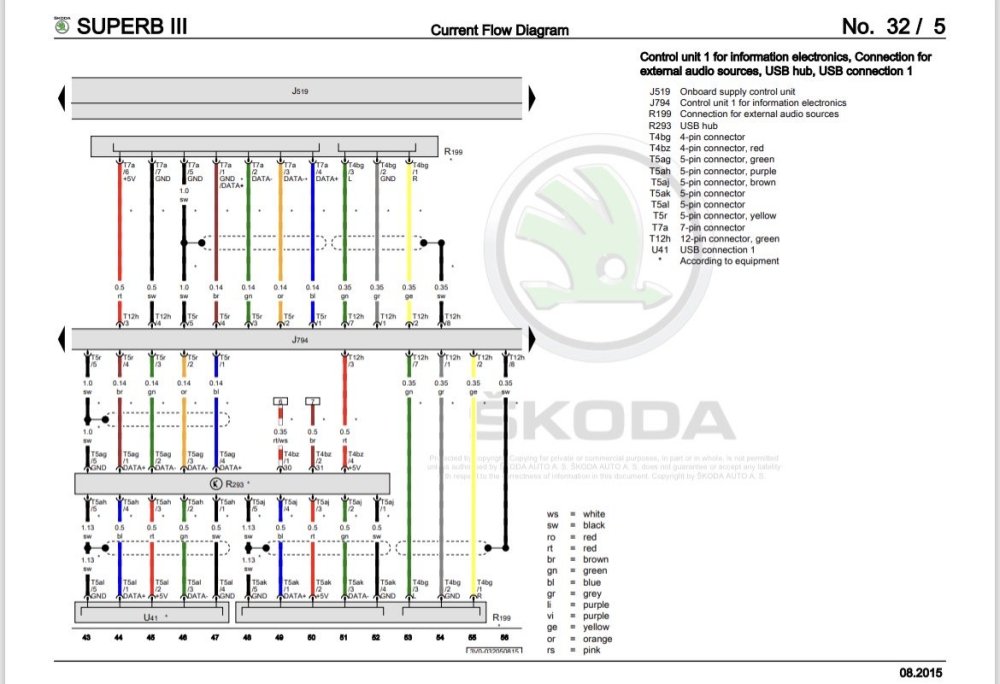
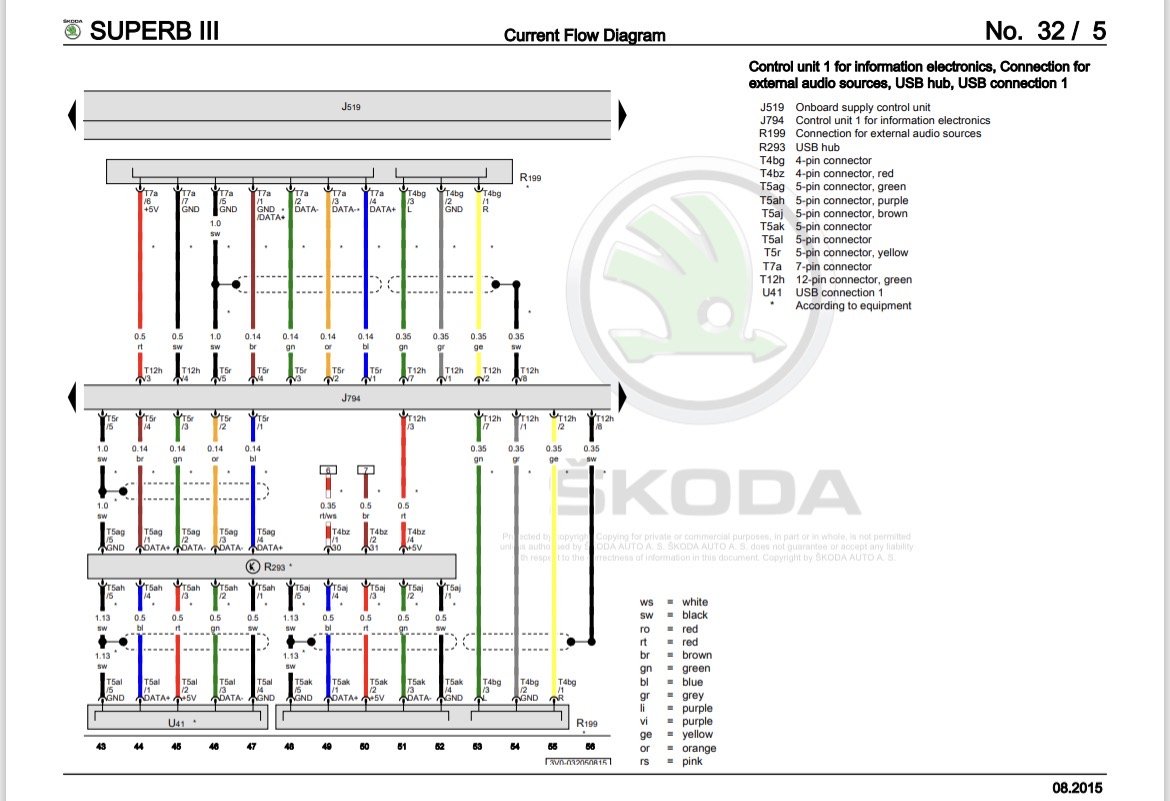
Looks like the only extra wires that would be needed are a 12v feed from fuse box and a ground. All others are reused from existing fakra connections and one red wire from the green block of the quad lock. (Top part of diagram is without hub, bottom part of diagram is with hub R293) BCM not involved. This kit has all the wiring. Would just be the actual usb port needed. https://a.aliexpress.com/_EIoHt10
-
Hello all, I'm doing a bit of archeology. As my car was at the authorized workshop for some body work (after my wife scratched the side being too close to a fence), I asked guys at the workshop to check the infotainment system. They performed some checks and verified that both infotainment unit and the connectivity device responsible for Internet connection are working OK. The best proof is that I receive live updates about traffic on the road and major road works are marked on the map. Proactively they performed a factory reset of my MIB3 unit and they advised to check if the maps will update. They assured me there is no kind of forced update method rather than waiting until a car downloads the maps on its own... They also told me that my Kodiaq, which is one of the last produced of 1st gen FL, have no option to use the USB stick for internal map updates. So right now I am almost 2 years behind the current version (should have 26.6 but still have 24.8). I will be checking this now for some time to give another chance for my unit to get the maps upgraded. I still have few months until the warranty is over. In case of no further updates I will report this issue once again to the dealer.
-
Good result! We've got dad's X-reg in for test soon. I know it wants a spring, but we're sending it in anyway in case there's anything else lurking.
-
I don’t think BCM would be involved. @Cairus will almost certainly know. I’ll dig out the wiring diagram.
-
Hi domhnall, a really interesting video, thanks. It looks as if some instruction will be needed to work out how to use all the driving modes..!
-
Sawabawa joined the community
-
Cost, no doubt. When I was looking for a replacement, there was only 1 on ebay in the UK and that was half as rusty as mine! With the lack of them, could this be a bigger issue, or am I just unlucky?
-
-
Same thing here, dealer has been promising an update for the past year already, which has not come yet. The jolt happens precisely a minute after the start. The scariest thing is that if you happen to be applying brake during this, it will release it, noticeably slipping them. On the side note, it seems that the VW plug-ins have the same issue as a friend of mine has the same issue on his VW. Edit: Just noticed that I had posted about this few comments above :) Yes, they actually swapped the gearbox back then, which made no change.
-
Glad you replaced it and rest of car is sound. Have had random bits on my octavia that seem to rust more than the rest of car. Wonder if its been a bad paint job at factory. Had one sill really bad but other good and a large patch on lower drivers door where as rest were ok. Once it starts you can hold it back for a while but it always comes back usually with a vengeance. Why they just dont galvanize these parts??? Alasdair
-
I can offer you post 1 for Seat which is the same where I have distilled what's said here. Use the link you are using, not the old link in post 1, but it does tell you how to give it a poke to start it off, gleened from you good Skods folk. From a Skoda Mib3 user "Step 6: on the Navigation screen, on the bottom row, press "Settings" > “Version Info“ > "Update (SD/USB)“... the car engine does not need to be running, and if the ignition shuts off before the update finishes, just press the engine ‘start’ button once and repeat the above procedure from Step 6. The Update Progress Bar will resume where it left off so you don’t have to start updating from scratch.... When complete the YY.MM will change. Photograph before and after." This is where the usb with led light come in since they flicker when data is being copied. Skoda folk like them. You arent thinking its not working when it is and the reverse. https://www.seatcupra.net/forums/threads/updating-the-inbuilt-mib3-mib-4-satnav-offline.472408/ The manual pdfs I put in post 1. Getting the files in the route unzipped and a blank USB in exfat is the key. Pesky Macs leaving dross on the drive is another issue. But as said there are a few people where technical issues have prevented the map update working. Details on those Briskoda map posts. If its a car not in the region where it hadnt been sold, then you need a retrofitter. Turkey and the Middle East and Africa are candidates for that one.
-
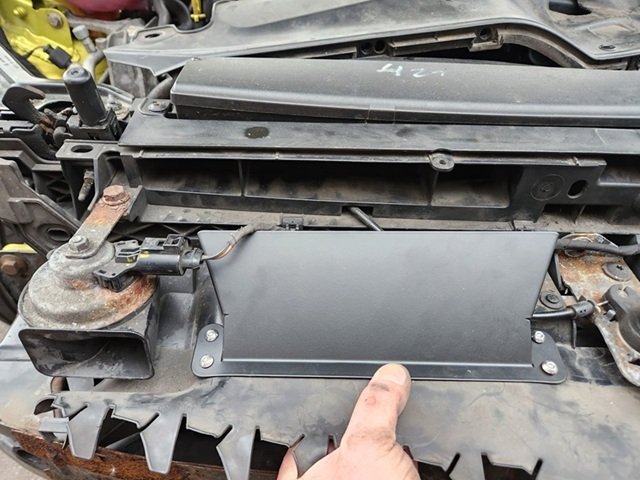
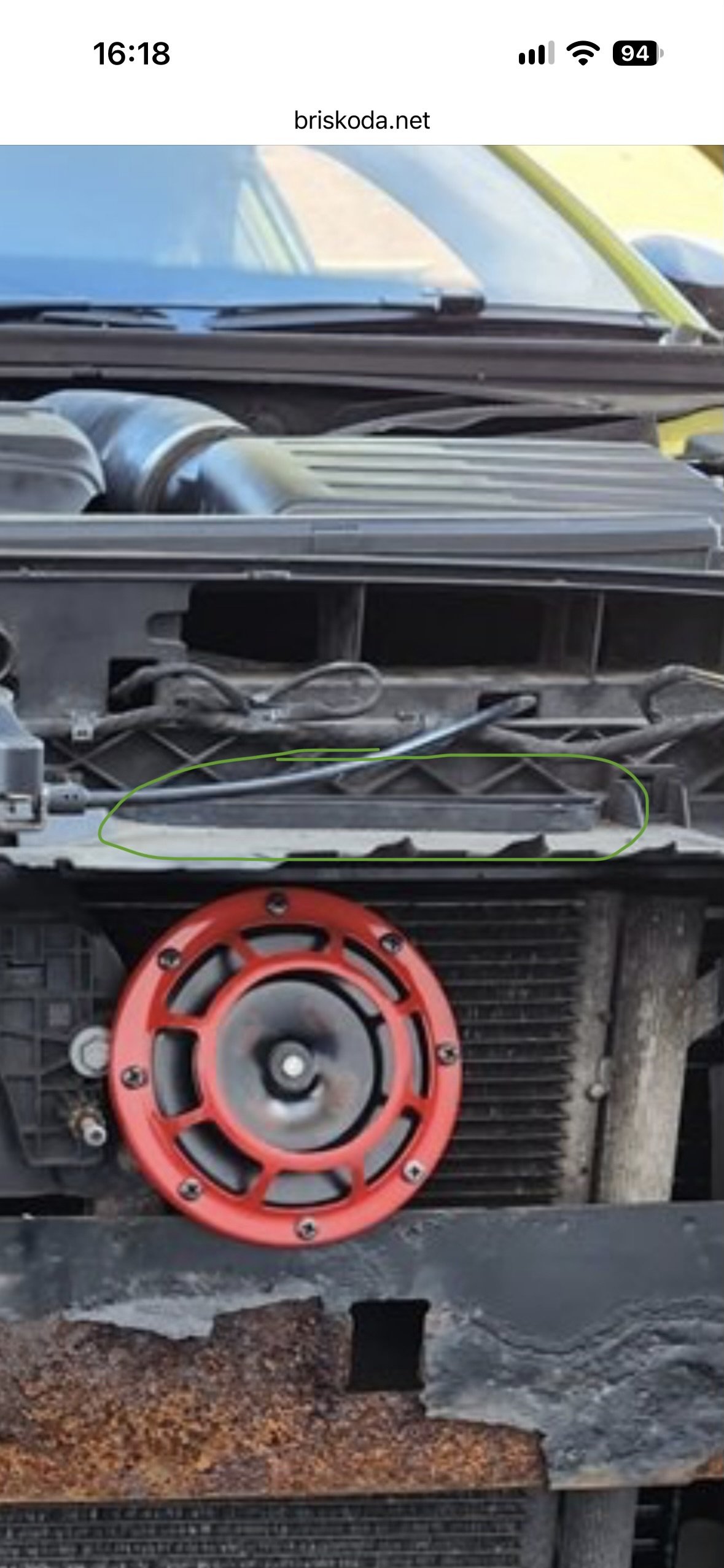
Aargh, got 5 more images , I cant upload them. Basically, I cut out the aperture in the RH side so it matched the LH side, the airbox was already modded - R600 pikey mod. I bought these vent guide things which are meant for the Golf GTI, and mounted them the other way up to guide air into the airbox
-
Not coastal, West Midlands actually. Previous owner was Peterborough. I've had it 5 years now. I did a bit more than that RH opening. Forgive the one photo, I did tidy it properly afterwards! Let me see if I can post them, I'm hitting some sort of forum limitDid you take the opportunity to have this bit cut open to aid induction airflow? On topic - yeah that did look rusty - how old is the car and are you coastal? Or was the previous owner coastal do you know?
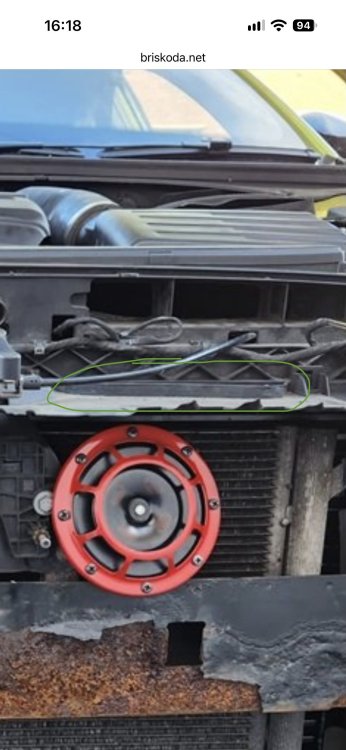 I replaced it with a vgc used one. The way the rust was peeling off, it couldn't have had it's original rigidity in it, quite scary. Rest of car is absolutely fine.English; Hi everyone! How can I turn off the center display in a 2026 Superb while keeping the radio or media playing? Thanks for the help. @Firefighter0718 Szia! A Briskoda alapértelmezett nyelve az angol. Számos országból vannak tagjaink. Kérlek, használj online fordítóeszközt. Köszönöm. Hi the default language on Briskoda is English. We have members from many countries. Please use an online translation tool. Thank you.











.thumb.jpg.9dd3f612ba7f13d10be5c518d3c8d255.jpg)
Important Information
Welcome to BRISKODA. Please note the following important links Terms of Use. We have a comprehensive Privacy Policy. We have placed cookies on your device to help make this website better. You can adjust your cookie settings, otherwise we'll assume you're okay to continue.